E
F
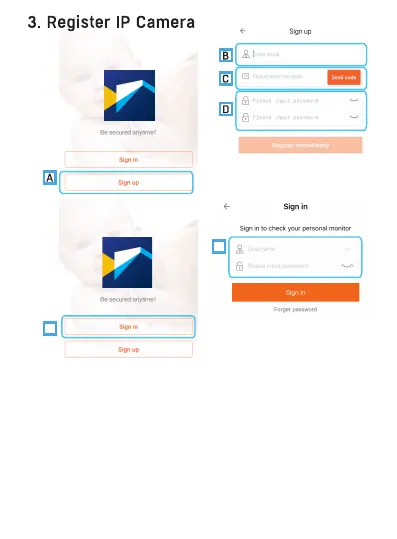
A: Select "Sign up" tab.
B: Enter your Email ID.
C: Check email, and input the received verification code. Kindly note
sometimes theverification mail may be found in spam mailbox.
D: Set password for your account. Press "Register immediately" tab.
E: Select "Sign in" tab.
F: Input email and password of your new created account (or an existing
account), select "Sign in" tab
-4-
Please connect your mobile device to 2.4GHz WiFi network before
opening the Nextech iCam app on your mobile device. If this is your first
time setting up your camera, you will need to create an account. Please
follow below.


 To Next Page