2
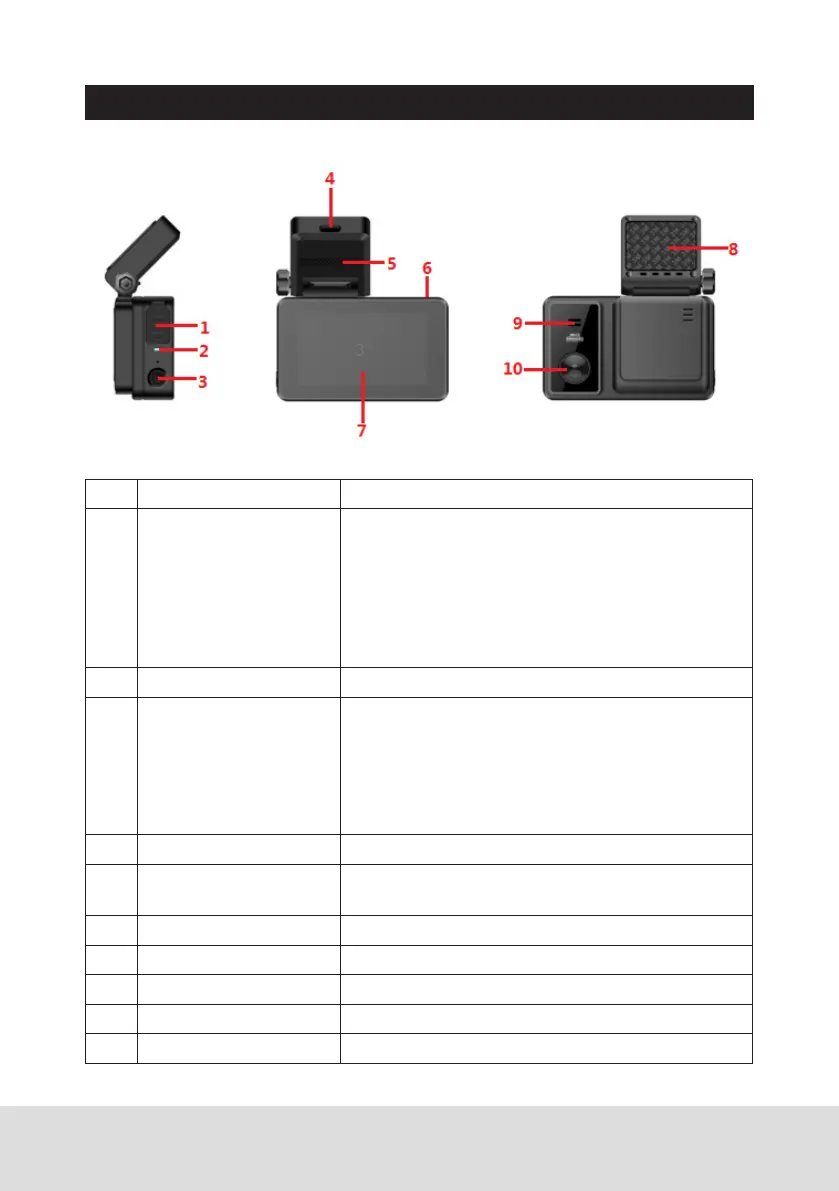
PRODUCT STRUCTURE AND INSTRUCTIONS:
Ref Component Description
1 MINI USB interface,
MicroSD card slot,
reset button
USB interface: Connect to PC for data (MicroSD
card) transfer with an MINI USB cable.
SD card slot: Insert MicroSD Card (Support
128GB Max min class 10).
Reset button: If the device fails to operate
properly, try resetting the device. Press the reset
button by using a fine pen or paperclip.
2 LED When recording, charging indicator light flashes.
3 Power When the unit is off, long press [power]button to
start the unit, and the dash camera will start to
work automatically.
When the unit is on, long press [power] button to
turn it off; short press [Power] to enter into the
setting interface.
4 Type-C USB Connect to Type-C cable to charge the battery.
5 Bracket It’s Magnetic suction mount with GPS module
inside.
6 AV IN port Connect to the Reverse Camera (Optional).
7 LCD Screen 3’’ IPS screen.
8 3M sticker Use it to fix the bracket on the windscreen.
9 Speaker
10 Camera Lens



 To Next Page