This document is a Quick Start Guide for the NEXTRON HT-500/HT-500-MAX soundbar. It provides essential instructions for setting up and operating the device.
Function Description:
The NEXTRON HT-500/HT-500-MAX is a soundbar designed to enhance the audio experience of a television. It functions as an external speaker system, offering various connectivity options to integrate with different TV setups. The soundbar is intended for desktop placement, typically in front of a TV, and is not designed for wall-mounting. It features a remote control for convenient operation and supports automatic power-on/standby/wakeup functions when connected via HDMI eARC/ARC.
Important Technical Specifications:
While specific technical specifications like power output, frequency response, or driver size are not detailed in this quick start guide, the document highlights key connectivity features:
- Power Input: DC 18V IN. The soundbar is powered by an AC/DC adapter (supplied).
- Audio Inputs:
- HDMI (ARC/eARC): Supports HDMI Audio Return Channel (ARC) and enhanced Audio Return Channel (eARC) for high-quality digital audio transmission from compatible TVs. This is the recommended connection method for optimal functionality, including automatic power control with the TV.
- OPTICAL IN (OPT): A digital optical input for connecting TVs without HDMI ARC/eARC. An optical digital cable is supplied for this connection.
- AUX IN: An analog audio input, likely a 3.5mm jack, for connecting devices using a 3.5mm audio cable (supplied).
- RCA IN (RCA L/R): Analog RCA stereo inputs for connecting devices using RCA audio cables (supplied).
- USB: A USB port, likely for media playback or firmware updates, though its specific function is not detailed in this guide.
- Display: The soundbar features a digital display, indicated by "88:8.8" in the diagram, which likely shows volume levels, input modes, or other operational information.
Usage Features:
- Remote Control: The soundbar comes with a remote control (battery not included) for convenient operation. The guide provides instructions on how to set up the remote control by inserting batteries.
- Desktop Placement: The soundbar is designed for desktop placement, typically under or in front of a TV. It is explicitly stated that wall-mounting is not supported. Users are advised not to place objects on top of the soundbar or metal objects around it, as this may interfere with wireless functions.
- Multiple Connectivity Options: The guide details various ways to connect the soundbar to a TV, catering to different TV models and available ports:
- HDMI eARC/ARC Connection: This is the preferred method for TVs with compatible HDMI ports. It allows for digital audio transmission and enables features like automatic power-on/standby/wakeup with the TV. Users are instructed to enable "Control for HDMI" or "eARC/ARC" functions on their TV and set the audio format to PCM 2 channel.
- Optical Connection: For TVs without HDMI eARC/ARC, an optical digital cable can be used.
- Analog Connections (AUX, RCA): For older TVs or devices, analog connections via 3.5mm AUX or RCA cables are available.
- Power Management:
- Manual Power Control: The soundbar can be manually powered on or switched to standby mode by pressing a button on the device.
- Auto Standby/Wakeup: When connected to a TV via HDMI eARC/ARC, the soundbar can automatically wake up or turn off with the TV, providing a seamless user experience.
- Audio Source Selection: Users must ensure that the correct connection method is selected as the audio source on the soundbar, especially when using multiple input options.
- Troubleshooting: The guide includes a troubleshooting section addressing common issues such as "No TV sound is output from the soundbar" and "The TV remote control does not work." It advises users to check connections, power cords, TV settings (HDMI control, audio output, PCM 2 channel format), and the soundbar's input selection. It also suggests relocating the soundbar if it obstructs the TV's remote control sensor.
Maintenance Features:
The quick start guide does not explicitly detail maintenance features. However, it implies general care instructions through its warnings:
- Placement: Avoid placing objects on top of the soundbar speaker and metal objects around the system to prevent interference with wireless functions and potential damage.
- Connectivity: Ensure cables are firmly connected to prevent sound issues.
The document emphasizes the importance of reading the guide before setting up and operating the new product and provides contact information for support via email and Amazon Buyer-Seller Messages.

 Need help?
 General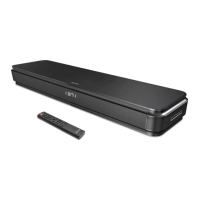

 To Next Page