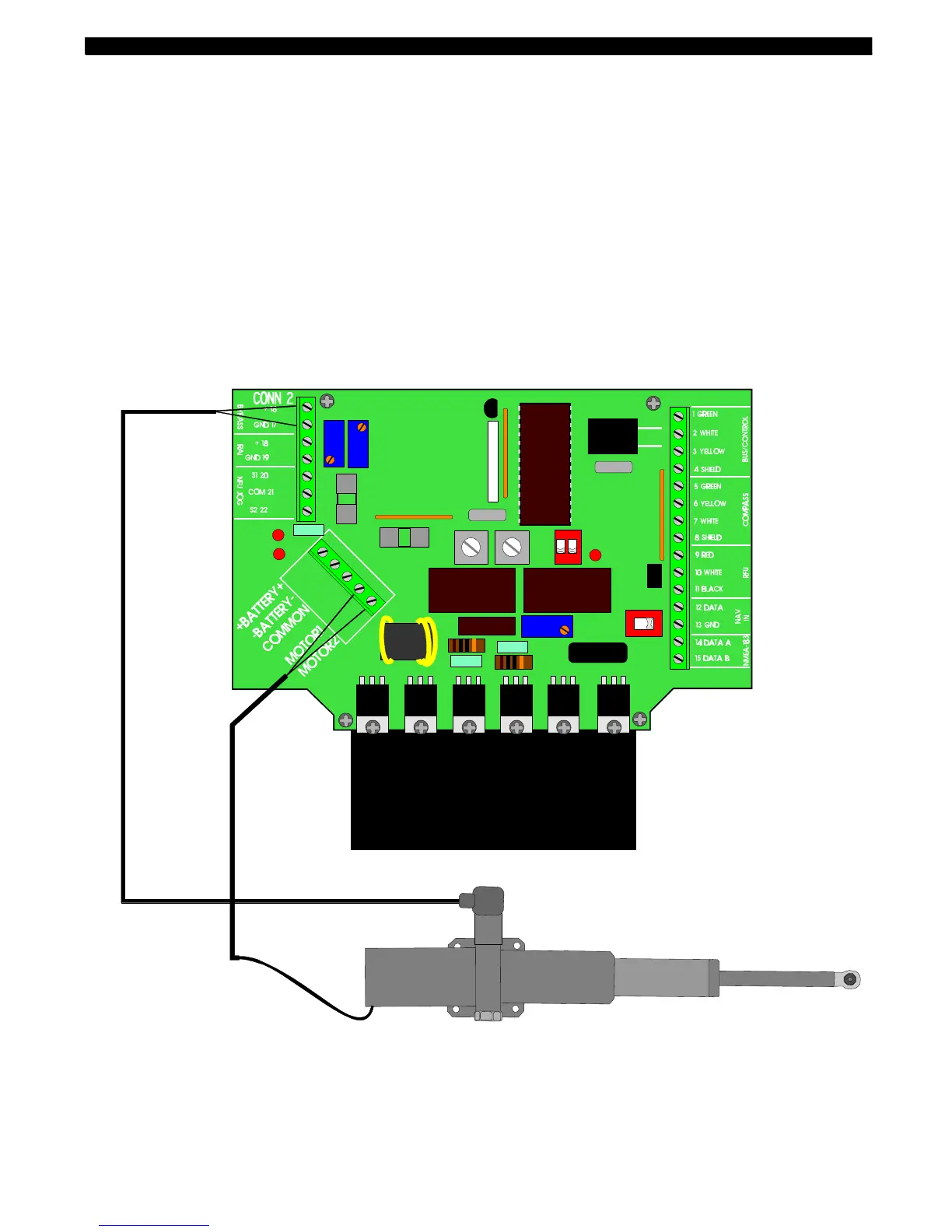
2.2 Connection
Note! For correct wire dimensions see Nexus Autopilot manual ”Wire Thickness”.
Connect the motor power wires to the Nexus Servo Unit as follows:
• Red wire to Servo Unit terminal marked "MOTOR 1".
• Black wire to Servo Unit terminal marked "MOTOR 2".
Connection of the bypass solenoid.
The connector for the built in solenoid is mounted at the side of the Linear drive, remove the
connector by loosing the screw on top of the connector. Open up the connector by use of a
small flat screwdriver. Connect two leads, to the two screws marked 1 and 2 (do not con-
nect the screw marked ground). Use a two lead cable with a thickness of minimum 1,5 mm
2
. Route and connect that cable to the Servo unit at terminal 16 and 17 marked BYPASS.
3 Dockside testing
When the complete electrical installation is checked and the power is turned on, there are
further procedures to be carried out in order to complete the installation.



 To Next Page