!Page!2!
Initial Device Setup
NOTE: A minimum of two G.hn Coax Adapters are required to create a proper connection. Follow
Steps 4-8 to add additional G.hn Adapters to your network.
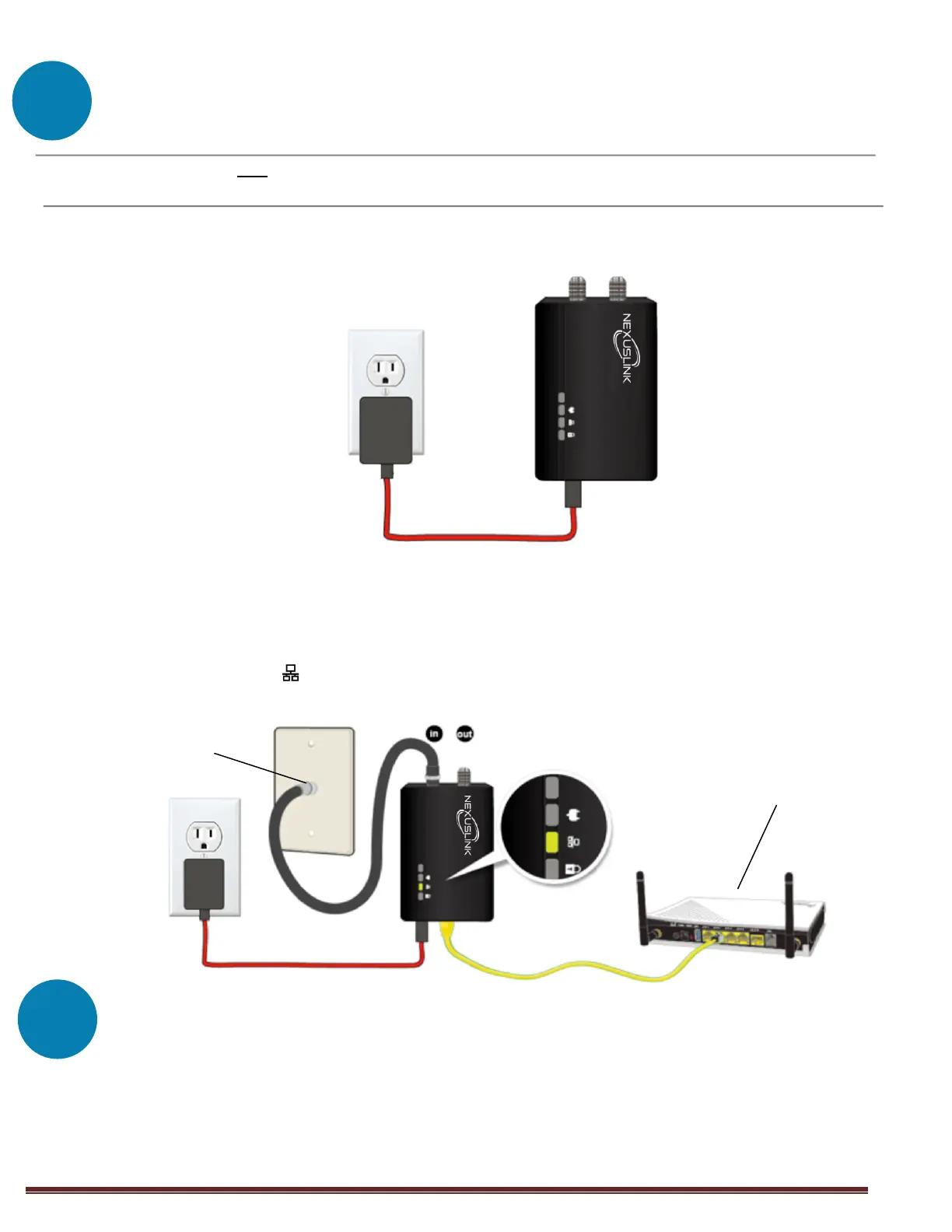
1. Plug the power supply into the Coax Adapter into the power outlet nearest to the
network device (Eg. Modem, Router, or Access Point).
2. Connect the coaxial cable to the “IN” of the Coax Adapter and to a cable wall outlet.
3. Ensure that your network device is powered on. Connect the Coax Adapter to the LAN
port of the network device with an Ethernet cable. Wait for 10 seconds for the Coax
Adapter’s Ethernet LED to light up GREEN indicating a stable connection.
Device Connection
4. Plug the power supply into the additional Coax Adapter and into the power outlet
nearest to the remotely located Internet-enabled device (Eg. TV, PC, STB, DVR, Etc.)
5. Connect the coaxial cable to the “IN” of the Coax Adapter and to a cable wall outlet.
Network Device
(Modem, Router, or Access Point)


 To Next Page
 Loading...