6
OPERATION DIRECTIONS
1. Connect to telephone or tablet
• Turnonthebuttonswitchoftheback,after3
seconds,speakerwillhavea“tinkle”warningsound,
atthisstate,speakerindicatorlightisashingslowly,
3secondslater,speakerwillhave“honk”warning
sound,blueindicatorlightbecomestoquicklyash,it
indicates Bluetooth is under searching status.
• TurnontelephoneBluetoothsettingtoenter
searchingstatus(dierentbrandtelephoneswill
have different methods to turn on Bluetooth setting).
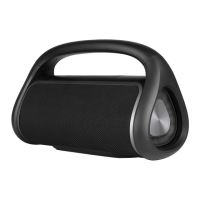
Searchingresultwilldisplay“NGSROLLERDISCO”,
usethepassport“0000”(4zeros),thenconrmed
wellconnectedtothespeakerBluetooth,thespeaker
willhavewarningsound,itindicateswellconnected
between Bluetooth speaker and telephone. 30
secondsforholeoperation(dierenceindierent
brand telephones). First time it is necessary to use
passportforidenticationoftelephoneandspeaker,
forthesecondtime,noneedpassportandjustclick
“NGSROLLERDISCO”toconnect.
• Afterwellconnected,playmusicfromtelephone,
then use Bluetooth buttons to operate.
• Adjustvoluemebuttontosuitablelevel,volume
increase“+”,volumedecrease“–”.
• Answercall:Whencallcomingfromtelephone,
shortpress“ ” directly can answer. To make sure
callquality,itshouldkeepBluetoothwithin50cm
distance,press“ ” directly to hang up call.
2. Connect to flat computer
Pleaserefertotelephoneoperationdirections.
3. Connect to laptop
DuetomanyBluetoothversionsaboutlaptops,
connectedmethodswillbedierent.Ifcannot
connectforthersttime,itshouldbeinstorednew
version Bluetooth drive in the laptops.


 To Next Page