ENGLISH
3
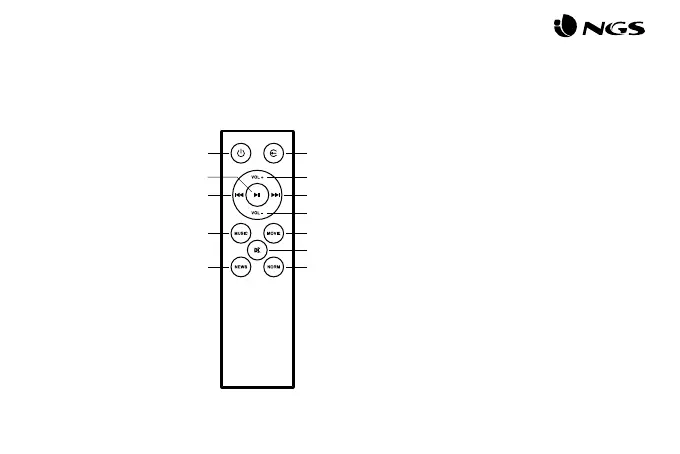
DESCRIPTION OF REMOTE
CONTROL
1
2
3
4
5
6
7
8
9
10
11
12
On / O
Audio source switch
Play/Pause
Previous track
Increase volume
Next track
Decrease volume
Music sound eect
News sound eect
Movie sound eect
Mute
Normal sound eect
1 2
5
6
7
3
4
8
9
10
11
12
BLUETOOTH MODE
• Turn on the speaker and then switch to Bluetooth mode: the
“Bluetooth mode” prompt tone will sound and the indicator
will ash in blue. Keep the speaker and Bluetooth-enabled
device within a radius of ten metres.
• Set your mobile phone to search for Bluetooth devices.
• When the Bluetooth enabled nds the speaker, select “NGS
SUBWAY” from the list of found devices.
• If required, enter the password “0000”.
• After successfully being paired, BT will light up in blue.
AUX MODE
• Keep the unit powered on. Plug one end of the 3.5mm AUX
cord to the headphone jack on your device.
• Plug the other end of the 3.5mm AUX cord into the AUX jack
on the speaker.
• Use the connected device’s audio controls for music playback.



 To Next Page