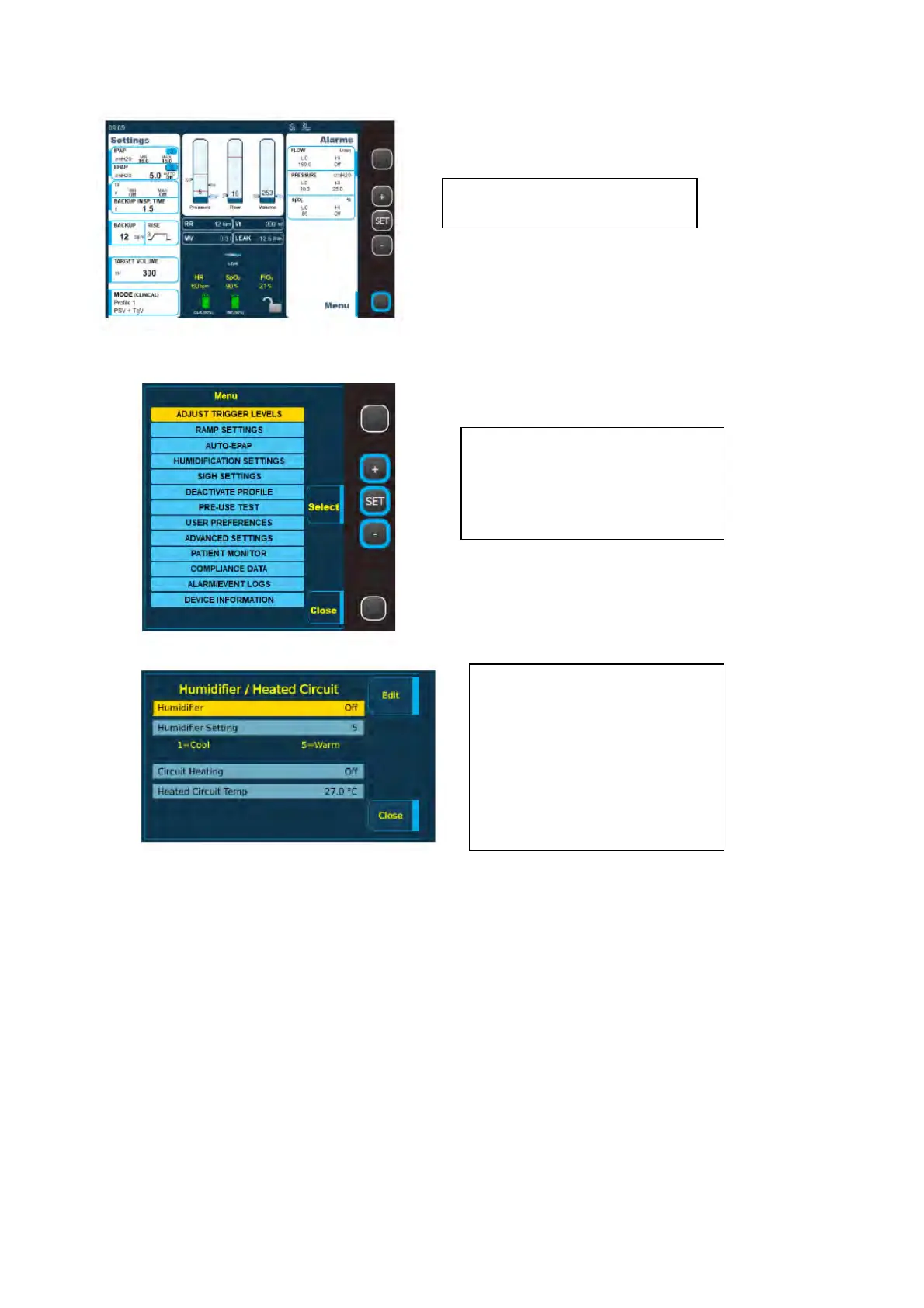
Adjusting the humidification level
Please note your humidifier will not work and you will not be able to adjust the settings if you are
using the internal battery. It must be plugged into the mains.
Internal battery
All Nippy 4s have an internal battery. The internal battery is intended as a backup power source
if the primary power source fails. If this happens the ventilator will alarm and will switch to the
internal battery. A message will be displayed on the screen to make you aware that the battery
is being used.
The internal battery will last approximately 2.5 hours depending on your settings.
‘Click in’ battery
You may also be provided with a click-in battery. The click-in battery is intended as a power
source during transportation, or if the primary mains power source fails. The click-in battery can
be replaced during treatment, provided that the internal battery is charged.
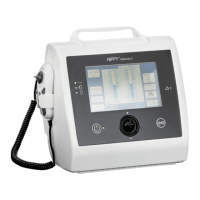
Use the + and - buttons to
highlight humidification
settings and press the SET
button to open it.
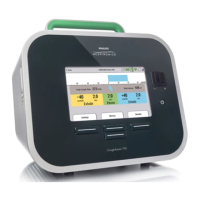
Use the + and - buttons to
highlight humidifier settings
and select EDIT.
Use the + and – to change
the settings and then
CLOSE to save.


 To Next Page