that yields the most bass output and leave the
switch in that position. Then use the knob to
fine-tune the phase setting. Slowly twist the
knob, listening for the point at which the bass at
the listening position is the loudest. Small
changes in phase generally produce subtle
changes in bass output. You may have to adjust
the knob now and again over a period of a few
weeks to find the best setting for your listening
room.
Gain Switch (Rear Panel)
The Subwoofer Gain switch allows you to
increase the gain of the X1 subwoofer output by
10dB. Normally, the factory default "0" position
will give you a wide range of volume adjustment.
However, if the sensitivity of your satellite
speakers is greater than 93dB, your range of
volume adjustment on the X1 may be limited. In
this case, set the Gain Switch to 10dB.
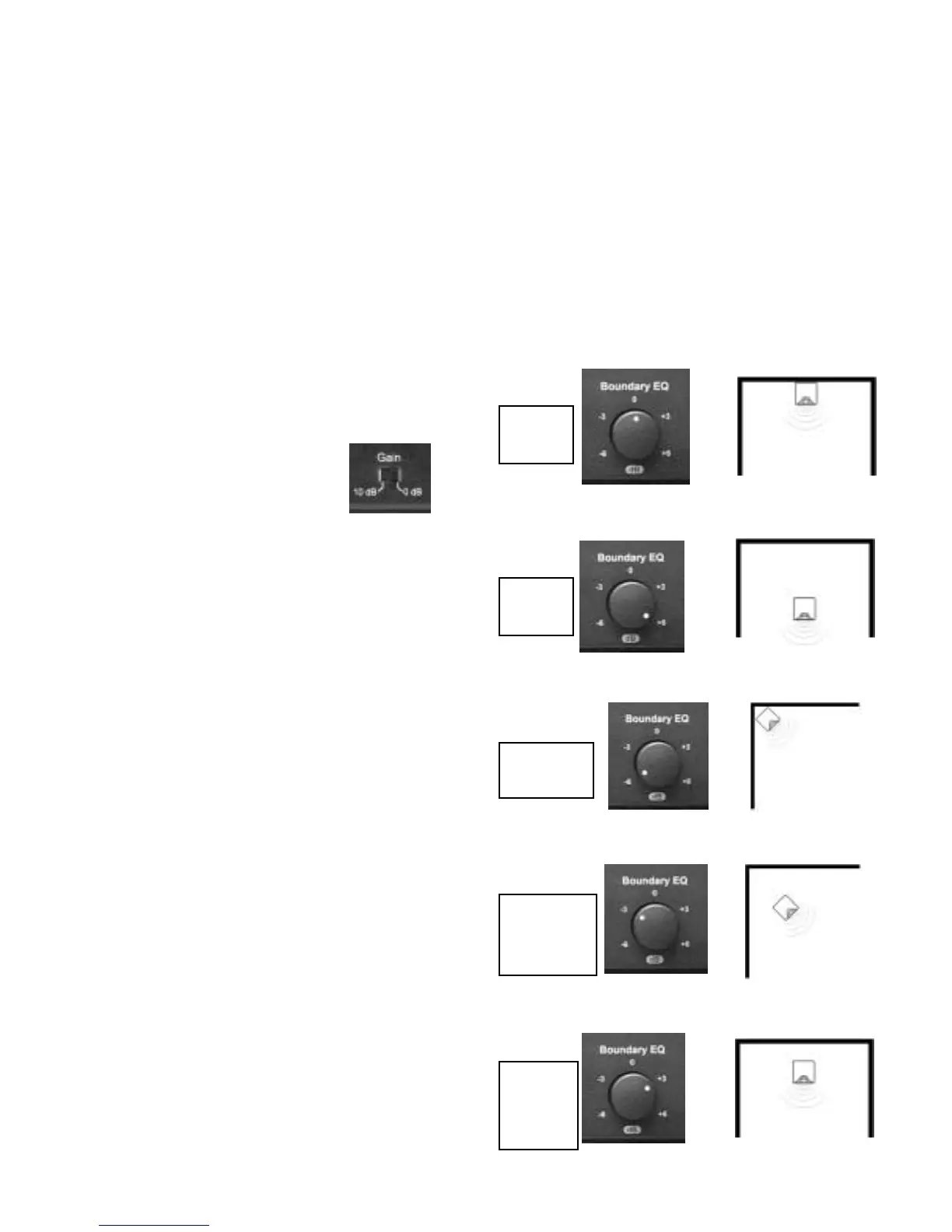
Boundary EQ (Front Panel)
The Boundary EQ is a feature unique to NHT
Evolution products. Reflective boundaries (such
as walls) reinforce a speaker’s bass output (3dB
for two walls, 6dB for a corner) if the subwoofer
is placed near them. Conversely, placing a sub-
woofer out in the room results in a relative
decrease in bass output. Boundary reinforce-
ment may lead to low frequency response that is
uneven. Some frequencies will sound exagger-
ated relative to others, or the subwoofer will
sound thin and lack impact. The Boundary EQ
control allows you to compensate for the effects
of room boundaries on the frequency response
of the subwoofer. Adjusting the control enables
you to achieve smooth low frequency output
from the subwoofer regardless of its location in
your room.
The following diagrams show the correlation
between subwoofer placement and Boundary
EQ. These diagrams are guidelines only. Your
room acoustics and personal tastes will ulti-
mately dictate the final setting.
Quarter
Space
Quarter/
Half
Space
Half/
Whole
Space
Half
Space
Whole
Space


 To Next Page
 Loading...