12
DESCRIPTION AND FUNCTIONS
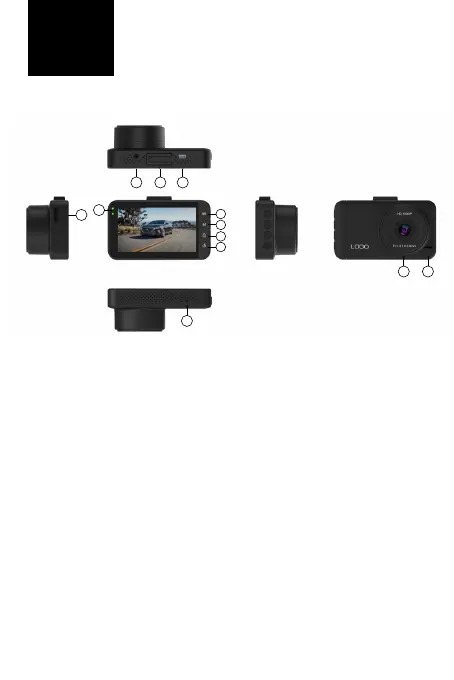
1. Upbutton – in the menu, it is used to browse the menu.
2. Menu/Switchingmodes)/Emergencyrecording – a short press
in standby mode (the camera does not record video) is used to enter
the video, photo, recording settings menu (depending on the selected
mode) and a further press to the camera settings. A long press in stan-
dby mode is used to switch modes (Recording, Shooting, Playback).
When recording a video, a short press turns on emergency recording
(recorded videos are protected against deletion).
3. Buttondown/turningothemicrophone – in the menu, it is
used to navigate through the menu. Long press in standby mode and
during video recording turns o/on the camera microphone.
4. OK/Turnoandonbutton - a short press in standby mode turns
on video recording, a short press during video recording stops recor-
ding. A short press in the menu is used to conrm the selected item.
A long press with the camera turned o turns the camera on. A long
press in standby mode turns o the camera.
5. USB-C – used to connect to the power supply.
6. Entryforholder
7. Entryforservicepurposes
8. LEDs - the lower blue LED blinks during video recording, lights up in
standby mode. The upper red LED indicates the connection to the
EN
7
9
1
2
3
4
8
6 5
12
11 10



 To Next Page