14
Volume: adjust the camera speaker volume
Frequency: frequency setting (50Hz for Europe, 60Hz for USA).
Format: erases all data on the memory card.
Factoryreset: returns all settings to factory settings.
Version: camera rmware version information
SUCTION GLASS HOLDER
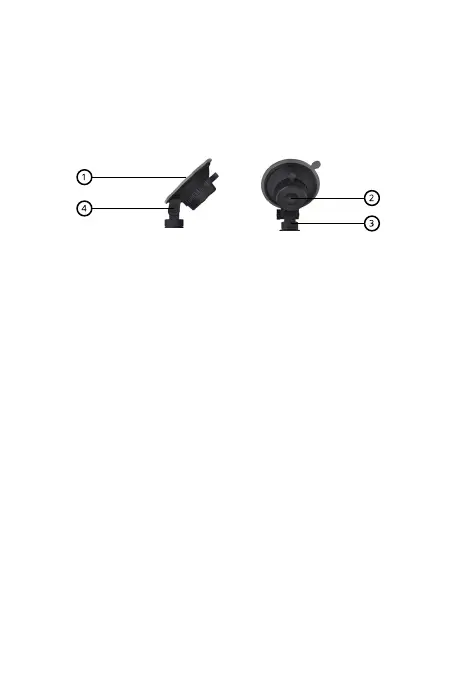
Press the suction part (1) of the holder against the glass and lock the
holder using the rotating mechanism (clockwise direction). Turn the
mechanism counterclockwise to remove the holder.
Attach the camera to the holder using the attachment (3) on the top of
the camera. You can adjust the tilt of the camera using the screw (4). After
setting the correct slope, do not forget to tighten the screw suciently.
Warning: place the suction camera holder only on the glass of the car, which
has been properly cleaned (degreased) and is completely dry. The best bon-
ding results are achieved at temperatures around 20°.
MICROSD CARD
Choose a branded microSD card with fast video recording (type UHS-I U3
and faster) with a maximum capacity of 64 GB. Before using the card for
the rst time in the camera, it is necessary to format the card on a PC to
the FAT32 le system (formatting the memory card will erase all data on
the card). Insert the memory card into the camera with the PINs facing
the camera display.
Recommendation: regularly format the memory card in the PC to avoid
problems when recording video. If you use the camera daily, format the card at
least once a month. More information about the use of the memory card and its
formatting will be provided by the manufacturer of the selected memory card.
AUTOMATIC ON/OFF CAMERA
The moment the camera detects charging, it automatically turns on and
starts recording (a memory card must be inserted). When the camera is
disconnected from the power supply, it stops recording video and turns o.


 To Next Page
 Loading...