14
EN
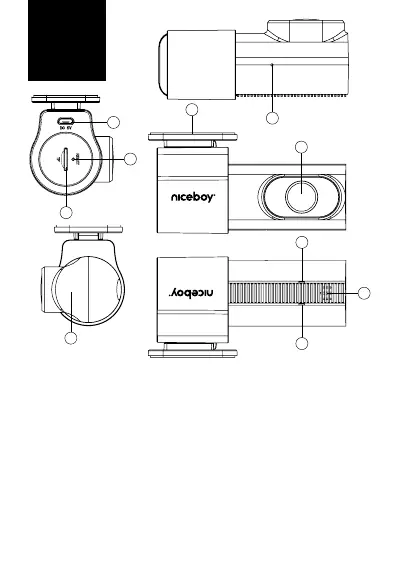
DESCRIPTION
1. USB-C:usedtopowerthecamera
2. Reset:resetsthecameraifnecessary
3. MicroSDslot:usedforinsertingamemorycard
4. Motionmicrophone:usedforrecordingsounds
5. Adhesivepartoftheholder:usedtoattachthecameratothe
carglass
6. Lens:fullglasscameralens
7. Speaker:usedtoplaysounds
8. LEDs:aashingblueLEDindicatesvideorecording,iftheLEDis
steadyblue,thevideoisnotbeingrecorded.TheredashingLED
indicatestheconnectionofthecameratothephoneviaWiFi,ifthe
LEDispermanentlyred,thentheconnectionviaWiFiisnotmade
9. Rotatingpartwiththelens:allowsyoutorotatethelensto
adjusttheangleoftheshot
5
6
1
2
3
8
8
7
9
4



 To Next Page