15
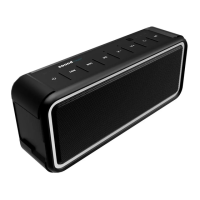
PRODUCT OVERVIEW
Power Button/Indicator – 1
• Press and hold for 3 seconds to power on/o
• If necessary, press and hold for 8 seconds to force a system restart.
Prev – 2
• Use this button to navigate to the previous track
Next – 3
• Use this button to navigate to the next track
Play/Pause/Pairing Device – 4
• While in Bluetooth mode, press and hold this button to begin pairing device.
V-(olume) – 5
• Decrease Volume
V+(olume) – 6
• Increase Volume
• A beeping sound will alert you when you have reached maximum volume.
Phone Button – 7
• Press to answer. Press and hold to reject/end the call.
M(ode) Button – 8
• Use this button to toggle between Bluetooth/AUX/Micro SD modes
Battery-Level Indicator – 9
• When battery is charged, display is green. When the device is low in power, display ashes red.
These lights indicate your device’s remaining charge level:
30% Battery – 10
60% Battery – 11
100% Battery – 12
Note:When the battery displays that only 30% charge remains, lowering volume to less than
50% of the maximum will increase battery eciency.
EN







 To Next Page