12
EN
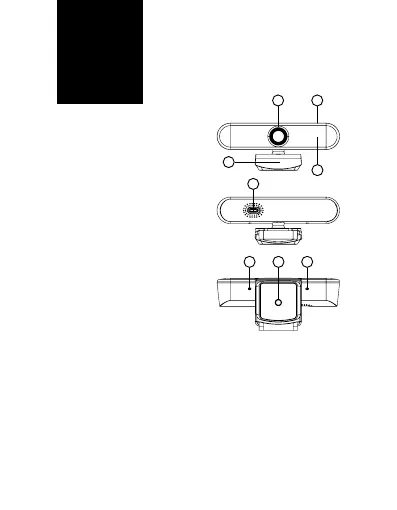
DESCRIPTION
1. CameraLens
2. Integrated mount
3. USB-C port
4. Tripodscrew-thread
5. Microphoneinput
6. Lightingtouch-pad
7. FrontpanelwithLED
lights
2
7
3
5 54
1 6
PC CONNECTION
ToconnectthewebcamtoaPC,usethesupplied
USBcable,whichyouconnecttotheUSB-Cport(3)
on the camera and the other end to a USB on the
PC.TheNiceboySTREAMPRO2LEDwebcamisa
Plug&Playdevice,thereforenoinstallationonthe
PC is required and after being connected to the PC,
the camera is ready for use.



 To Next Page