14
EN
DESCRIPTION
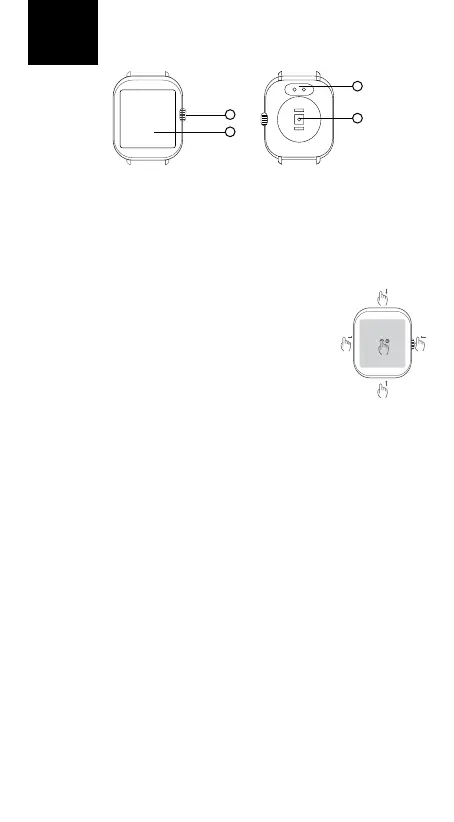
1. Powerbutton-longpresstoturnthewatchon/o.Ashortpresswith
thedisplayoactivatesthedisplay.Ashortpresswiththedisplayactiva-
tedstartsthemenu.Ashortpressinthemenuisusedtoreturntothe
homescreen.
2. Watchtouchscreen
3. Opticalsensorformeasuringheartrateandothervalues
4. Chargingconnector
CONTROL
Thewatchisoperatedusingafulltouchscreendisplay.With
thedisplayactivated,moveuptoaccessthenotications
menu,movedowntoaccessthesettingsmenu,moveleftto
scrollthroughscreensrecordingactivity,sleep,weatherand
more,andmoverighttoopenthemenuofrecentlylaun-
chedfunctions.Longpressonthebasedialtochangedials.
CONNECT YOUR WATCH TO THE APP
DownloadtheFitCloudProapptoyourmobilephone(Android10andlater
andiOS8.2andlater).Theappisonlyavailableformobilephones.Andfollow
theinstructions:
1. TurnonBluetoothonyourmobilephone
2. Ifyourwatchiso,turnitonbypressingthepowerbutton(1)
3. LaunchtheFitcloudproappandfollowtheon-screeninstructions(select
WATCH3fromtheavailabledevices).Conrmtheconnectiononthewatch.
Fortheapptoworkproperly,youmustenableaccesstoappnotications
inyourmobilephonesettings.Youmustalsoenabletheappinthemobile
phone‘sRAMmanagementsothatthephonedoesnotstoptheappfromru-
nninginthebackground.Formoreinformationaboutsettingupyourmobile
phone,refertoyourmobilephonemanual.
CONNECT YOUR WATCH TO YOUR MOBILE PHONE FOR BT CALLS
Followtheinstructionstomakecallsusingyourwatch:
1. TurnonBluetoothonyourmobilephone.
2. Activatetheaudiomodeonyourwatch(swipefromthemainscreento
theAudioModemenu,activatetheswitchusingthetouchscreen).
3. Inyourmobilephone‘sBTsettings,ndthedevicecalledWATCH3and
connect(remembertoenableaccesstocallsandaudioinyourphone‘s
Bluetoothsettings).
4. ThewatchnowbehaveslikeanormalBTspeakerorheadsetandyoucan
receivecallsthroughitormakeoutgoingcallsfromthewatchmenu.
WATERPROOF
TheNiceboyWATCH3meetstheIP67standard,whichmeansprotection
againstimmersioninfreshwatertoamaximumdepthof1meterandfor
amaximumof30minutes.Donotusethewatchinsalt(sea)water.Wedo
1
3
4
2



 To Next Page