15
notrecommenditsuseinchlorinatedwater.Thewatchisnotintendedfor
swimming.
CHARGING
Chargethewatchonlywiththeoriginalcharger,whichyouattachtotheco-
nnectorsonthebackofthewatch(4)usingmagnets.Usea5Vadapterwitha
currentof1Aforcharging.Chargethebatterytofullcapacitybeforeusingthe
watchforthersttime.Donotexposethewatchtotemperaturedierences
andkeepthewatchundercontrolwhilecharging.
WATCH FUNCTIONS
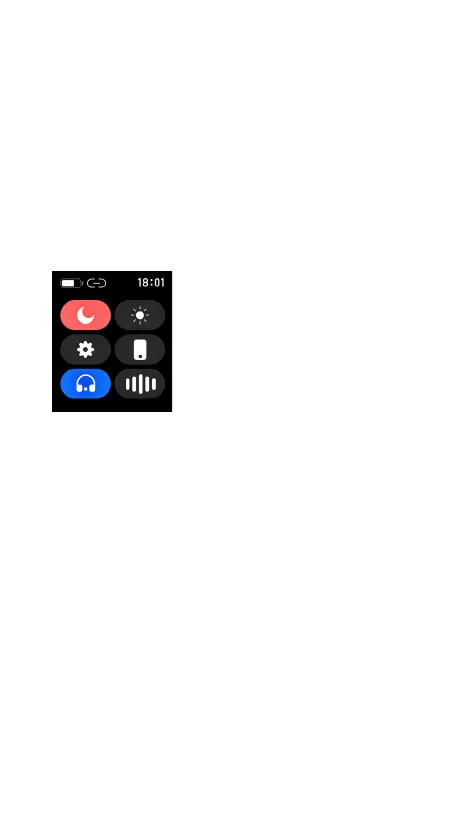
Control panel
Byswipingdownonthedisplay(onthehomescreenwiththewatchface)you
willseethecontrolpanel,whichisusedfordonotdisturbmode,brightness
adjustment,entersettings,ndphone,modeforBTcallsandassistant(the
phone‘snativeassistantisalwaysrunningifithasone-Bixby,Siri,etc.).
CLOCK SETTINGS
YoucanaccessthewatchsettingsviatheControlPanel.Thefollowingitems
areavailable:
Menu style:adjuststheappearanceofthewatchmenu.
Display:allowsyoutochangethedial,adjustthebrightness,adjustthe
backlighttime,wakeupthedisplaybyturningthewrist.
Battery:showsthebatterystatusofthewatchandallowsyoutoturnon
PowerSavingMode(thewatchturnsoBTanddisconnectsfromthephone).
Vibration strength:optiontosetthevibrationintensity
Language:settingthelanguageofthewatchenvironment
QR code:linktowatchapp
Time setting:allowsyoutosetthetimeanddateofthewatchandsetthe
12/24htimedisplaymode.
Password:SettingthePINcodetoenterthewatchmenu
System:oersinformationaboutthewatch(BTname,MACaddress,FW
version),enablesturningoandrestartingthewatch.



 To Next Page