12
EN
DESCRIPTION
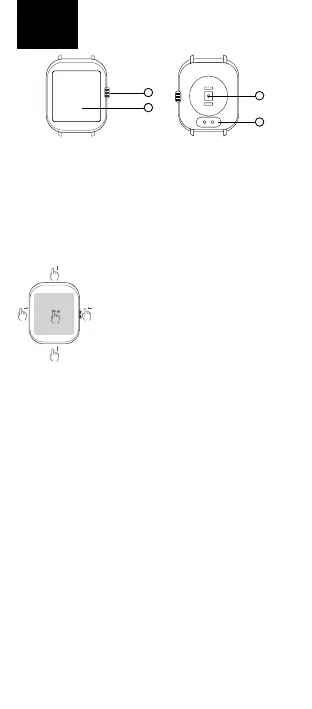
1. ON/OFFbutton–pressandholdtoturnwatcheson/o.
Pressbrieywhenthedisplayisotoactivateit.Pressbriey
whenthedisplayisactivatedtostartthemenu.Whileinthe
menu,pressbrieytoreturntothehomescreen.
2. Touchscreen
3. Opticalsensorformeasuringheartrateandothervalues
4. Chargingconnector
CONTROLS
Thewatchiscontrolledviaafulltouch
screen.Whenthedisplayisactivated,
swipeuptogettothenoticationmenu,
swipedowntothesettingsmenu,swipe
tothelefttomovebetweenscreenswith
arecordofactivities,sleepdata,weather
andothers,andswipetotherighttoopen
themenuofrecentlylaunchedfunctions.
Youcanchangethewatchfacesbypress-
ingandholdingontothemainwatchface.
CONNECTING THE WATCH WITH THE APPLICATION
DownloadtheFitCloudProapptoyourmobilephone(An-
droid10andaboveandiOS8.2andabove).Theapplicationis
onlyavailableformobilephones.Followtheinstructions:
1. TurnonBluetoothonyourmobilephone
2. Ifthewatchiso,turnitonbypressingthepower
button(1)
3. LaunchtheFitcloudproappandfollowtheon-screen
instructions(selectWATCHLITE3fromthedeviceslisted)
Inorderfortheapptoworkproperly,youneedtoenable
accesstoappnoticationsinyourmobilephonesettings.
ItisalsonecessarytoenabletheapplicationintheRAM
managementofthemobilephonesothatthephonedoes
notterminatetheapplicationrunninginthebackground.For
moreinformationonmobilephonesettings,refertoyour
mobilephonemanual.
WATERPROOFNESS
NiceboyWATCHLITE3meetstheIP68standard,whichmeans
protectionagainstimmersioninfreshwaterforthemaximum
of30minutesandtoamaximumdepthof1.5meter.Do
notusethewatchinsalt(sea)water.Wedonotrecommend
usingtheminchlorinatedwater.
CHARGING
Chargethewatchonlywiththeoriginalcharger,whichyou
attachusingmagnetstotheconnectorsonthebackofthe
watch(4).Useanadapterwithavoltageof5Vandacurrent
1
3
4
2



 To Next Page