Part # M017879450000 REV. July 1, 2011
ECOTECH EZ
TM
Variable Speed Motor/Control
1:54 PM
To Change Fields
Program
Menu
Exit
Run Custom
Flow
Run
MAX Flow /
Vacuum
RUN / STOP
ENTER
MAX
100% Flow
5:00 PM
120 MIN
Mo Tu We Th Fr
Sa Su
To Change Menu Options
Mon-Fri Flow 1
Mon-Fri Flow 2
Sat-Sun Flow 1
Sat-Sun Flow 2
Custom Flow 1
Vacuum Mode
Attention
Low Voltage
Blocked Pump
High Amps
Temp Trip
Press ENTER to Confirm
To Change Values
Press ENTER to Save Press Exit to Cancel
TIME ON
TIMER
TIME OFF
Call
For
Service
1
2
3
4
1
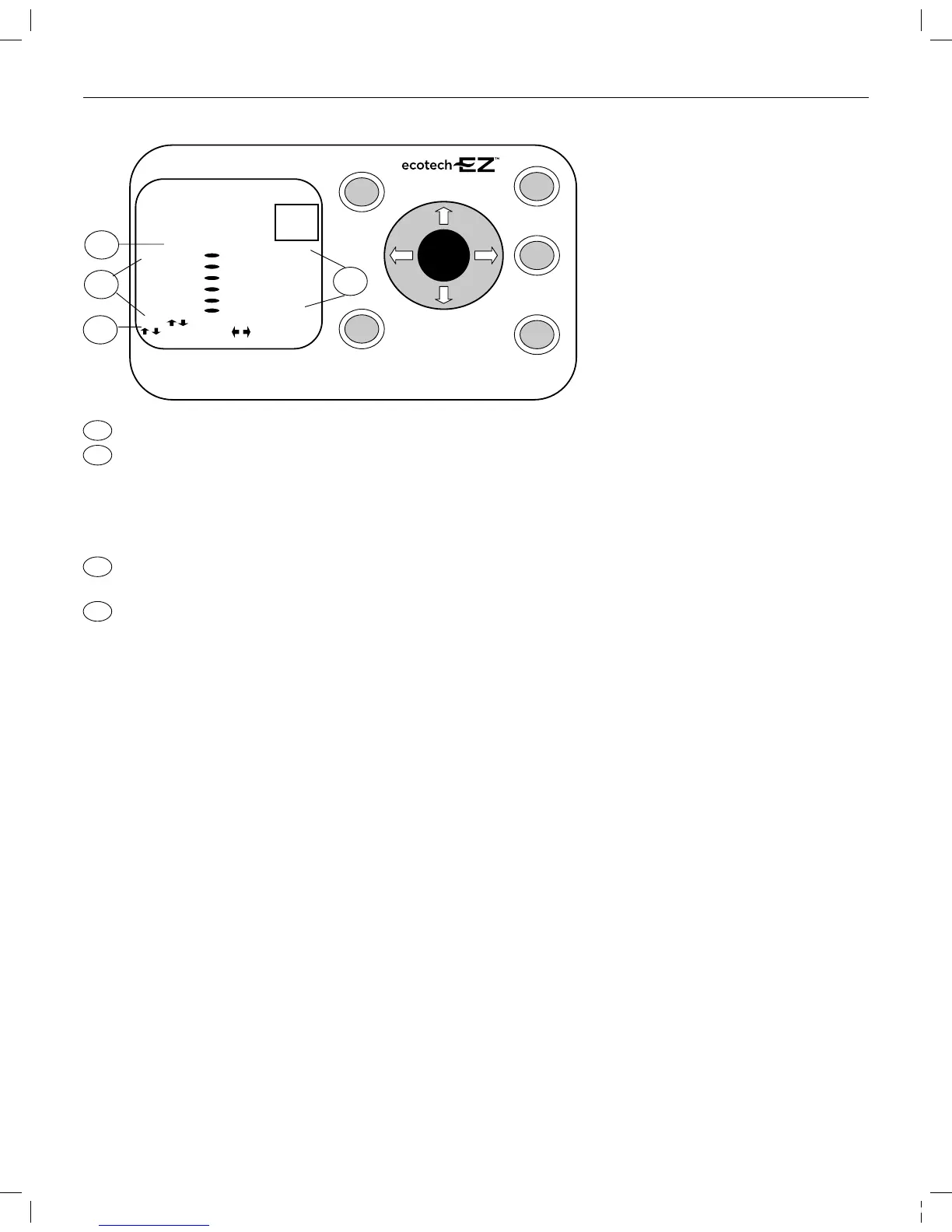
The “Press ENTER to Confirm” icon illuminates when the unit requests you to confirm your selection.
The Attentionsection displays important operating information regarding your unit. Detailed information on these items can be found in
The Fault section of this manual – Pages 24-25.
• Low Voltage indicates insufficient voltage is getting to the motor.
• Blocked pump indicates there is an obstruction which does not allow the pump to properly operate.
• High Amps is an indication of some type of overloaded condition.
• Temp Trip indicates an overheat condition. If you are unsure how to resolve any of these issues, please call your pool professional.
Directions for operation.These directions will illuminate based upon your location in the Program menu. “Press Exit to Cancel” is an indicator
to press the Exit button to leave the program menu or to press the Exit button as an Escape key should an error occur while programming.
These are your program menu selection options.
Mon-Fri Flow 1 is the first On, Off and Flow percentage setting for Monday through Friday operation.
Mon-Fri Flow 2 is a second On, Off, and Flow percentage available for Monday-Friday operation.
Should you require different setting for weekend operation, Sat-Sun Flow settings are also available.
Four Custom Flow settings are also available should special settings be required for water features, backwash, or party mode
operation. Vacuum Mode is not programmable.
2
3
4
Variable Speed Pool Motor
The “” icon illuminates when the unit requests you to conrm your selection.
The section displays important operating information regarding your unit. Detailed information on these items
can be found in the Fault section of this manual – Pages 24-25.
• indicates insufcient voltage is getting to the motor.
• indicates there is an obstruction which does not allow the pump to properly operate.
• is an indication of some type of overloaded condition.
• indicates an overheat condition. If you are unsure how to resolve any of these issues,
please call your pool professional.
Directions for operation. These directions will illuminate based upon your location in the Program menu. “”
is an indicator to press the button to leave the program menu or to press the button as an Escape key should an error
occur while programming.
These are your program menu selection options.
is the rst On, Off and Flow percentage setting for Monday through Friday operation.
is a second On, Off, and Flow percentage available for Monday-Friday operation.
Should you require different setting for weekend operation, settings are also available.
Four settings are also available should special settings be required for water features, backwash,
or party mode operation. is not programmable.
1
2
3
4
315612_MNJ26_VAR SPD_nonSRVS.indd 11 7/19/11 8:01 AM


 To Next Page