Part # M017879450000 REV. July 1, 2011
ECOTECH EZ
TM
Variable Speed Motor/Control
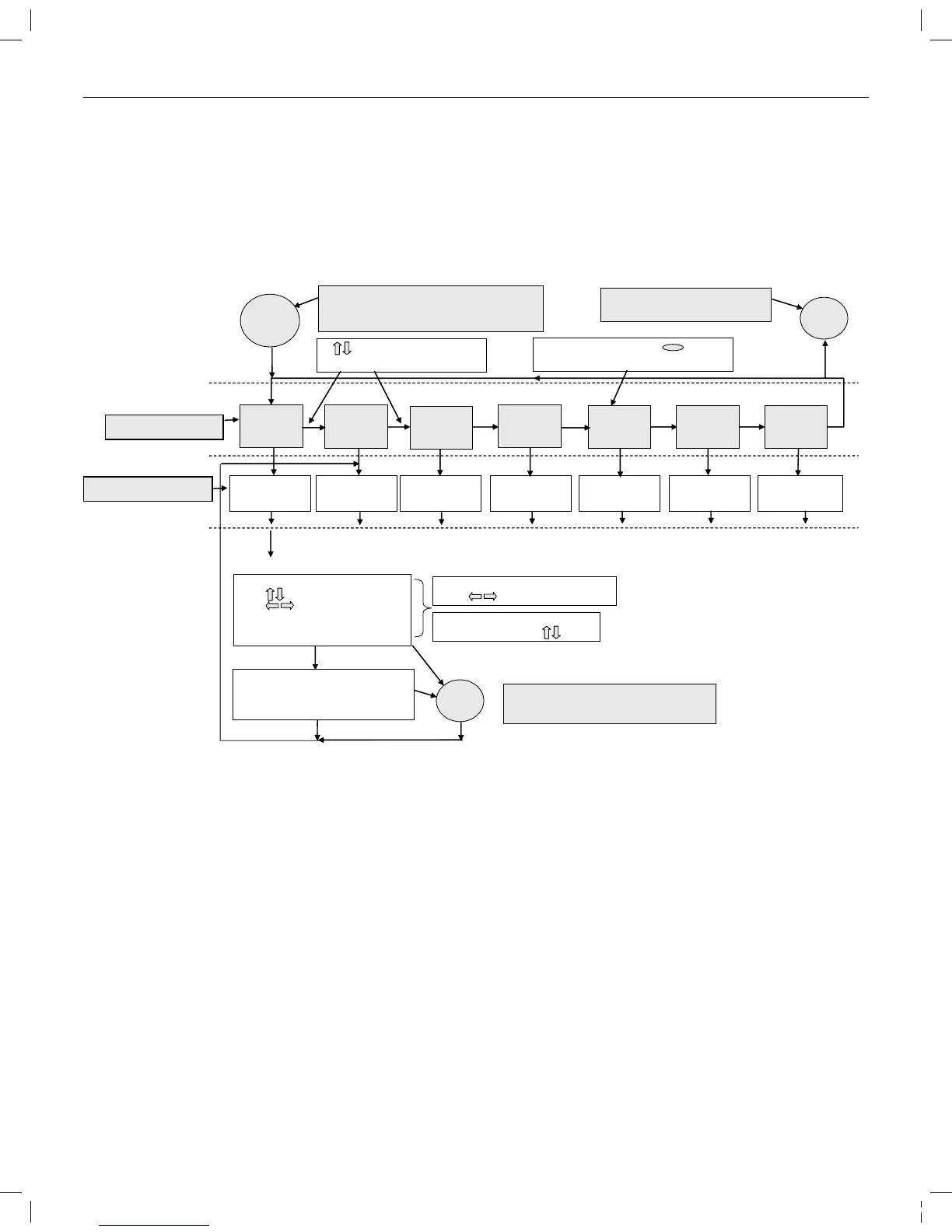
Each Menu Option has its own programming procedure. See Pages 13-17.
Pre ss ing the “Program Menu” b u tton w ill
en te r th e M enu O p tions le vel. P ressin g
wh ile in “P ro gra m M en u ” will h ave no e ffe ct.
C lock
M on-Fri
Flo w 1
M on-Fri
Flo w 2
S a t-S u n
Flo w 1
S a t-S u n
Flo w 2
C ustom
Flo w 1 -4
Press “E N TE R ” to
ac c ess C lo c k S et
Functio n s
Press “E N TE R ” to
ac c ess M o n -F ri 1
Functions
Press “E N TE R ” to
ac c ess M o n -F ri 2
Functions
Press “E N TE R ” to
ac c ess Sat-S u n 1
Functio n s
Press “E N TE R ” to
ac c ess S at-S u n 2
Functio n s
Press “E N TE R ” to
ac c ess Custom
Flow F u nction s
arro ws a re u sed to m o ve
be tw e e n M e n u O p tio n s
O N LY th e follow ing se g m e nts Illum in ate:
-” To C ha nge V a lues”
-” T o C hange F ield s”
- blink H o u r d igit of Clo c k
- “P re ss E n ter to S av e”
- “P re ss E x it to C ancel”
E a c h digit p lus A or P “blin k s” in sequenc e
as the buttons are presse d
P ressing “E N T E R ” saves th e C lock
setting and ex its C lock S et m ode.
T h e M E N U option increm e nts to “D a y of
the W eek” set m od e.
Clock Set Functions (press “ENTER”)
M E N U n a m e a n d cu rsor “blin k”
wh e n yo u can a cce ss th at m o d e
D ays o f
the w e ek
Press “E N TE R ” to
ac c ess D ay of th e
W eek S etting
P rogram
M enu
E xit
Pre ss ing the “Exit” bu tton w ill
re tu rn th e u nit to R un m ode
E a c h digit p lus A or P w hile “blinking”
can be change d w ith the button s
E xit
P ressing “Exit” at any tim e exits C lock S et m od e
and increm en ts M E N U option to “D a y of the
W ee k” setting m ode. Tim e se tting is N O T sav e d.
Eac h M E N U o p tio n ha s its o wn program m in g p roce d ure. See Pages 1 3-1 7.
Menu Options -- Level 1
Function Setting -- Level 2
315612_MNJ26_VAR SPD_nonSRVS.indd 12 7/19/11 8:01 AM


 To Next Page