Division of Nidec Motor Corporation
7078 Shady Oak Road
Eden Prairie, MN 55344-3505 USA
T: +1 952 995-8000
www.controltechniques.com
7078 Shady Oak Road, Eden Prairie, MN 55344-3505
+1 952 995-8000 www.controltechniques.com
This Application Note applies to the M700 & M702 Drive Series
Basic M700 Demo Drive and Motor Setup using MConnect Software
This application note will demonstrate how to set up the M700 demo for Analog Velocity Mode using
MConnect software. The application note will focus specifically on using the MConnect software and
will assume the user has an Ethernet patch cable connected to the drive with a PC static IP address set
to be able to communicate to drive IP address 192.168.1.100 along with a M700 demo unit connected
to 230 Vac input voltage.
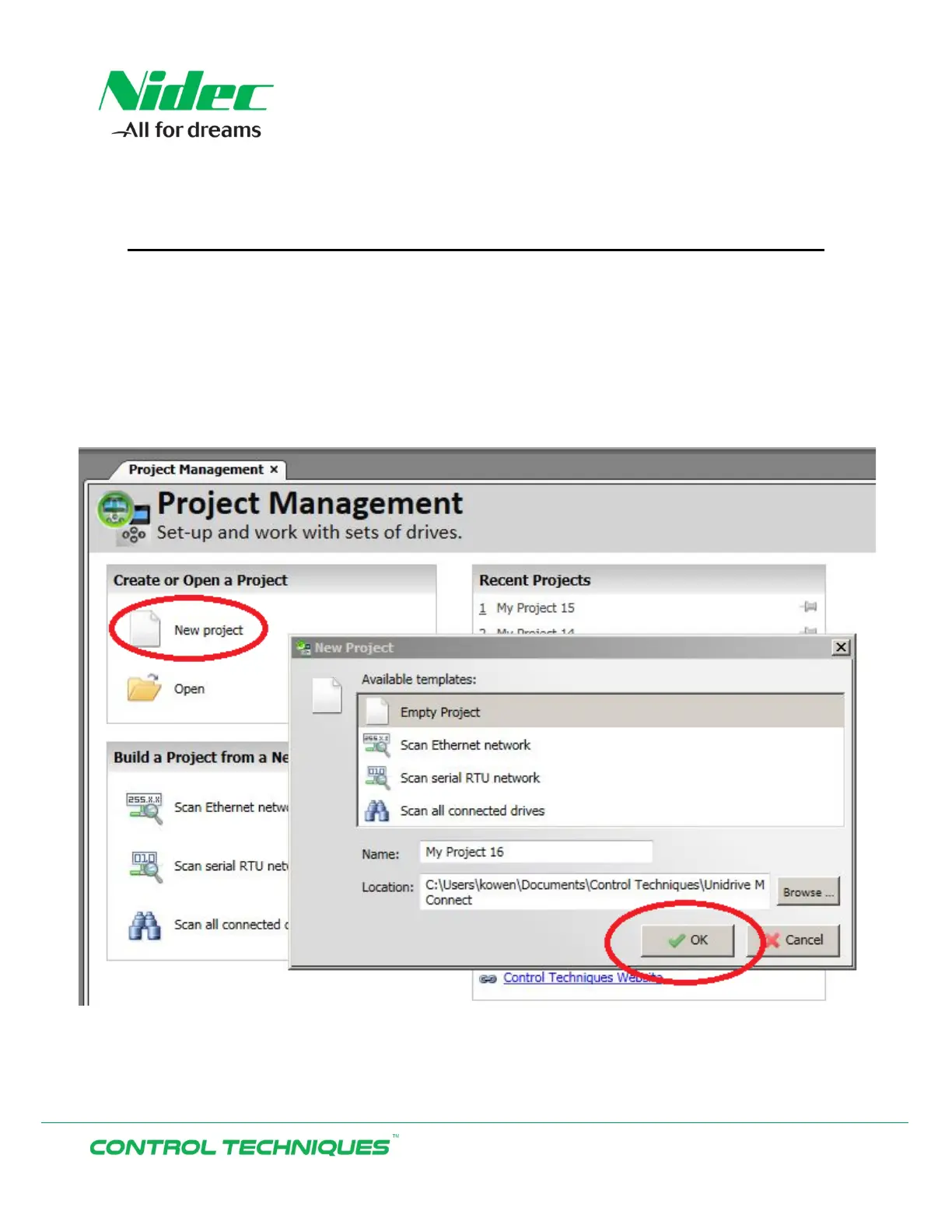
After opening the MConnect software select ‘New project’. Keep the default ‘Empty Project’ enter a
Name for the project or accept the default name shown by Selecting ‘OK’.
M700 Demo
AN0009
Rev.04, 11/20/17


 To Next Page