EasyManua.ls Logo

Nike TRIAX FLY - User Manual

Nike TRIAX FLY
2 pages
Print Icon
To Next Page IconTo Next Page
Loading...
In TIME mode you can set time and calendar
information within two time zones.
You can set two time alarms in ALARM mode.
The time alarm will sound for 20 seconds.
Switch Time Zones
2 sec
Electrolite ON
BEGIN setting
Time and Date
Continue to Next Setting
Set Hour... Minutes... Year... Month... Day... Day of Week...
Select 12 or 24 Hour Clock
Press to change value
2 sec
EXIT Time and Date
Tu rn Button Chime ON / OFF
1
2
3
2 sec
Leave Alarm Month and Day
fields blank for a daily alarm.
Set Alarm Time Zone
Adjusted Alarms turn
ON upon EXIT
BEGIN by pressing
LAP/RESET button
to select Alarm 1
or Alarm 2
TRIAX FLY
Question and Answer IconNeed help?

Do you have a question about the Nike TRIAX FLY and is the answer not in the manual?

Summary

Time and Date Setup

Setting Time and Calendar

Configure time and calendar details for two distinct time zones.

Switching Time Zones

Adjust settings to alternate between different time zones.

Alarm Functionality

Setting Alarms

Configure up to two time alarms, including daily alarm settings.

Button Chime Control

Enable or disable audible feedback for button presses.

Timer Modes Overview

Available Timer Types

Select from Countdown-Repeat, Countdown-Stop, or Count-Up timers.

Timer Operations

Start, stop, and reset timers for accurate timekeeping.

Chronograph Mode

Chronograph Functionality

Capture lap and total time data during workouts.

Chronograph Operations

Start, mark laps, reset, and stop the chronograph.

Product Specifications and Safety

Mode Limits and Operating Conditions

Details on chronograph limits, water resistance, and temperature range.

Material Specifications

Information on crystal, strap, case, bezel, and button materials.

Battery Information and Warnings

Details on battery type, life, replacement, and safety warnings.
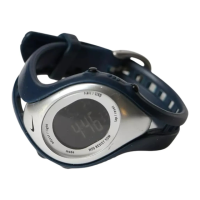
Nike TRIAX FLY Specifications

General IconGeneral
BrandNike
ModelTRIAX FLY
CategoryWatch
LanguageEnglish

Related product manuals