Need help?
Do you have a question about the Nikkei NLD24MSMART and is the answer not in the manual?
Warnings and instructions to prevent electric shock from the TV.
Key instructions for safe installation and initial operation of the TV.
Explanation of symbols and markings on the product for user safety.
Details on tuners, ports, OSD menu, timers, and locks.
Explains messages displayed when TV enters standby due to no signal or inactivity.
How to use the TV's physical buttons for basic functions like volume and channel.
Using the remote for menu navigation, input selection, and power control.
Steps for connecting the power adapter and ensuring proper grounding.
Details on connecting aerial or satellite cables to the TV's input sockets.
Information regarding licensed technologies and trademarks used in the product.
Technical specs for TV broadcasting, receiving channels, and digital reception standards.
Dimensions, weight, and operating temperature/humidity specifications.
Details on frequency ranges and maximum output power for wireless LAN.
Notes on regulatory restrictions for wireless LAN usage in different countries.
Explains buttons for source selection, media playback, and menu navigation.
Details buttons for volume, channel control, settings, and custom functions.
Information on setting custom functions for My Button 1 and My Button 2.
Diagrams and descriptions for connecting devices via Scart, VGA, and Side AV ports.
Details on connecting audio/video equipment via HDMI, SPDIF, and headphone jacks.
Information on connecting USB devices, CI modules, and power via 12V DC.
Steps for switching the TV on from standby and powering it down completely.
Guide through the initial language, country, and PIN setup process.
How to select and search for Digital Aerial, Digital Cable, Satellite, or Analogue broadcasts.
Guidelines for connecting USB storage, formatting, and compatibility notes.
Instructions for instant and timeshift recording of TV programmes.
How to view recorded programmes and use slow forward playback.
Settings for recording and navigating media files via the Media Browser.
Using CEC for device control and ARC for audio output to sound systems.
Setting up audio output to external amplifiers or sound systems.
Guide on how to find and use the TV's built-in electronic manual.
Options for Mode, Contrast, Brightness, Sharpness, and Colour settings.
Settings like Dynamic Contrast, Noise Reduction, Colour Temp, and HDMI Full Range.
Specific settings for PC input, including Autoposition and screen shifting.
Controls for volume level, equalizer modes, and balance.
Settings for headphone volume, sound modes, and digital output.
Options for language, privacy settings, and parental locks with PIN management.
Settings for network, timers, date/time, accessibility, and hard of hearing features.
Information on software updates, Netflix, Store Mode, and Audio Video Sharing.
Settings for power up mode, CEC control, and audio device output.
Automatic/manual scanning, network tuning, analogue fine-tuning, and satellite configuration.
Editing, filtering, and managing favourite channels within the Channel List.
Setting up parental locks, maturity locks, child locks, and PIN management.
Navigating EPG schedules and viewing event details.
Setting timers and recording programmes directly from the EPG.
How to access and use Teletext services, including mix mode.
Steps for searching and installing TV firmware updates automatically.
Solutions for TV not turning on, poor picture quality, and lack of sound.
Troubleshooting steps for unresponsive remote controls and unselectable input sources.
Addressing recording unavailability and slow USB disk performance.
Table of typical video display modes and resolutions supported by the TV.
Compatibility chart for various signals across SCART, Side AV, YPbPr, and HDMI inputs.
List of supported video file extensions, codecs, resolutions, and bit rates.
Supported picture file types and their resolution capabilities.
List of supported audio file extensions, codecs, bit rates, and sample rates.
Details on supported subtitle file extensions, parsers, and containers.
Table showing supported resolutions for DVI input via a converter cable.
Step-by-step guide to configure and connect the TV to a wireless LAN.
Explains network type, speed tests, and advanced network settings.
How to connect mobile devices to the TV via WiFi for content sharing.
Using TV as wireless display and sharing content from mobiles.
Tips for resolving wireless network and audio video sharing issues.
How to access and use the TV's internet portal for various applications and content.
How content is displayed in the Picture-in-Picture window when using the portal.
Instructions for using the browser, Speed Dial, history, and search functions.
Safety precautions for class 1 laser products and handling of discs.
Guidelines on handling, cleaning, and storing DVD discs.
Steps for inserting discs, selecting source, and basic playback.
How to insert a disc, navigate menus, and start playback.
Solutions for poor picture quality, discs not playing, and wrong OSD language.
Troubleshooting steps for no sound, distorted sound, and general playback errors.
Information on DVD, Audio CD, MP3-CD, and Picture-CD compatibility.
Details on supported disc types and video decoding standards used by the TV.
Explains buttons for playback, source selection, and TV menu access.
Details navigation buttons, volume, channel control, and standby function.
How remote buttons control DVD, movie, picture, and music playback.
Explains button combinations for functions like slow forward and rapid advance.
Instructions for powering on the TV using a 12V car adapter.
Steps for turning off the TV when using a 12V power source.
 General
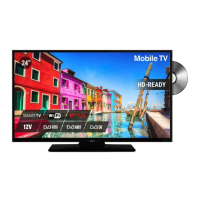
| Screen Size | 24 inches |
|---|---|
| Display Technology | LED |
| Smart TV | Yes |
| Aspect Ratio | 16:9 |
| HDMI Ports | 2 |
| USB Ports | 1 |
| VGA Port | 1 |
| Headphone Jack | 1 |
| Resolution | 1366 x 768 |
| Viewing Angle | 178/178 degrees |

 To Next Page