EasyManua.ls Logo

Nikko NA-540 - Page 4

Default Icon
15 pages
Print Icon
To Next Page IconTo Next Page
To Previous Page IconTo Previous Page
Loading...
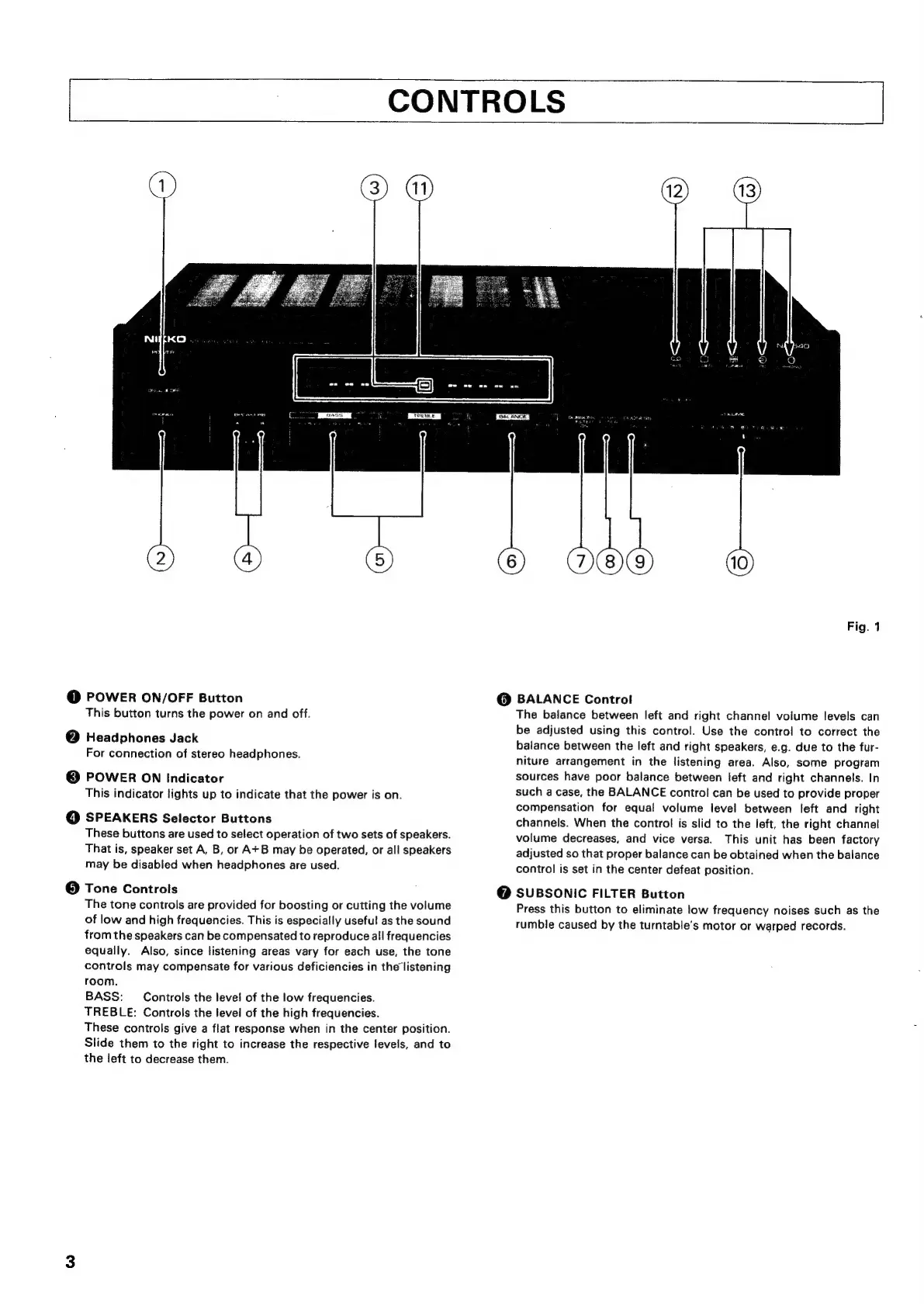
CONTROLS
TELE
@
POWER
ON/OFF
Button
This
button
turns
the
power
on
and
off.
@
Headphones
Jack
For
connection
of
stereo
headphones.
©
POWER
ON
Indicator
This
indicator
lights
up
to
indicate
that
the
power
is
on.
©
SPEAKERS
Selector
Buttons
These
buttons
are
used
to
select
operation
of
two
sets
of
speakers.
That
is,
speaker
set
A,
B,
or
A+B
may
be
operated,
or
all
speakers
may
be
disabled
when
headphones
are
used.
@
Tone
Controls
The
tone
controls
are
provided
for
boosting
or
cutting
the
volume
of
low
and
high
frequencies.
This
is
especially
useful
as
the
sound
from
the
speakers
can
be
compensated
to
reproduce
all
frequencies
equally.
Also,
since
listening
areas
vary
for
each
use,
the
tone
controls
may
compensate
for
various
deficiencies
in
the
listening
room.
BASS:
Controls
the
level
of
the
low
frequencies.
TREBLE:
Controls
the
level
of
the
high
frequencies.
These
controls
give
a
flat
response
when
in
the
center
position.
Slide
them
to
the
right
to
increase
the
respective
levels,
and
to
the
left
to
decrease
them.
Fig.
1
@
BALANCE
Control
The
balance
between
left
and
right
channel
volume
levels
can
be
adjusted
using
this
control.
Use
the
control
to
correct
the
balance
between
the
left
and
right
speakers,
e.g.
due
to
the
fur-
niture
arrangement
in
the
listening
area.
Also,
some
program
sources
have
poor
balance
between
left
and
right
channels.
In
such
a
case,
the
BALANCE
control
can
be
used
to
provide
proper
compensation
for
equal
volume
level
between
left
and
right
channels.
When
the
control
is
slid
to
the
left,
the
right
channel
volume
decreases,
and
vice
versa.
This
unit
has
been
factory
adjusted
so
that
proper
balance
can
be
obtained
when
the
balance
control
is
set
in
the
center
defeat
position.
@
SUBSONIC
FILTER Button
Press
this
button
to
eliminate
low
frequency
noises
such
as
the
rumble
caused
by
the
turntable’s
motor
or
warped
records.

Related product manuals