EasyManua.ls Logo

Nikko NA-540 - Page 5

Default Icon
15 pages
Print Icon
To Next Page IconTo Next Page
To Previous Page IconTo Previous Page
Loading...
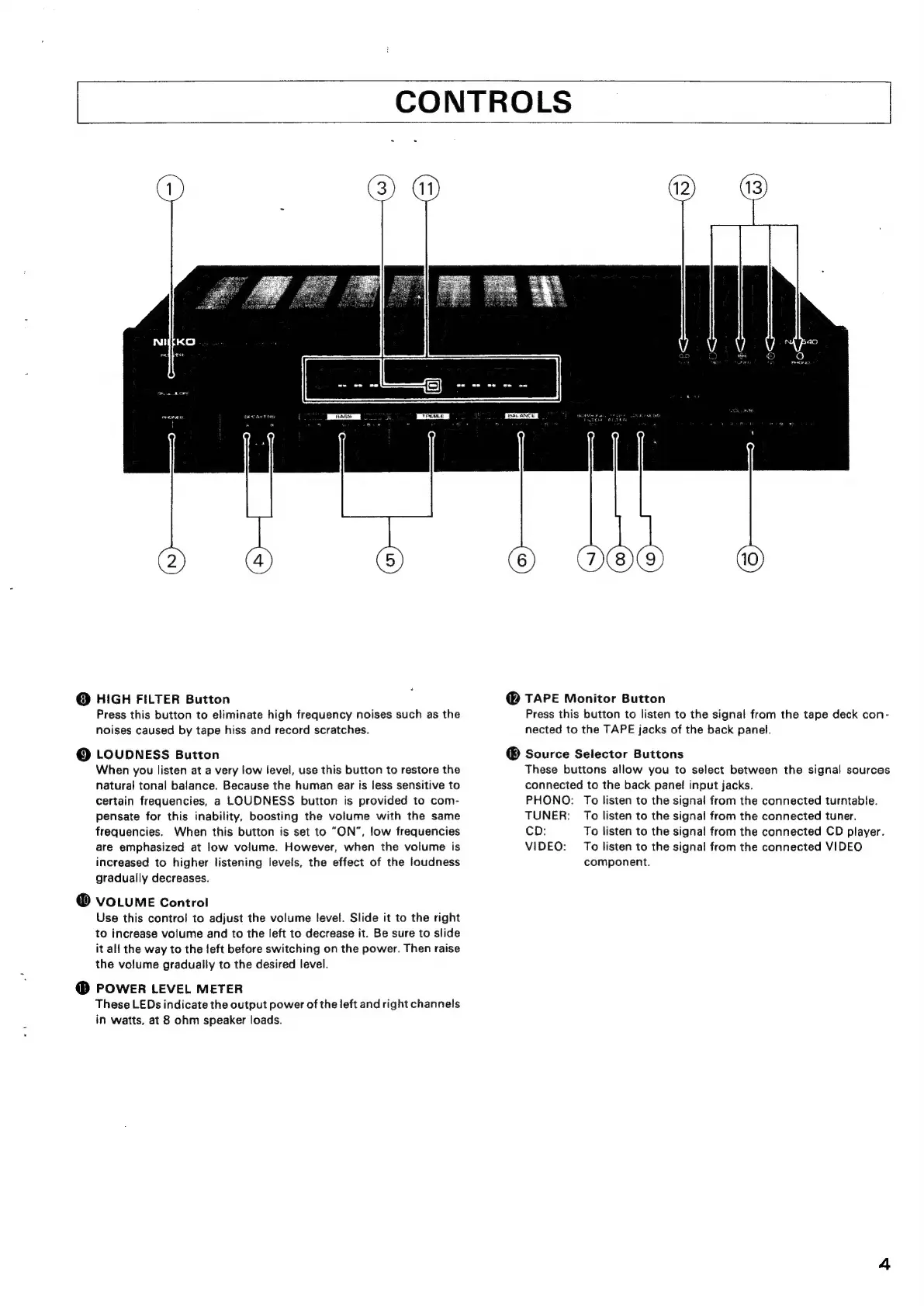
CONTROLS
@
HIGH
FILTER
Button
Press
this
button
to
eliminate
high
frequency
noises
such
as
the
noises
caused
by
tape
hiss
and
record
scratches.
@
LOUDNESS
Button
When
you
listen
at
a
very
low
level,
use
this
button
to
restore
the
natural
tonal
balance.
Because
the
human
ear
is
less
sensitive
to
certain
frequencies,
a
LOUDNESS
button
is
provided
to
com-
pensate
for
this
inability,
boosting
the
volume
with
the
same
frequencies.
When
this
button
is
set
to
“ON”,
low
frequencies
are
emphasized
at
low
volume.
However,
when
the
volume
is
increased
to
higher
listening
levels,
the
effect
of
the
loudness
gradually
decreases.
@
VOLUME
Control
Use
this
control
to
adjust
the
volume
level.
Slide
it
to
the
right
to
increase
volume
and
to
the
left
to
decrease
it.
Be
sure
to
slide
it
all
the
way
to
the
left
before
switching
on
the
power.
Then
raise
the
volume
gradually
to
the
desired
level.
@
POWER
LEVEL
METER
These
LEDs
indicate
the
output
power
of
the
left
and
right
channels
in
watts,
at
8
ohm
speaker
loads.
@
TAPE
Monitor
Button
Press
this
button
to
listen
to
the
signal
from
the
tape
deck
con-
nected
to
the
TAPE
jacks
of
the
back
panel.
®
Source
Selector
Buttons
These
buttons
allow
you
to
select
between
the
signal
sources
connected
to
the
back
panel
input
jacks.
PHONO:
To
listen
to
the
signal
from
the
connected
turntable.
TUNER:
To
listen
to
the
signal
from
the
connected
tuner.
CD:
To
listen
to
the
signal
from
the
connected
CD
player.
VIDEO:
To
listen
to
the
signal
from
the
connected
VIDEO
component.

Related product manuals