66
66
6
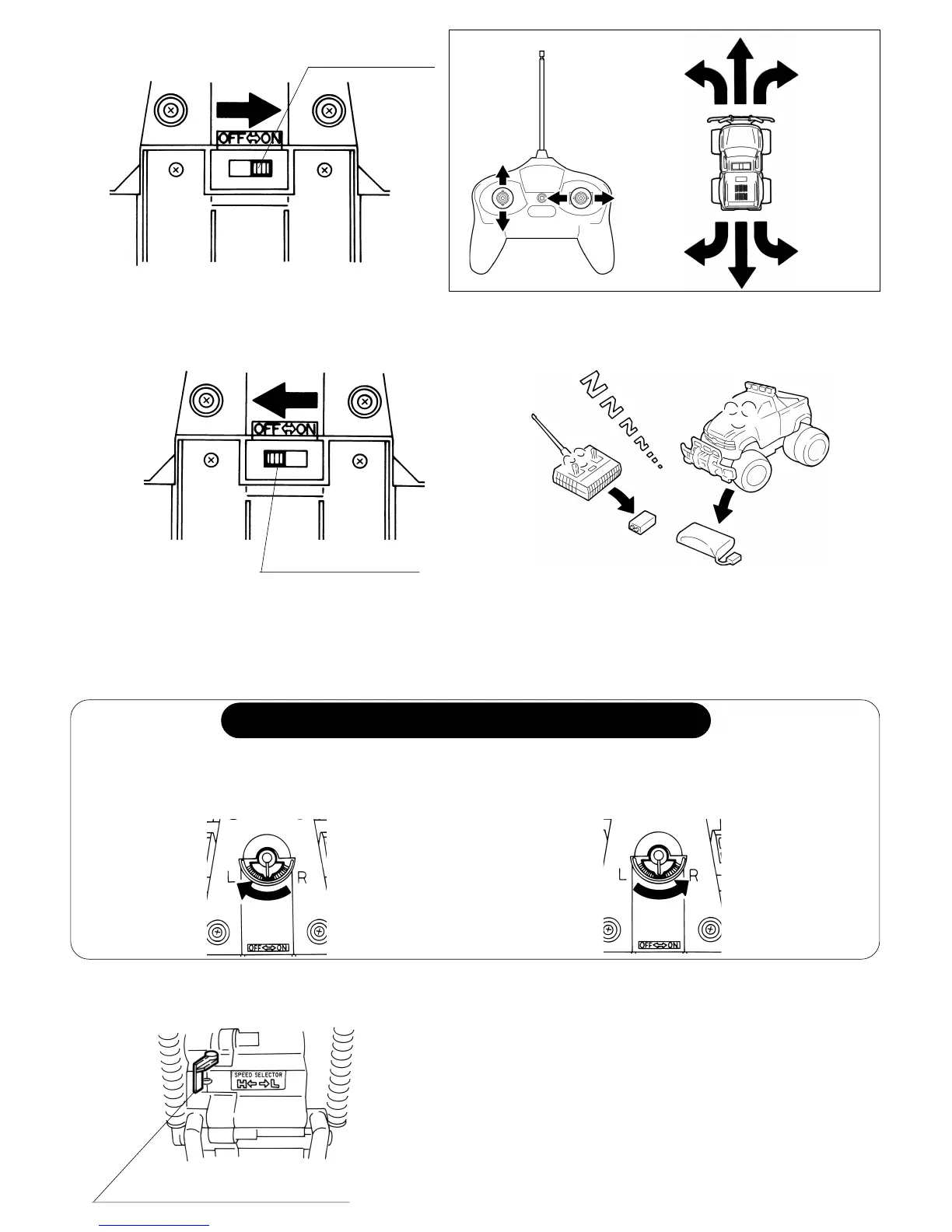
TO ADJUST STEERING ALIGNMENTTO ADJUST STEERING ALIGNMENT
TO ADJUST STEERING ALIGNMENTTO ADJUST STEERING ALIGNMENT
TO ADJUST STEERING ALIGNMENT
Turn the steering alignment lever towards
“R” if the vehicle runs towards left.
(5) Turn OFF the vehicle after playing.
(6) To prevent damage from battery leak-
age, remove all the batteries from
transmitter and vehicle after playing.
Adjust the steering alignment when the vehicle does not run straight forward.
Turn the steering alignment lever towards
“L” if the vehicle runs towards right.
Power switch
(3) Turn ON the power switch of the vehicle.
Power switch
(4) Start operation.
EnglishEnglish
EnglishEnglish
English
2 GEAR SELECTION (H/L)2 GEAR SELECTION (H/L)
2 GEAR SELECTION (H/L)2 GEAR SELECTION (H/L)
2 GEAR SELECTION (H/L)
Set the change over switch to H or L.
H/L change over switch
LOW:
HIGH:
”H” Gear is suitable for large place
with smoth surfacce.
Vehicle runs faster than at “L” Gear.
“L” Gear is suitable for rough surfaces
or small places, change over switch.



 To Next Page