127
i
C The Shooting Menu: Shooting Options
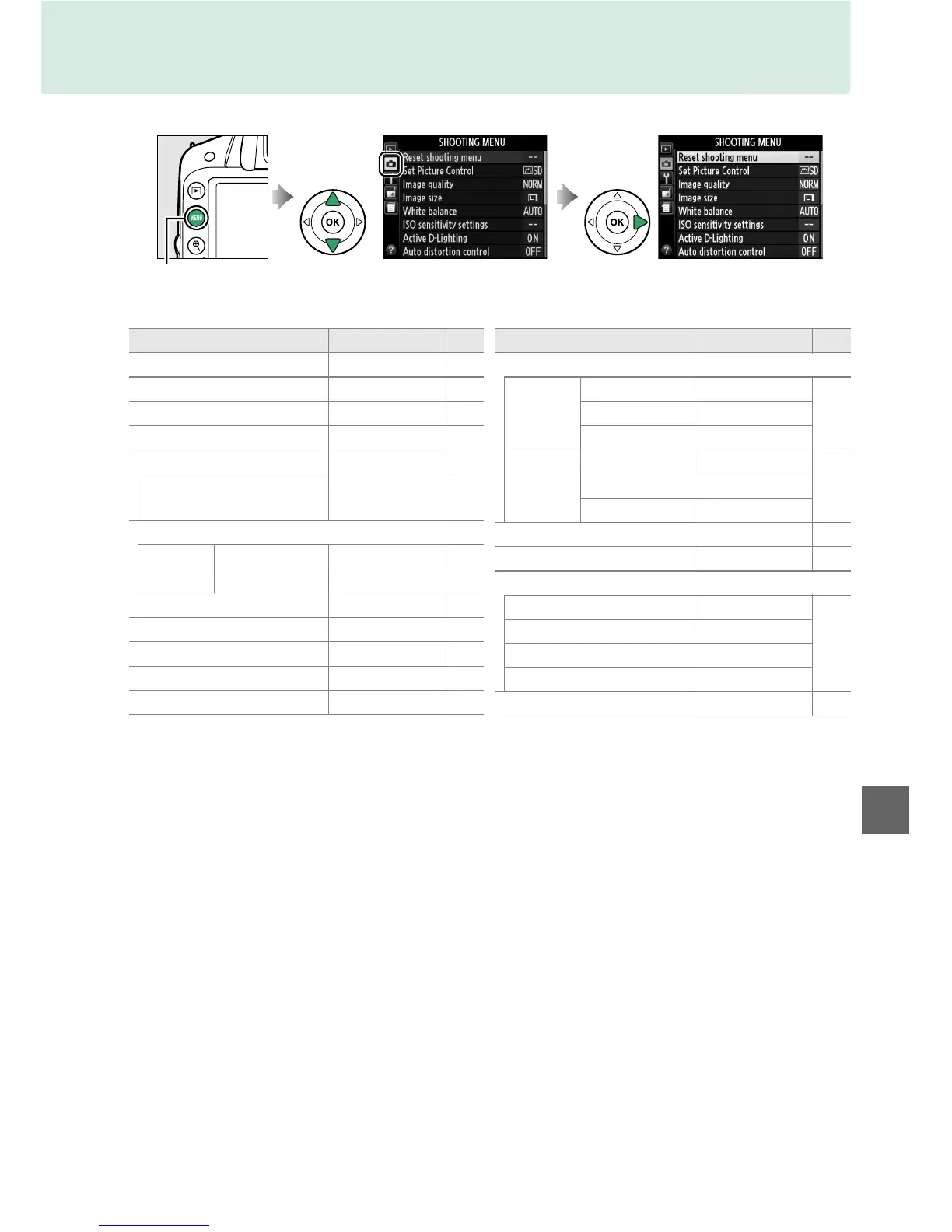
To display the shooting menu, press G and select the C (shooting menu) tab.
The shooting menu contains the following options:
* Default varies with country of purchase.
Note: Depending on camera settings, some items may be grayed out and unavailable.
For information on the options available in each shooting mode, see page 187.
G button
Option Default 0
Reset shooting menu — 128
Set Picture Control Standard 76
Image quality JPEG normal 44
Image size Large 46
White balance Auto 69
Fluorescent
Cool-white
fluorescent
70
ISO sensitivity settings
ISO
sensitivity
P, S , A , M 100
51
Other modes Auto
Auto ISO sensitivity control Off 129
Active D-Lighting On 67
Auto distortion control Off 130
Color space sRGB 130
Noise reduction On 131
AF-area mode
Viewfinder
n Single-point AF
38m Dynamic-area AF
Other modes Auto-area AF
Live view/
movie
k, l, p, o Face-priority AF
82m, P, S, A, M Wide-area AF
n Normal-area AF
Built-in AF-assist illuminator On 131
Metering Matrix metering 60
Movie settings
Frame size/frame rate
* —
90
Movie quality High quality
Microphone Auto sensitivity
Manual movie settings Off
Flash cntrl for built-in flash TTL 132
Option Default 0











 To Next Page