CSU-W1_EN_V1 05/2024 Page 4 / 19
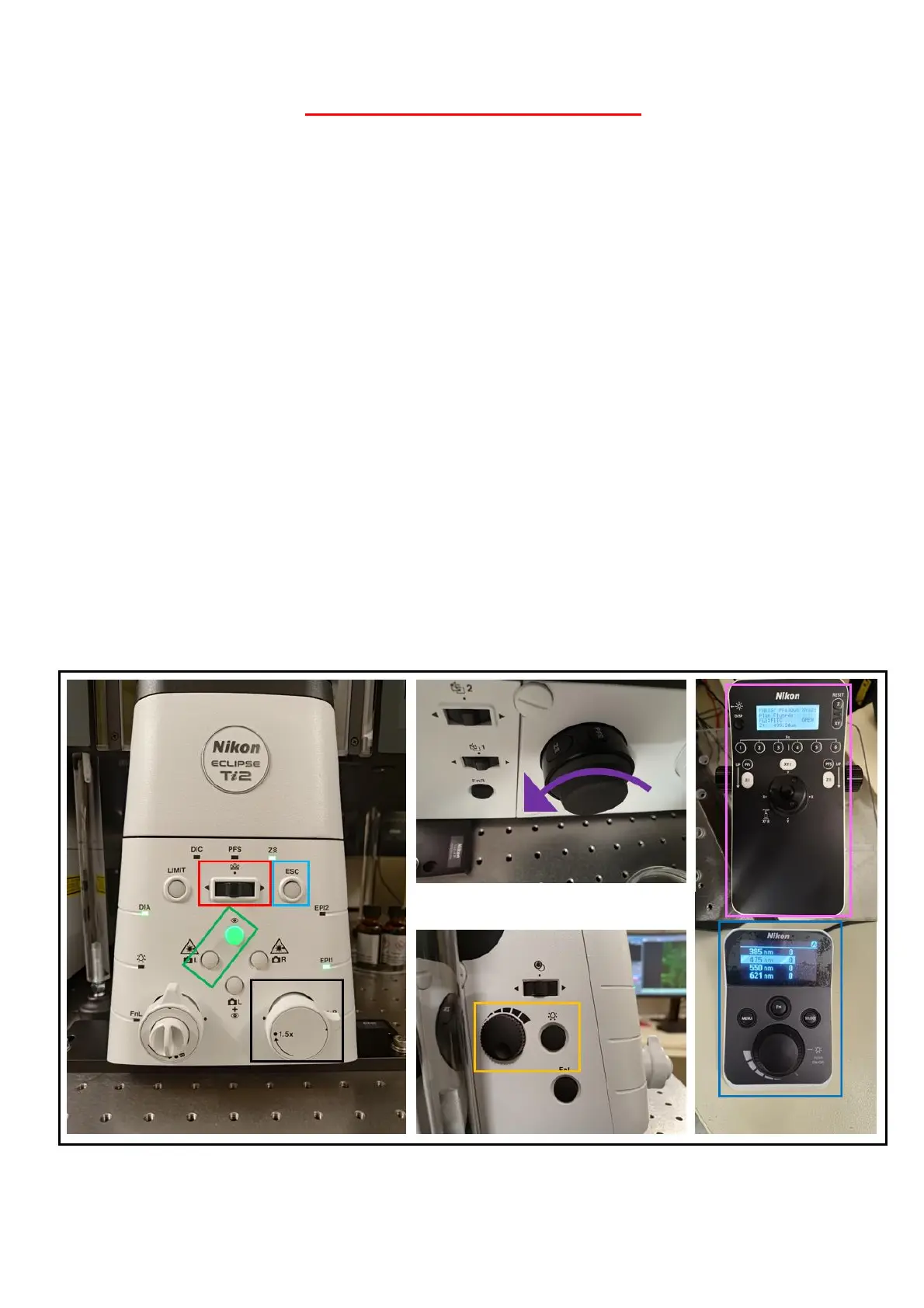
MICROSCOPE FRAME CONTROLS
1- Select the objective
2- ESC allows you to lower the objective. Use it before changing an objective with an
immersion. Then, you can push this button again to upper the objective
3- Choose how you want to observe your sample. Here, green light is on eyepieces
4- Optovar lens up to 1.5x
5- There is no coarse or fine focus. The wheel is affected by the speed. Furthermore, to
raise the objective, turn the wheel towards you
6- The left side of the frame is for the brightfield observation. You can adjust the intensity
of the light
7- Use the joystick for the x and y position. You can adjust the speed by pushing the button
and the joystick (3 differents levels). You can also adjust the speed of the z (3 differents
levels)
8- Use the wheel to adjust the power of led for the eyepiece



 To Next Page