Introduction: Getting to Know the Camera 3
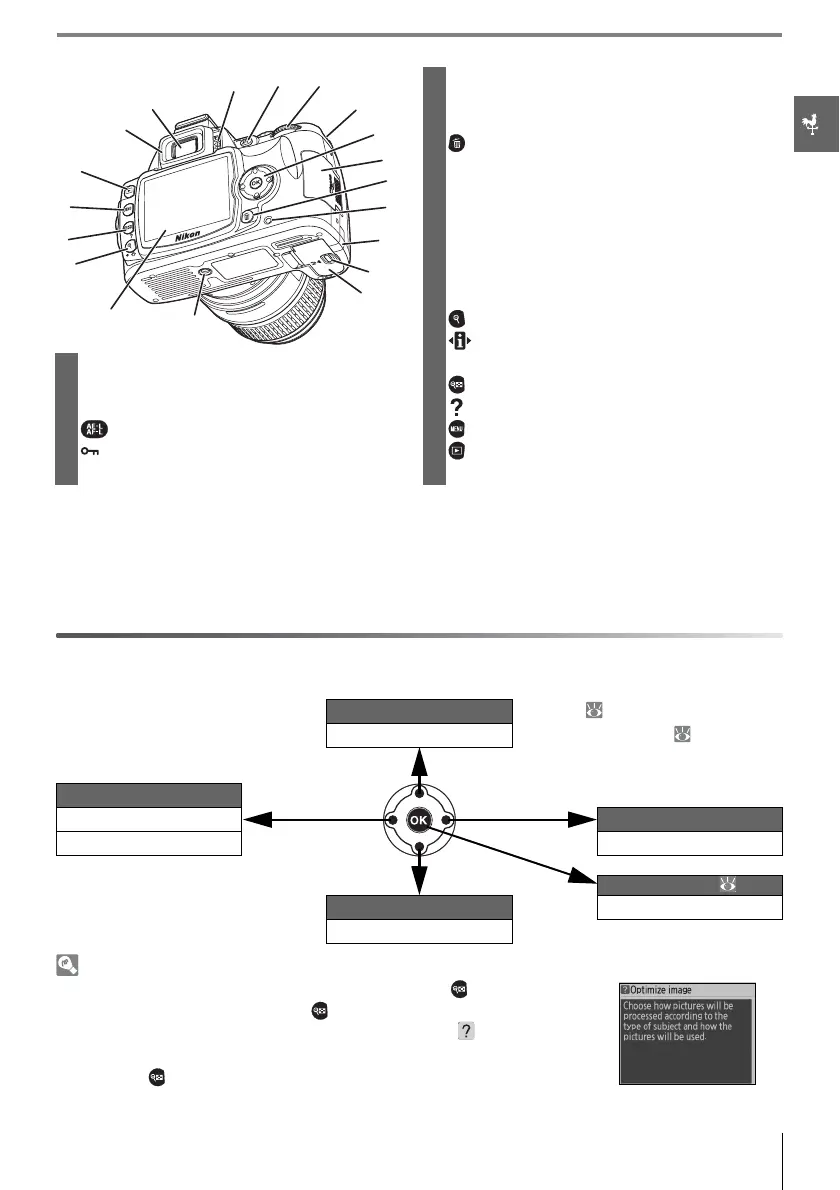
* Multi selector
The multi selector is used for menu navigation and playback.
Help
For help on the current mode or menu item, press the button. Help is
displayed in the monitor while the button is pressed; to scroll the dis-
play, press the multi selector up or down. A blinking icon indicates
that help on an error or other problem can be viewed in the monitor by
pressing the button.
6 Eyelet for camera strap................................................. 7
7 Multi selector
*
8 Memory card slot cover............................................ 12
9 (delete) button..................................................20, 54
10 Memory card access lamp ...................................... 12
11 Power connector cover for optional AC
adapter connector .....................................................103
12 Battery-chamber cover latch................................. 10
13 Battery-chamber cover ...................................10, 103
14 Tripod socket
15 Monitor....................................................................6, 50, 82
16 (playback zoom) button..................................... 53
(setting) button ..................................................... 22
1 DK-16 viewfinder eyepiece cup...............................7 z (reset) button............................................................. 38
2 Viewfinder eyepiece ...............................................5, 14 17 (thumbnail) button................................................ 52
3 Diopter adjustment control ....................................14 (help) button
4 (AE-L/AF-L) button...........................................46, 77 18 (menu) button.......................................................... 63
(protect) button.......................................................54 19 (playback) button............................................20, 50
5 Command dial..............................................................115
View more photo info Playback ( 51)
Move cursor up Menus/shooting info ( 22, 63)
Press up
View previous photo Press right
Return to previous menu
View next photo
Cancel Press left Display sub-menu
Press down
Retouch photo ( 89)
View more photo info Make selection
Move cursor down
씍씍씍
씎씎씎
씌씌씌
씋씋씋
씊씊씊
씉씉씉
씈씈씈
쐉쐉쐉
쐈쐈쐈
쐅쐅쐅



 To Next Page