Reference: More on Photography (All Modes)/Focus 23
Focus
Focus can be adjusted automatically (see “Focus Mode,” below) or manually ( 28). The
user can also select the focus area for automatic or manual focus ( 24, 25) or use focus lock
to focus to recompose photographs after focusing ( 26).
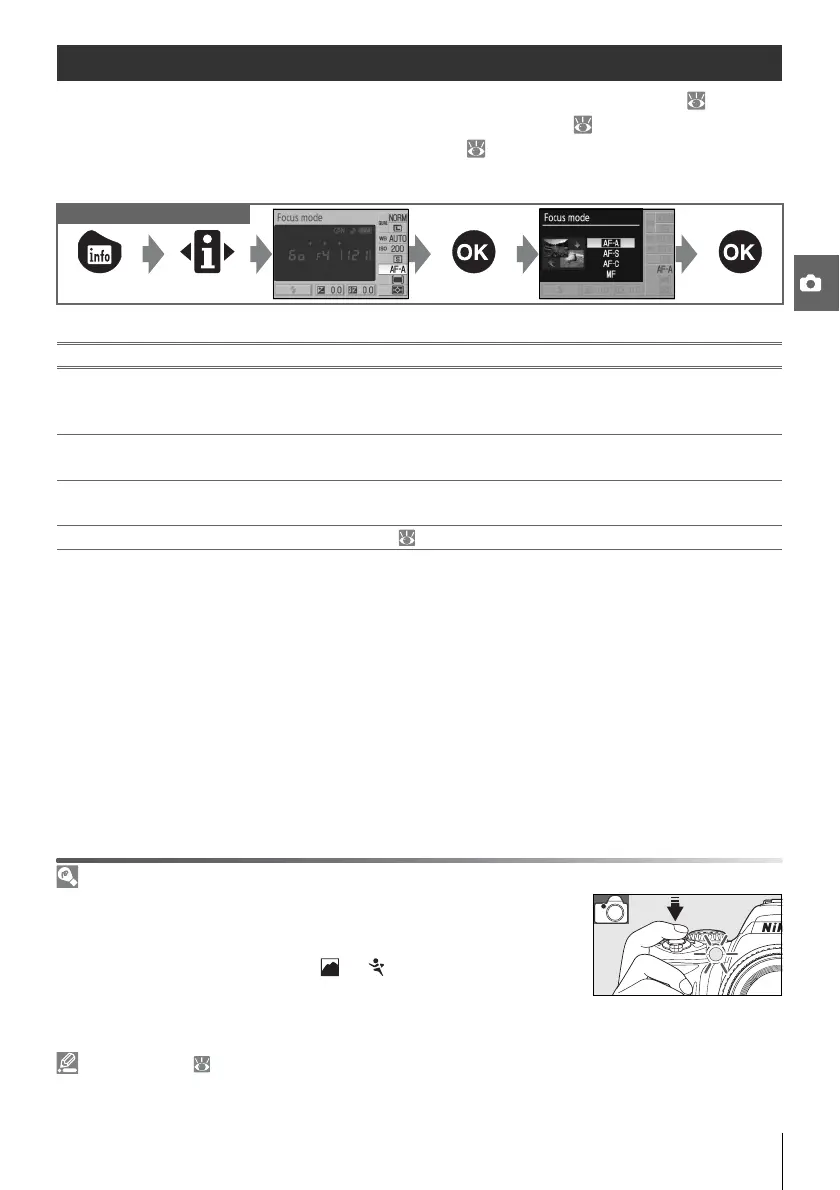
Focus Mode
Choose how the camera focuses. AF-S and AF-C are available only in P, S, A, and M modes.
Controls used
The AF-Assist Illuminator
If the subject is poorly lit, the AF-assist illuminator will light automatically
to assist the autofocus operation when the shutter-release button is
pressed halfway. The AF-assist illuminator will not light in continuous-
servo AF or manual focus mode, in , or modes, or if Off has been
selected for Custom Setting 9 (AF assist). The illuminator has a range of
about 0.5–3.0m (1ft. 8in.–9ft. 10in.); when using the illuminator, use a
lens with a focal length of 24–200mm and remove the lens hood.
2—Focus Mode ( 75)
Focus mode can also be selected from the Custom Settings menu.
Focus mode Description
AF-A
Auto-servo AF
(default setting)
Camera automatically selects single-servo autofocus when subject is judged
to be stationary, continuous-servo autofocus when subject is judged to be
moving. Shutter can be released if camera is able to focus.
AF-S Single-servo AF
For stationary subjects. Focus locks when shutter-release button is pressed
halfway. Shutter can be released if camera is able to focus.
AF-C
Continuous-
servo AF
For moving subjects. Camera focuses continuously while shutter-release but-
ton is pressed halfway. Shutter can be released if camera is able to focus.
MF Manual focus User focuses manually ( 28).



 To Next Page