Reference: More on Photography (All Modes)/Using the Built-in Flash 35
Flash Mode
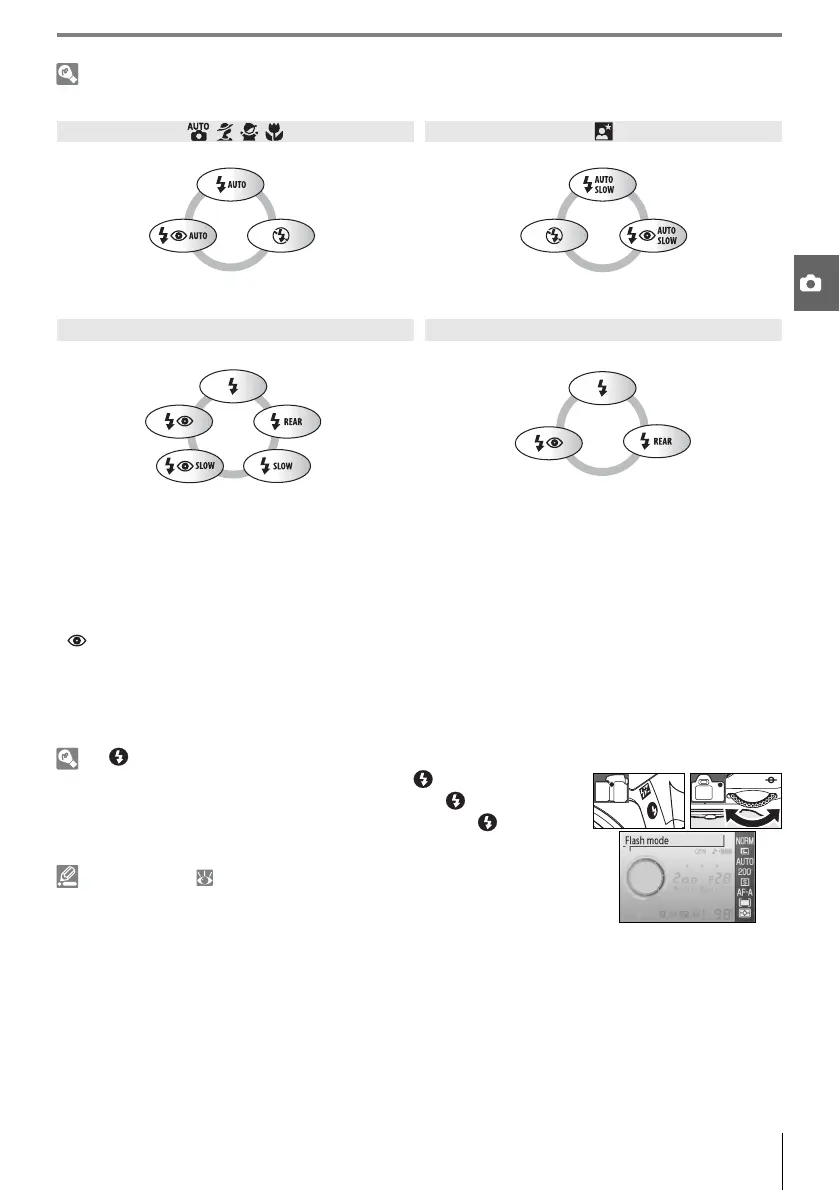
The flash modes available depend on the mode currently selected with the mode dial.
* SLOW is displayed after command dial is released.
Flash modes are described below.
• AUTO (auto flash): When lighting is poor or subject is back lit, flash pops up automatically when shut-
ter-release button is pressed halfway and fires as required.
• (red-eye reduction): Use for portraits. AF-assist lamp lights before flash fires, reducing “red-eye.”
• SLOW (slow sync): Shutter speed slows automatically to capture background lighting at night or
under low light. Use to include background lighting in portraits.
• REAR (rear curtain sync): Flash fires just before shutter closes, creating the effect of a stream of light
behind moving subjects. If this icon is not displayed, flash will fire immediately after shutter opens.
The Button
, , ,
Auto Auto slow sync
Auto+
red-eye
reduction
Off Off
Auto slow
sync+
red-eye
reduction
P, A S, M
Fill flash Fill flash
Red-eye
reduction
Rear-
curtain+
slow
sync
*
Red-eye
reduction
Rear-curtain
sync
Slow sync+
red-eye reduction
Slow sync
Flash mode can also be selected by pressing the button and rotating
the command dial. In P, S, A, and M modes, press the button once to
raise the flash and then select a flash mode by pressing the button and
rotating the command dial.
Custom Settings ( 76, 78)
Use Custom Setting 10 (ISO auto) to adjust sensitivity for optimal flash
output. Custom Setting 14 (Built-in Flash) can be used for manual flash
control.



 To Next Page