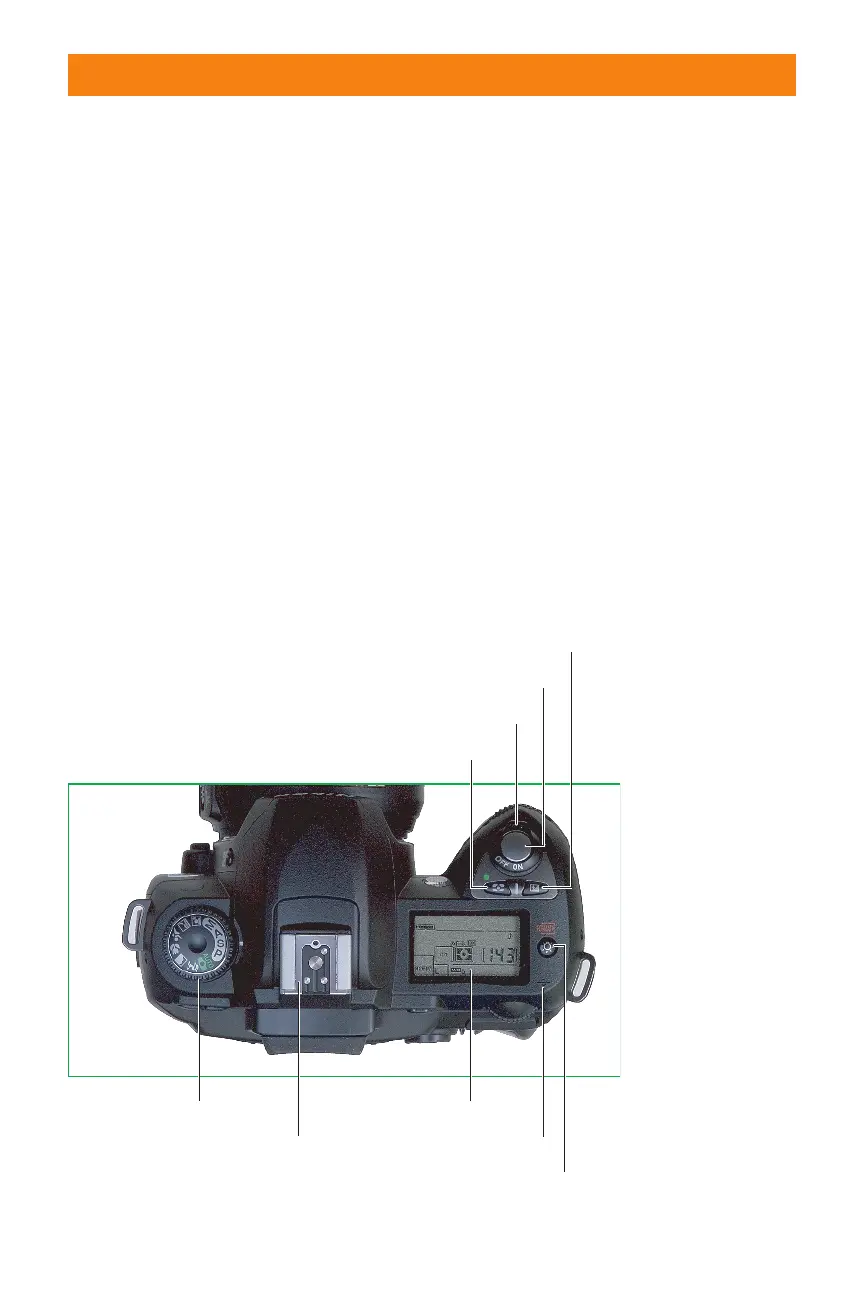
✦ LCD Lamp/Format #1 button:
Press this button to backlight the
control panel for about 8 seconds
when working under illumination
that makes it difficult to view the
panel’s information without a little
help. This button also can be used
to reformat the D70’s digital mem-
ory card, if you hold it down simul-
taneously with the Format #1
button on the back panel
(described in the next section).
✦ Sensor focal plane: Some special-
ized kinds of close-up photography
require knowing exactly where the
plane of the camera sensor is
located. This marker shows that
point, although it represents the
plane, not the actual location of
the sensor itself, which is placed
aft of the lens.
✦ Metering Mode/Reset #1 but-
ton: Press this button while spin-
ning the command dial on the
back of the camera to change from
matrix to center weighted or spot
metering modes (explained later in
this chapter). This button also can
be used to reset the D70’s internal
settings to the original factory set-
tings if held down simultaneously
with the Reset #2 button
(described later in this chapter).
✦ Exposure compensation button:
Hold down this button while spin-
ning the command dial to add or
subtract exposure from the basic
setting calculated by the D70’s
autoexposure system.
22 Part I ✦ Using the Nikon D70
Mode dial
LCD lamp/Format #1
On/Off switch
Shutter release
Exposure compensation
Metering Mode/Reset #1
Sensor focal plane
Monochrome LCD control panel
Flash accessory shoe
1.8 Key components on the top panel of the D70.
06_596780 ch01.qxd 6/16/05 7:20 PM Page 22



 To Next Page