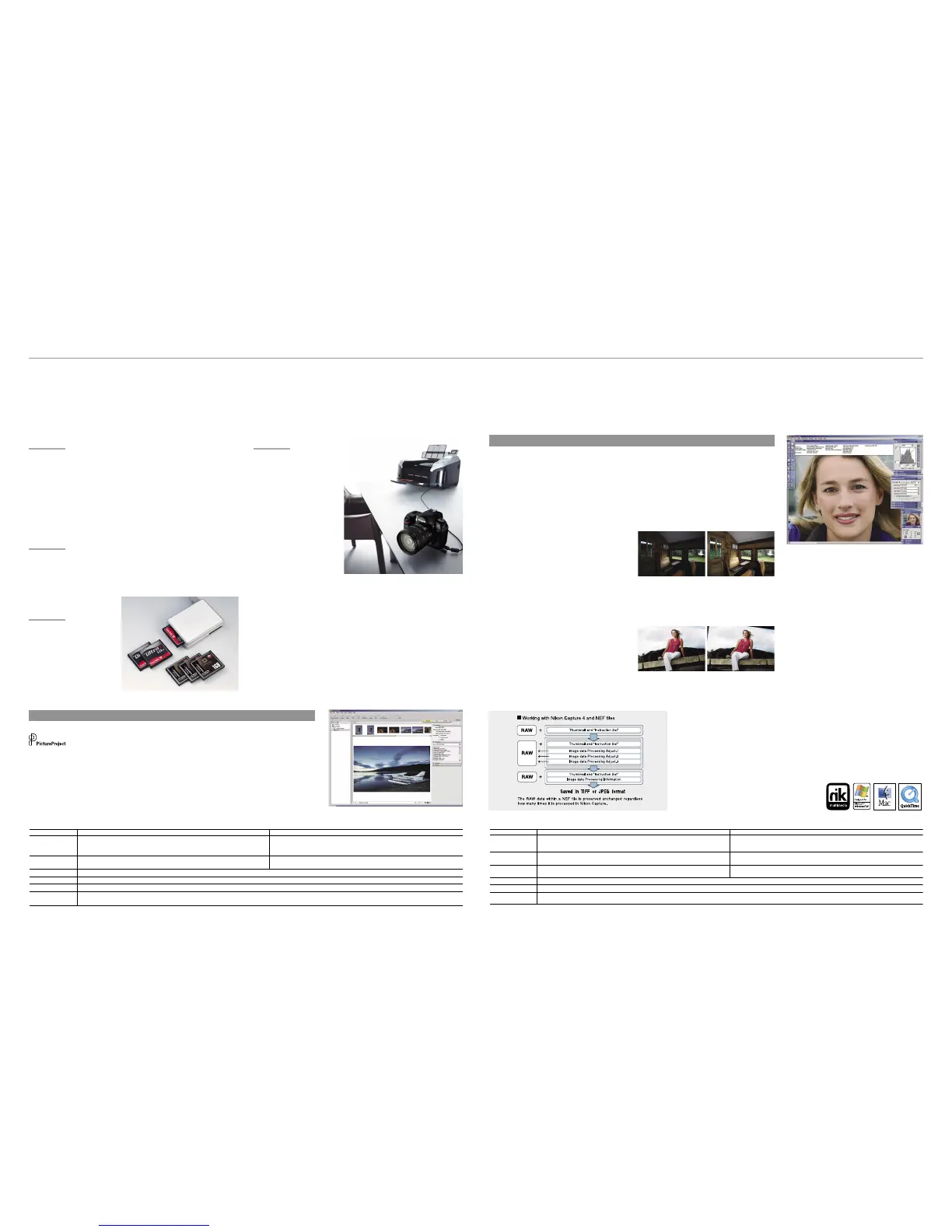
PictBridge support
Printing pictures can be
as simple as connecting
the D70s to any PictBridge
compatible printer via the
supplied USB cable. The
D70s improves PictBridge
s u p p o r t b y a d d i n g
in - c a m e ra page setu p
support for easier printing
and greater control over
the results.
Variety of custom settings
A total of 25 custom settings help personalize the operation of the
D70s to match individual shooting styles, or optimize it for use under
the demands of different shooting conditions. The custom settings
menu is displayed on the LCD monitor in easy-to-understand
fashion, and selections are made using the handy multi selector on
the camera’s back. Help dialogs that describe each setting can also
be displayed with the press of a button.
Simultaneous NEF + JPEG recording
The D70s’s ability to simultaneously save individual NEF (RAW) and
JPEG les for the same image helps optimize workow operations
for varying conditions and needs.
Storage media
(CF Card, Microdrive™)
The D 70s is c ompati ble
with CompactFlash™ cards
and Microdrive™ media of
up to 4GB capacity.
The NEF difference
Nikon Electronic Format (NEF) is a unique le format
consisting of an image’s RAW data, along with an
inst ruction set that provides unpar al leled image
ed iting capabil it y. Wit h NE F, all c orre ctions and
adjustments made are saved in the le’s instruction
set. The original le’s RAW data is never altered,
re gardle ss how many times the ins tru cti on set
is ch anged. Ins truction s ets can also be saved
separ ate ly for all ad jus tme nts o r only s ele cted
parameters, and then later applied to individual les or
to a large number using automated batch processing.
It’s the best of versatile image editing combined with
precious savings in hard disk space.
Nikon Capture 4 processes and displays NEF les
using a full 16 bits per color channel for smoother
delity when making tonal and other color corrections.
Changes can be saved to the NEF le, as a new
Instruction Set, or as a TIFF or JPEG le.
Version 4.2 continues to rene the power, speed and
exibility of Nikon Capture 4. Building on familiar
fea t ures such as Fishey e-to- rect i line a r i m age
transformation, Image Dust Off and batch processing,
a num ber of ne w functions exp and the creativ e
possibilities and improve workow efciency.
•D-Lighting:
adjusts shadows and highlights while maintaining
mid-tones for optimized results that compensate for
underexposure and overexposure.
•Straighten:
rotates a picture to level it on the horizontal or vertical axis
using either a simple dening mouse action, or by directly
entering the amount of rotation to be applied. (±10°)
•Improved color noise reduction — better lters out
color noise for smoother transitions while preventing
resolution loss at higher settings.
•Histogram tool:
displays a histogram that more closely
represents the nal image, and that
can be used to conrm specic ranges
of pixels in the image window.
•Marker:
saves the parameters for each image at
each step during processing, making it
easy to apply distinct nishing touches
when preparing the same image for
different applications.
•Improved Multi Image window:
opens more quickly, and the new scrollable thumbnail
image display is also faster. The interface adds new
features, including simultaneous editing of multiple
les, the ability to undo or redo commands, and le
deletion.
•Photo Effects tool:
ap plies monoc hrome, sepia o r tin t effec ts, and
provides both manual and auto brightness control.
•Plug-in lter support:
all o ws feat u re se t e x pans ion fo r eve n gre ater
capability to enhance and transform images. The
three editions of nik Color Efex Pro 2.0 for Nikon
Capture 4 as well as nik Color Efex Pro 2.0 Express
Edition offer selections of a wide range of lters and
effects packaged to match differing needs.
Remote Camera Control
Nikon Capture Control can control most shooting
setti ngs and t rigger t he D70s’s shut ter r elease
re mot ely from a comp ute r when t he came ra is
connected via the USB interface to a computer with
Nikon Capture 4 installed.
Pi ct urePro ject is rened with an
in tuitive n ew user interfa ce that
ma kes ima ge ma nagem ent, edi ting and sha ring
easier and more fun. Simply connect the camera to
a computer to automatically import pictures. Quickly
e-mail or Auto Enhance images, run slideshows,
burn CD/DVDs*, and access other commonly used
functions via practical buttons. Use drag-and-drop
to organize pictures into separate collections, and
quickly locate any le by name, keyword, or date.
Plug-in lter support offers feature set expansion,
inc lud ing compa tib ilit y w ith the wide range of
lters and effects offered by nik Color Efex Pro 2.0.
And, with support for JPEG, TIFF and NE F les,
PictureProject seamlessly bridges workow with the
powerful feature set of Nikon Capture 4.
PictureProject
Nikon Capture 4 (Ver. 4.2)
Software
Software
Nikon Capture 4 offers a unique image-editing environment and is the only program
that provides complete functionality to edit NEF (Nikon Electronic Format) les,
enabling photographers to optimize output for every possible need.
Versatility that makes digital photography more rewarding
Flexible settings and powerful software enhance shooting and the results
The following C omp actFlas h™ ca rds can b e us ed with the D70s :
• SanDisk Corporation
SD CFB 32/128/ 256/ 512M B/1GB, SDCFB (Type II) 192 /300MB , SDCF2B ( Type II) 256 MB,
SD CFH (Ultra) 128 /256 / 384/ 512MB/1G B, SDC FH (Ultra II) 2 56 /512MB /1GB , SDCF X ( Ex treme)
512GB, SDCF X ( Ex treme III) 1GB/2GB
• Lexar Medi a Co rporation
12X USB ser ies : 64/12 8/ 25 6/ 512, 16X U SB series: 256/ 512/1GB,
16X WA US B series: 128/25 6/512M B,
24X USB series: 25 6/ 512M B, 24X WA USB series : 25 6/ 512M B, 32X WA USB serie s: 1GB,
40X WA U SB seri es: 256/ 512MB/1G B/ 4GB,
80X WA s eries: 512/1G B/ 2G B/ 4GB
• Renes as Techno logy (H itachi)
HB28BxxxC8 x series: 16 / 32MB
• Microdrive™
DSCM -1100 0 (1G B), 3K4- 2 ( 2GB), 3K4 -4 (4GB )
Operation i s not guaranteed wit h cards p roduced by other manufacture rs.
For more detail s on the above cards, please cont act the relevant manu facturer.
* DVD burning requires the optional PictureProject DVD Show.


 To Next Page
 Loading...