Using Nikon View 4 with Windows XP Home Edition / Windows XP Professional (D1 Series)
xp-5
Reinstalling the Device Drivers
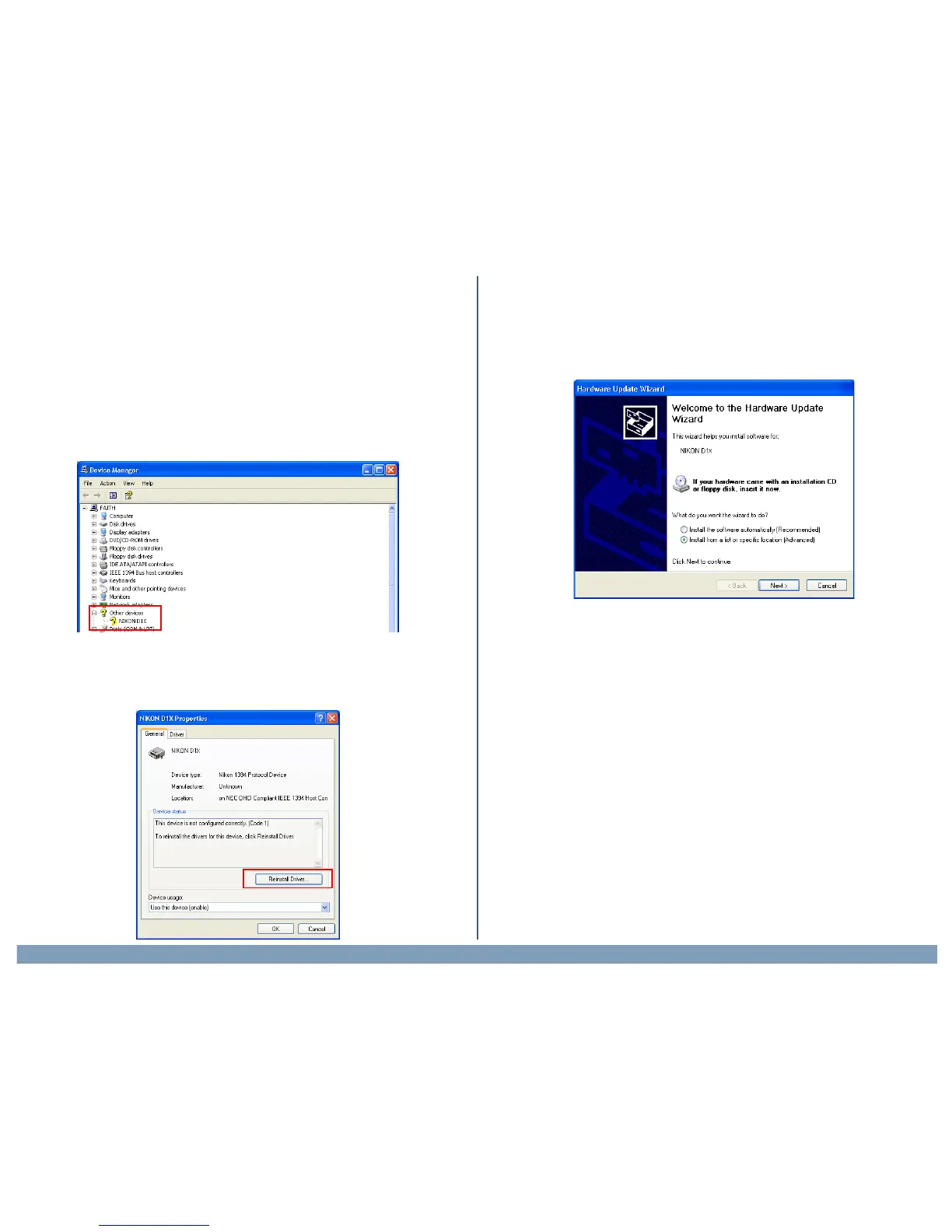
If “Nikon D1(D1X/D1H)” is listed under “Other Devices”, or if the “Found
New Hardware Wizard” failed to appear when you connected the camera
to the computer, follow the steps below to reinstall the camera drivers.
Step 1
Open the Device Manager (as explained in Steps 1-3) anddouble-click the
listing for the “Nikon D1/D1X/D1H” that appears under “Other devices” or
“Miscellaneous Devices.”
Step 2
The Properties window will be displayed. Open the General tab and click
Reinstall Driver.
Step 3
The Windows Update Device Driver Wizard will be displayed. Confirm
that “Install from a list or specific location” is selected and click Next.


 To Next Page
 Loading...