Photographing
6
Photographing
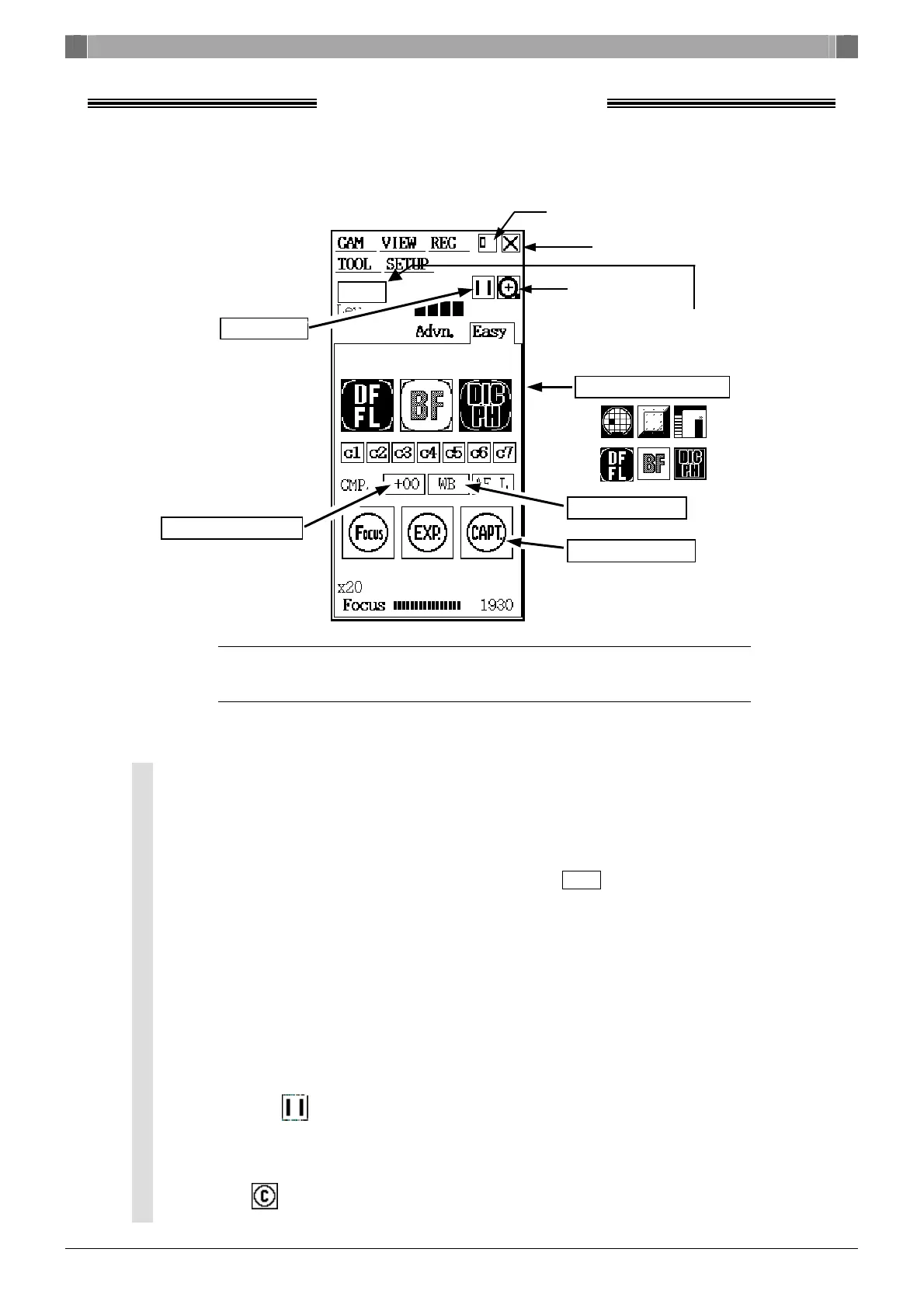
Easy Menu ·························································································
NOTE: Operation in FL mode of the Easy menu Bio is a special case. Refer to “2.1.2 Special
Photography on the Easy Menu–FL Scene Mode” in Chapter VI of the instruction
manual.
Operation procedure ········································································
(1) Scene mode button
Choose the appropriate button according to the subject to be photographed
or the observation method.
(2) White balance
Photograph an evenly white subject and press the WB button to adjust
the white balance.
(3) Focus
Set a sample under the microscope and watch the monitor while you adjust
the focus.
(4) Exposure compensation
Adjust the brightness of the image in the CMP range of –2.0 to +2.0.
(5) Freeze for image confirmation
Press the (freeze button) to confirm the image is being
photographed.
(6) Save image
Press (CAPT. button) to save the image to a CF card.
Closes the menu
Electronic zoom
(5) Freeze
Alters the menu size
(4) Corrects exposure
(1) Scene mode buttons
(2) White balance
(6) Saves an image
Cooled” is displayed DS-5Mc or DS-2MBWc
is connected.
Cooled





 To Next Page