I LCD panel
Viewfinder
Shutter Cause and Remedy
I
Blinking Symbol Blinking Symbol
•
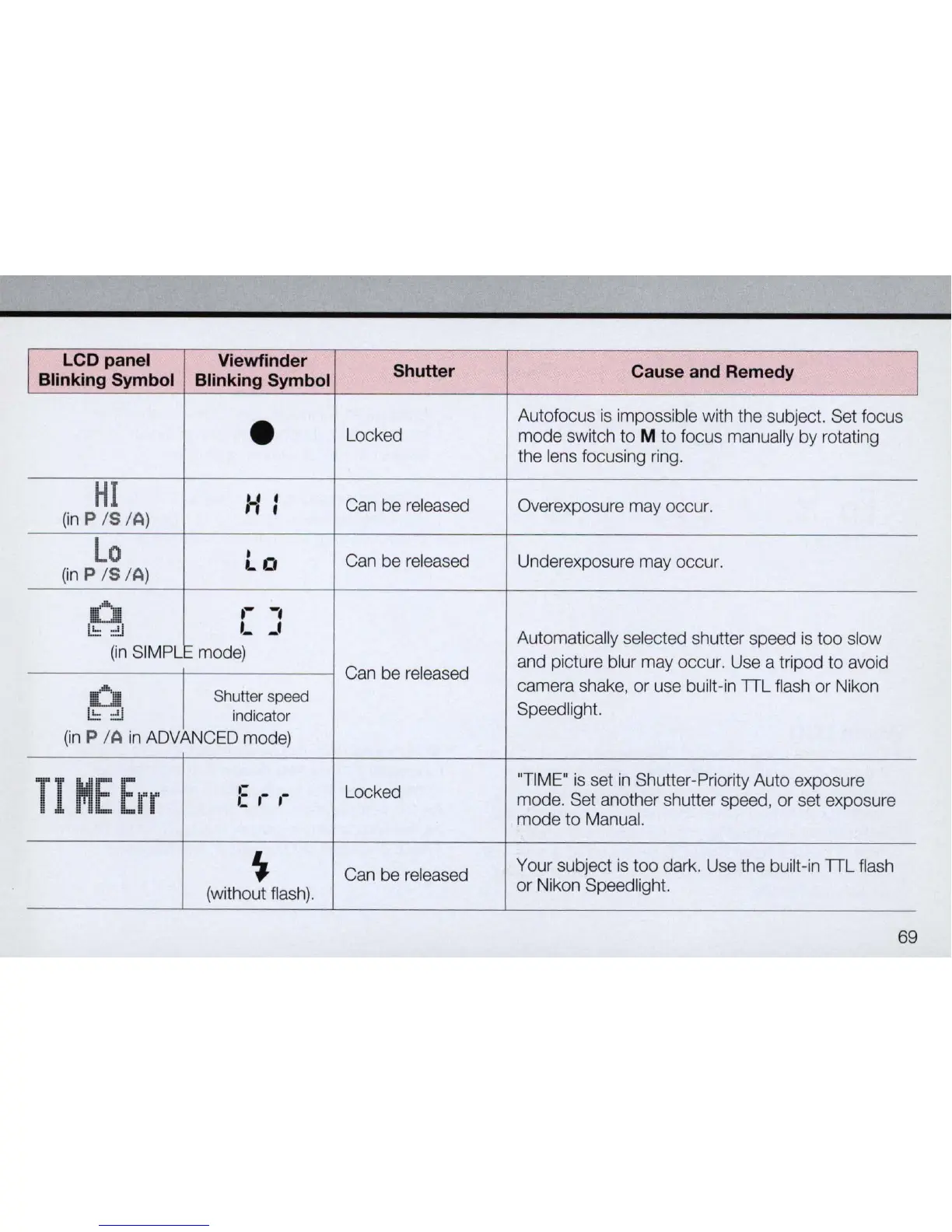
Autofocus
is
impossible with the subject. Set focus
Locked
mode switch
to
M to focus manually by rotating
the lens focusing ring.
HI
H:
Can be released
Overexposure may occur.
(in
P IS I
A)
Lo
Lo
Can be released
Underexposure may occur.
(in
P IS I
A)
U
.-
-,
I.!:::::!.I
,-
-'
Automatically selected shutter speed
is
too slow
(in
SIMPL mode)
and picture blur may occur. Use a tripod to avoid
Can be released
camera shake, or use built-in TTL flash
or
Nikon
U
Shutter
speed
I.!:::::!.I
indicator
Speed light.
(in
P IA
in
ADVANCED mode)
TI
ME
Err
,-
Locked
"T
IME"
is
set
in
Shutter-Priority Auto exposure
C ,-
,-
mode. Set another shutter speed,
or
set exposure
mode
to
Manual.
~
Can be released
Your subject
is
too dark. Use the built-in TTL flash
(without flash).
or
Nikon Speedlight.
69



 To Next Page