EasyManua.ls Logo

Nikon MB-D14 - Battery Level Display and Management; EN-EL15 Battery Status; AA Battery Status and Type Configuration; Accessing Battery Information Menu

Nikon MB-D14
17 pages
Print Icon
To Next Page IconTo Next Page
To Previous Page IconTo Previous Page
Loading...
II
B!
.
!!
.
~
.
rxl.~vel
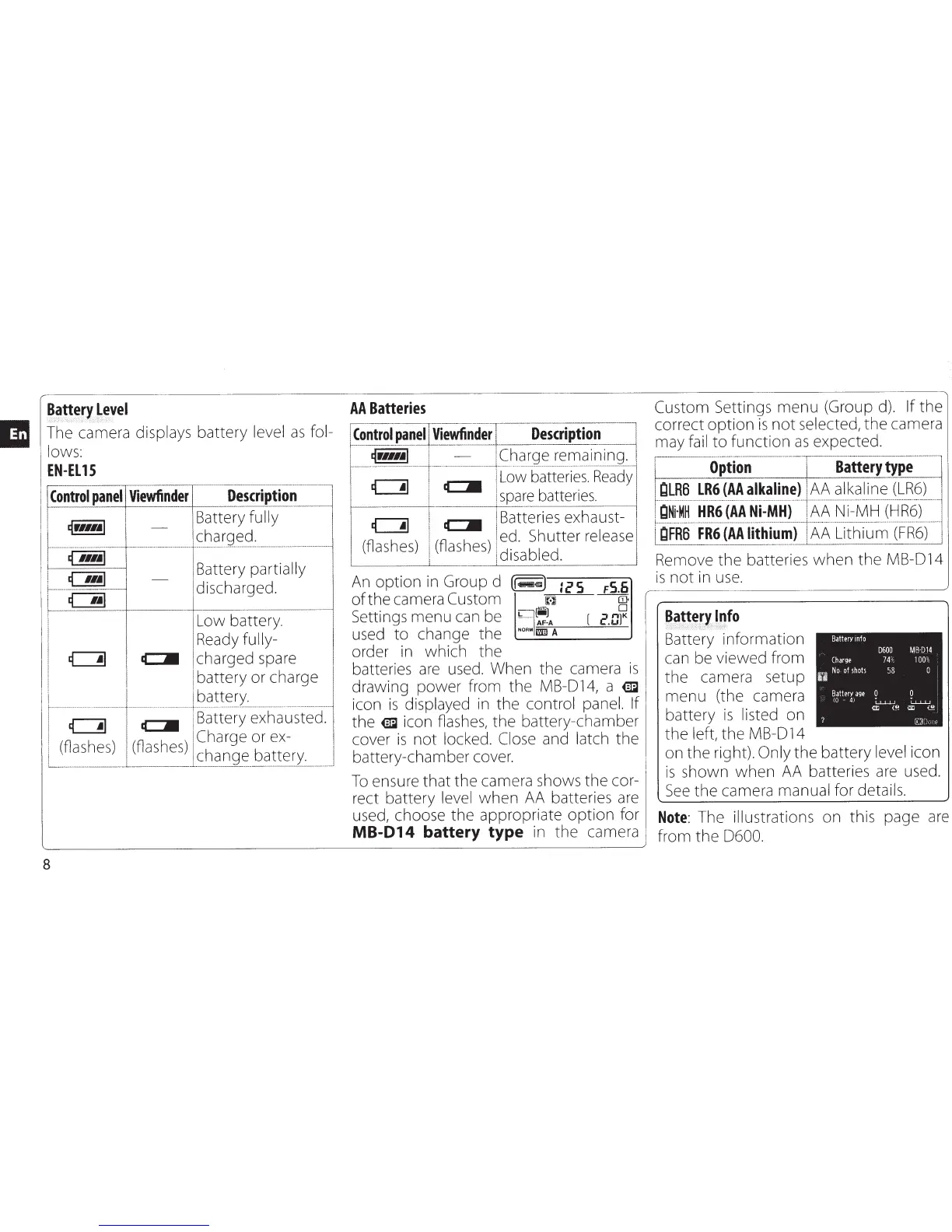
The camera displays
battery
level
as
fol-
lows:
EN-EL
15
~
---
-,----
---··--
--
-----~···-·
·--
~~~
panel
Viewfinder
Description
I
.r.=t
Battery
fully
!
-t!!!!!J
-
1
1
...
..
.
....
...
..
...
..
..........
...
......
...
.
.
S.
..
h?T9~
.
?.
.
:
.....
..
..
.
...
.......
. .
.
~
.
i
~
Battery partially
;
~
d' h d
f-----···
········-
·--··--·--
-
ISC
a rge .
l_~
I
Low battery.
Ready
fully-
c::!]
c::JIII
charged spare
battery
or
charge
.
···-
· .
....
~
.
?!!~Ex
~....
. . .
..
.
.......
.
-··-·
·
··
· .
c::!1
c::JIII
Battery exhausted.
1
(flashes) (flashes)
Charge
or ex-
I
'--
-···············-··---
--·-·
-·-·L
·-·-------
---··
s
_
~?__n
g
~--~
.
9
..
!!~!1
___
____
__
...1
8
AA
Batteries
Con
-
tr
-.
~~
--
pa-n~!~!'-!!~~~
~-=---
D
-_
.!scrip-t~-~
~~-
-
l
~r111~l
1
-
!Charge rema1nmg.l
-··-·
-··-···--···-
··--·---·---r
·
-··
···
-····------··---+··
········
··
······-····
··········
·······-·-··
··
····
·-··
·················-···-·
·-·······
·-·-'
c::!1
I
c::JIII
i
Low batteries.
Ready
i
I
spare
batteries.
·---+-
c::!]
I
c::JIII
I
Batteries
e
x
haus~-
(fl
h
)
1
(fl h )
I
ed. Shutter
rei
ea
.
se
as
es
!
as
es
!
d. bl
d
~
1
1sa
e .
An
option
in Group d
(!~~)
:cs
F5.6
of
the
camera
Custom
~
---m;
Settings
menu
can be
~lQ~;J
[
=-
1
K
AF-A
t:
.U
used
to
change
the
.__NO_R"_m_=
A
___
----J
order in
which
the
batteries
are
used. When
the
camera
is
drawing
power
from
the
MB-014, a
€m
icon
is
displayed in
the
control panel. If
the
€m
icon flashes,
the
battery-chamber
cover
is
not
locked. Close
and
latch
the
battery-chamber cover.
To
ensure
that
the
camera shows
the
cor-
rect battery
level
when
AA batteries are
used, choose
the
appropriate
option
for
MB-014
battery type
in
the
camera
Custom
Settings
menu
(Group d).
If
the
correct
option
is
not
selected,
the
camera
may fail
to
function
as
expected.
r
---·-
-
---··-·-··-··-
-·--
·-
·
··----··--·············-··T------······--···-·---···---
.
~--·
-··----·
1 _
Option
_
1
B~ttery
type
)
LR6
t·
······
······
·········
········
·········
···
··········
········
············j···· ·················· ············· ···············
···
··
········
I
QNi·MH
HR6
(AA
Ni-MH)
I
AA
Ni-MH
(HR6)
LgF
-R·a·
F:~~
--
(A
·
A
-
Iith:i~-~I
=l
l\l\
-
~(_ifh
·
i
·
u-m
..
(FR6S
·-·····
,
Remove
the
batteries
when
the
MB-014
is
not
in use.
B~!t
_
ery
.
l~fo
,
.....•
,c
.....
,.
_·
Battery
information
can be viewed
from
the
camera setup
menu
(the camera
battery
is
listed
on
the
left,
the
MB-014
Battery
info
Charge
0
No
of
shots
Battm
age
(0
-
4i
0
0600
74%
58
L.L.LLJ
a;
(!!
MB
-01
4
100%
0
0
l....u...u
a;
{!!
r.::n}!•('
on
the
right). Only
the
battery
level
icon
is
shown
when
AA batteries are used.
See
the
camera manual for details.
Note:
The illustrations
on
this page are
from
the
0600.

Related product manuals