10
Basic Shooting and Playback Operations
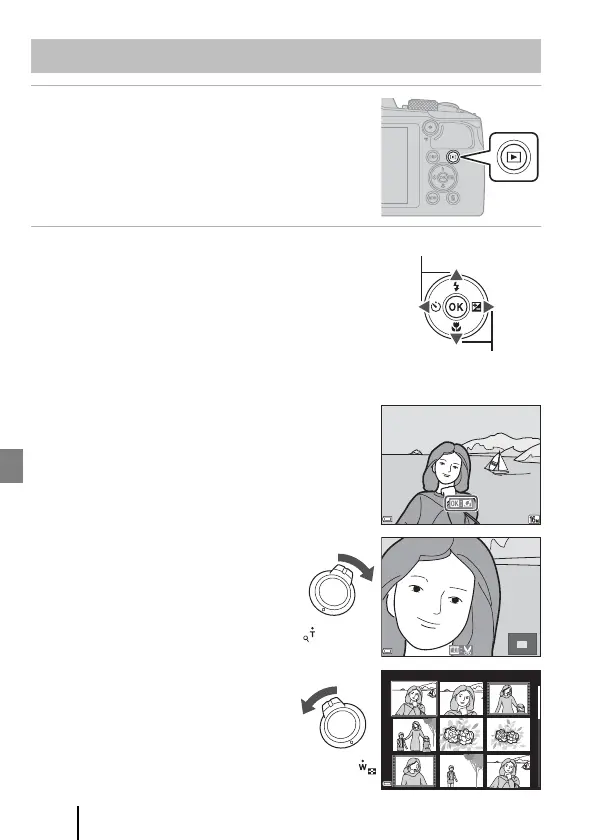
1 Press the c (playback) button to enter
playback mode.
• If you press and hold down the c button while
the camera is turned off, the camera turns on in
playback mode.
2 Use the multi selector to select an
image to display.
• Press and hold down HIJK to scroll through
the images quickly.
• Press the s (display) button to switch the
information displayed on the screen each time.
• To play back a recorded movie, press the k button.
• To return to shooting mode, press the c button
or shutter-release button.
• When e is displayed in full-frame playback
mode, you can press the k button to apply an
effect to the image.
• Move the zoom control toward g (i)
in full-frame playback mode to zoom
in on an image.
• In full-frame playback mode, move
the zoom control toward f (h) to
switch to thumbnail playback mode
and display multiple images on the
screen.
Playing Back Images
Display the previous image
Display the next image
4/4
1 5 / 1 1 / 20 1 9 1 5: 3 0
15/11/2019 15:30
0004. JPG
x 3.0
1/20



 To Next Page