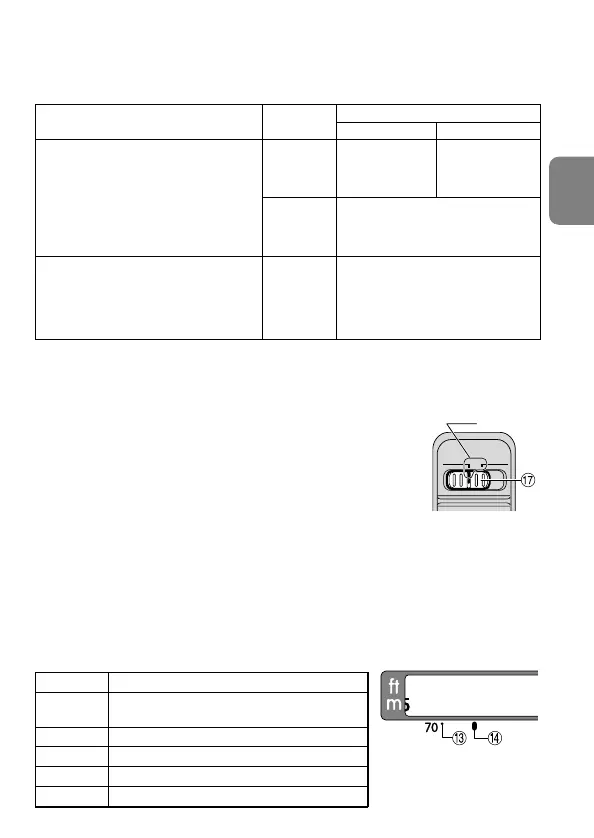
Lens’ focus mode
Cameras
MM/A
Camera’s
focus mode
Nikon digital SLR (Nikon FX/DX format)
cameras, F6, F5, F4-Series, F100,
F90X/N90s*, F90-Series/N90*,
F80-Series/N80-Series*, F75-Series/
N75-Series*, F70-Series/N70*,
F65-Series/N65-Series*,
Pronea 600i/6i*, Pronea S
F55-Series/N55-Series*,
F60-Series/N60*, F50-Series/N50*,
F-801s/N8008s*, F-801/N8008*,
F-601
M/N6000*, F-401x/N5005*,
F-401s/ N4004s*, F-401/N4004*
AF
(C/S)
MF
AF
(C/S)
MF
Manual focus
(Focus assist is available,
except with the F-601
M/N6000*.)
Autofocus with
manual priority
Manual focus
(Focus assist
is available.)
Manual focus
(Focus assist is available.)
* Sold exclusively in the USA.
17
En
2. Focusing
Set your camera’s focus mode selector according to this chart.
■ Autofocus with manual override (M/A mode)
1 Set the Focus mode switch ) to [M/A].
Note: Be sure to set the switch so that the indicator aligns with
[M/A] precisely.
2 Autofocus is provided, but you can manually override the focus
by operating the separate Focus ring 8 while lightly depressing
the shutter release button or the AF start (AF-ON) button on the
camera.
3 To cancel manual override, again lightly depress the shutter
release button or the AF start button on the camera. This will return the camera to
autofocus mode.
■ Infrared compensation
With infrared film, manual compensation must be made to the focused distance. First,
focus manually on the subject. Rotate the focus ring 8 to realign the distance scale
referring to the table below. Attach a red (R60) filter for infrared photography, and
then shoot.
Compensation from distance index line %
70 mm Shift the distance scale to the infrared
compensation index $. (3.9 mm)
100 mm 1.6 mm
135 mm 0.7 mm
200 mm 0.2 mm
300 mm 0 mm (No compensation is necessary)
Focal length
M/A
M
Indicator





 To Next Page