EasyManua.ls Logo

Niles SW10 - Rear Panel Signal & Power Controls

Niles SW10
24 pages
Print Icon
To Next Page IconTo Next Page
To Previous Page IconTo Previous Page
Loading...


    

       
       
     











 






       
 

 
  



























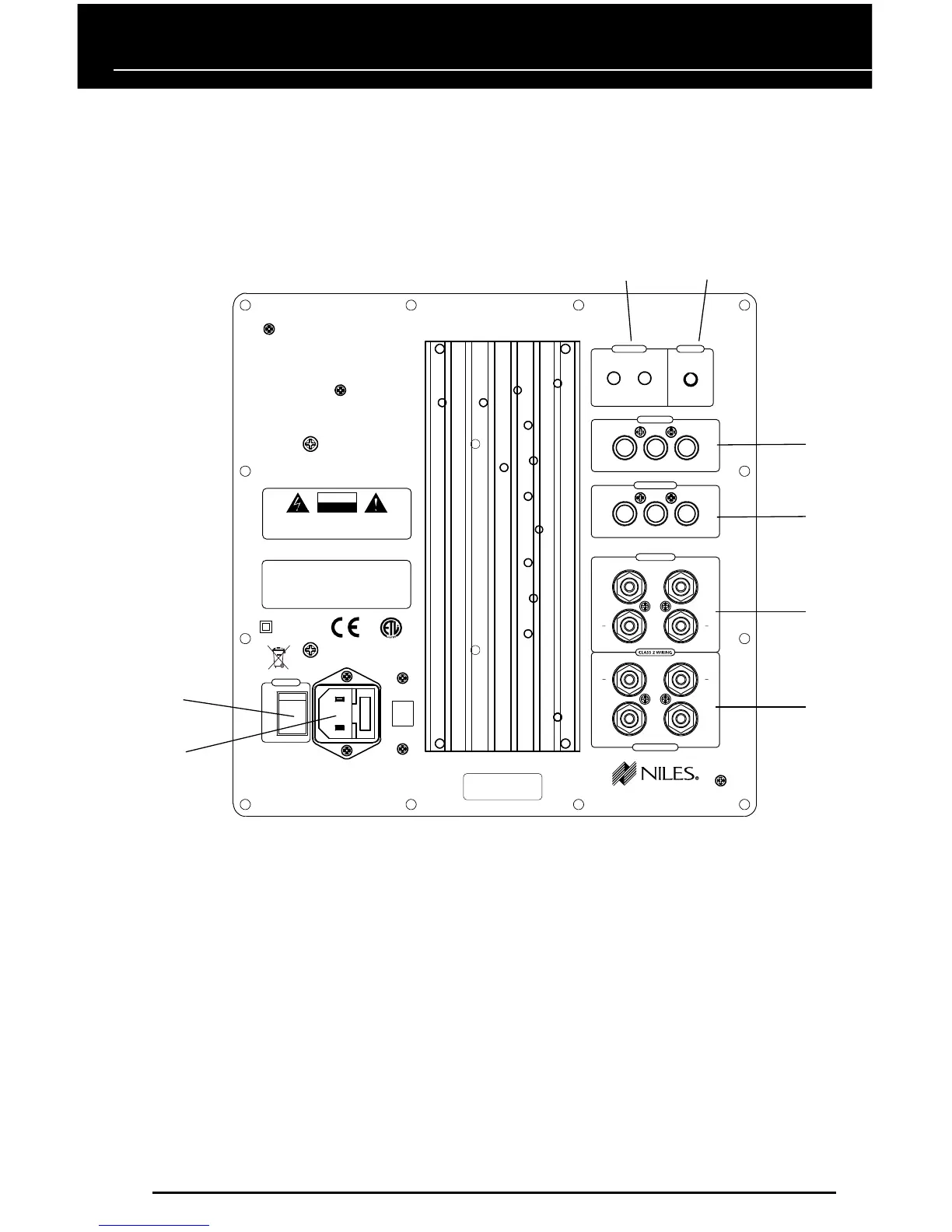
Figure 2. The SW12’s rear panel contains the subwoofer’s signal connectors
and power controls. (SW12 Shown - SW10 similar)
8
SIGNAL CONNECTORS AND POWER CONTROLS
The SW10 and SW12’s signal connectors and power controls are located on the unit’s rear panel,
as shown in Figure 2. They function as follows:
NOTE: SEE APPLICATIONS STARTING ON PAGE 10 FOR DETAILED WIRING CONNECTIONS FOR
YOUR APPLICATION.
1. TRIGGER: For external power triggering, use a mini (3.5 mm) mono plug to connect the
IN jack to a power on/off trigger signal from a home theater surround sound processor
or other voltage. Power on is 3 to 30 Vdc (or Vac). Power off is 0 Vdc (or Vac). Use the
OUT jack to pass the TRIGGER signal (at the same voltage level of the trigger input) to
another SW10 and SW12 or other equipment in your system. THIS JACK SHOULD NOT
BE USED TO POWER OTHER EQUIPMENT.
NOTE: FOR A SYSTEM NOT EQUIPPED WITH A POWER TRIGGER OUTPUT, CONSIDER USING A NILES
12-VOLT POWER SUPPLY (FG01035) AS A TRIGGER SIGNAL THAT IS ACTIVATED VIA A SWITCHED AC
OUTLET ON THE RECEIVER. SEE FIGURE 6 ON PAGE 13 FOR CONNECTION DETAILS.
7
2
8
1
3
4
5
6