4.Download and Install APP:
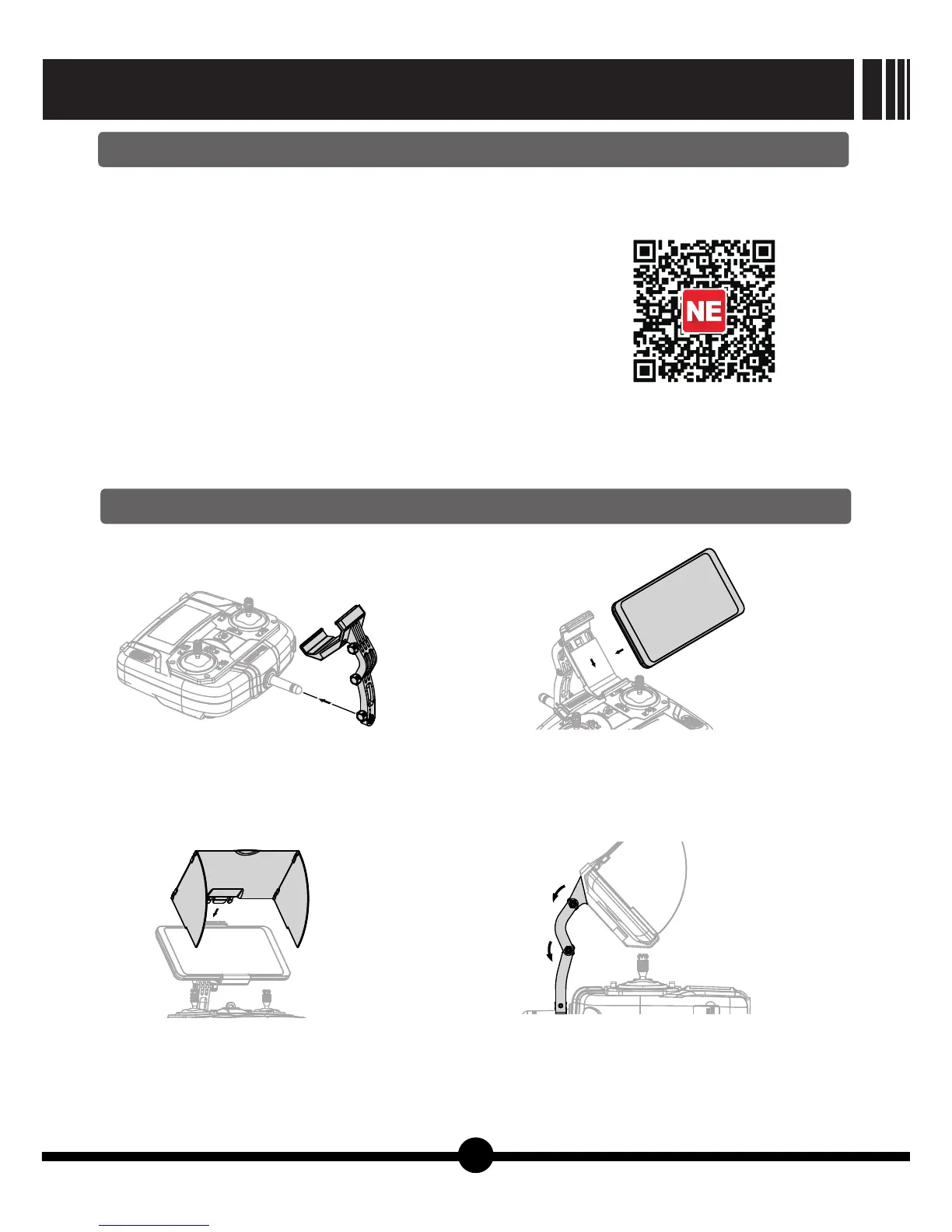
5.Smart phone holder installation and usage
1) Download and install APP:
Attention: Please check the latest APP version on www.nineeagle.com or you may update the APP
inside About page.
Optional ways to download
Use your mobile devices (Android operating system) to visit :
http://www.nineeagle.com/product/product_download.aspx?id=50
Visit Apple Store or Google Play by searching “nineeagle” to download.
Scan two-dimension code.
After download APP, please install it.
2) Find APP manual:
Please find the manual in “manual” section of User Center or visit www.nineeagle.com
3) Teaching Video
Please find the “video” section of User Center or visit www.nineeagle.com
Our product contains the smart phone holder, please follow the instruction to install.
a.Fix smart phone holder to the
transmitter and tighten the screws.
b.Put smart phone in the middle of holder
and ensure mobile phone firmly fixed.
c.Fix the screen hood to the holder slot
and unfold the hood.
d.Adjust the holder to get the best visual
direction.
【Picture14】
【Picture16】
【Picture15】
【Picture17】
8
GALAXY VISITOR 7
NE-MASF25


 To Next Page