4. OPERATING
YOUR
NES
•
TO
START
PLAY
1
.
Turn your television on
to
Channel
3.
Note: If Channel 3 is broadcasting in
your
area and interfering with the game,
set the switch on the back
of the Control Decic
to
Channel
4.
2.
If your
TV
has an automatic fine
tuning control (AFC}, turn it
off.
{Use the
manual fine tune dial to adjust the picture after
inserting the game
pak
as
described below.)
Note: If
you
have a
color
TV
that turns black
and white
when the
AFC is
turned off, leave the AFC on.
3. Make sure
that
the power switch on the Control Deck is off.
CAUTION
!! ALWAYS
MAKE SURE
THAT
THE
POWER
SWITCH ON
THE
CONTROL
DECK
IS
OFF BEFORE
INSERTING
OR
REMOVING A GAME PAK
I!
4,
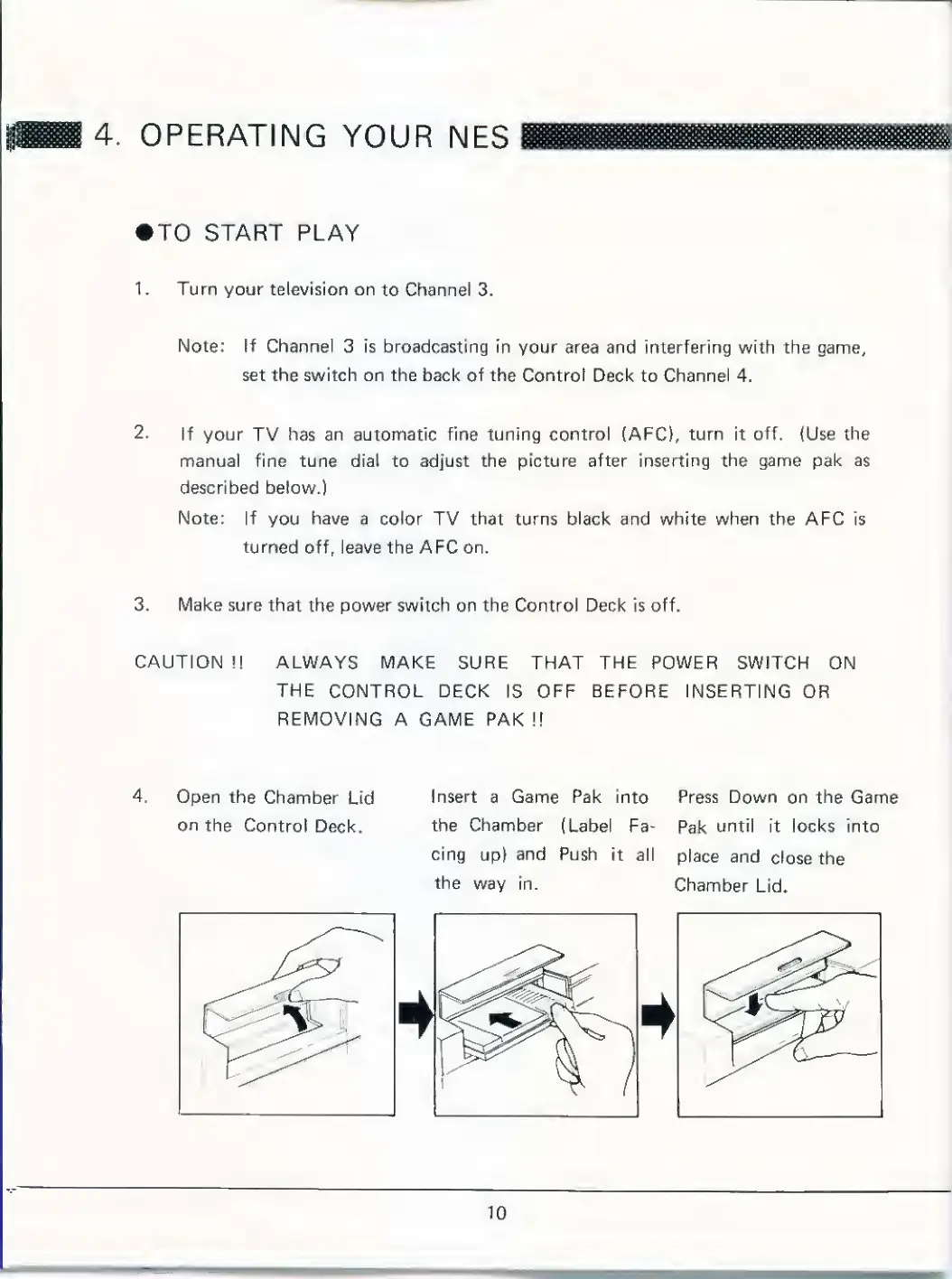
Open the
Chamber
Lid
on the
Control
Deck.
Insert a Game Pak into Press
Down on the
Game
the
Chamber
{Label Fa-
Pak
until it
locks
into
cing
up}
and
Push
it all
place
and
close
the
the
way in.
Chamber
Lid.



 To Next Page