EasyManua.ls Logo

Nintendo Entertainment System CONTROL DECK - Connecting the NES

Default Icon
34 pages
Print Icon
To Next Page IconTo Next Page
To Previous Page IconTo Previous Page
Loading...
2.
CONNECTING
THE
NES
CONTROL
DECK
TO
YOUR
TV
SET
There
are
two
alternative
methods of connecting the NES Control Deck to your TV
set, depending
upon your
type of TV;
EITHER:
(1)
Using the Audio/Video Cable;
OR:
(2)
Using the RF
Switch and Converters.
First,
compare
your
TV
with the
following illustrations
(1),
(2)
(i) and
(2)
(iij to
determine
which method
you should
use,
(1)
or
(2).
If
you
have
a VCR connected
to
your TV, see Page
7.
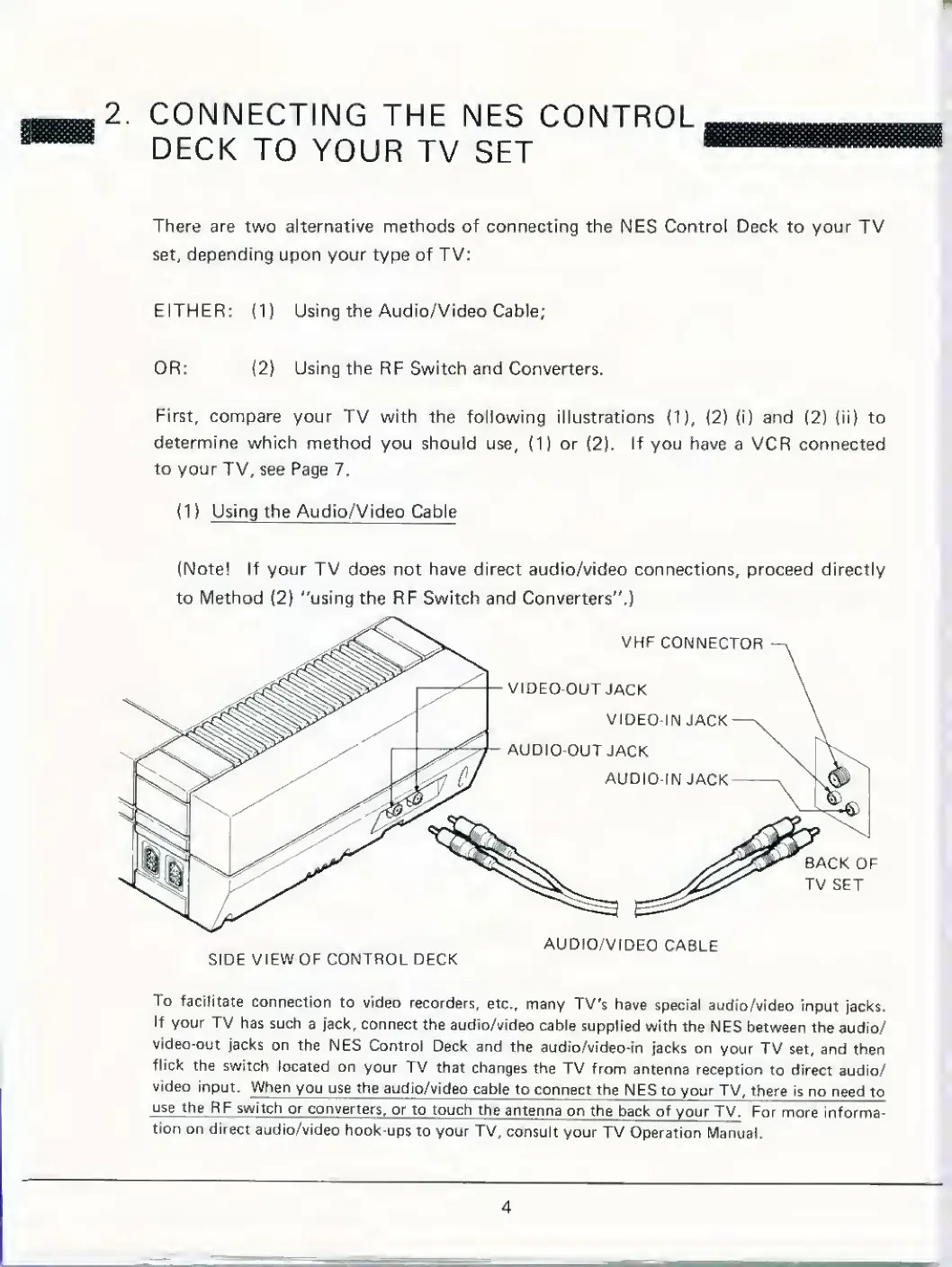
(1)
Using the Audio/Video Cable
(Notel If your TV does not have direct audio/video connections, proceed directly
to Method
(2}
"using the RF Switch and Converters".)
VHP
CONNECTOR
VIDEO-OUT
JACK
VIDEO-IN
JACK
AUDIO-OUT
JACK
AUDIO-IN
JACK
BACK
OF
TV
SET
SIDE VIEW
OF CONTROL DECK
AUDIO/VIDEO
CABLE
To facilitate
connection
to video
recorders,
etc.,
many TV's
have
special
audio/video
input
jacks.
If
your TV
has such
a jack, connect
the
audio/video
cable supplied
with the
NES
between the
audio/
video-out
jacks on the
NES Control
Deck and the
audio/video-in
jacks on
your
TV set, and
then
flick the switch
located on
your TV that
changes
the
TV
from
antenna reception
to direct
audio/
video
input. When
you use the
audio/video
cable
to
connect the
NES to your TV,
there
is no
need
to
use the
RF switch
or
converters,
or to touch
the
antenna
on the
back of
your
TV. For more
informa-
tion
on direct
audio/video
hook-ups
to
your TV,
consult
your TV
Operation
Manual.
4

Related product manuals