Pull cover
straight out of
connector hook.
Lever
Continued next page
Connector hook
Connector cover
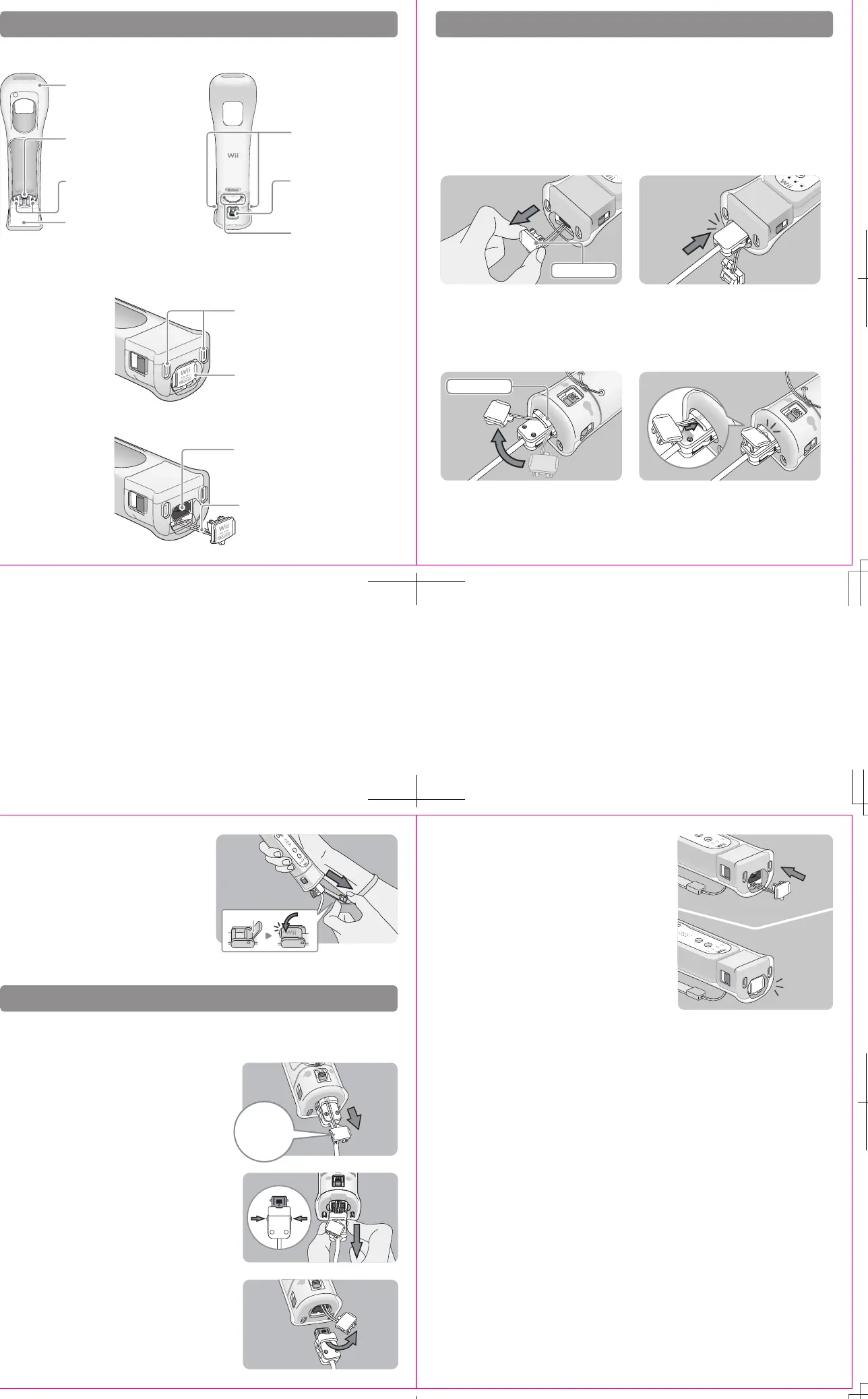
Components
Attaching Wii accessories
Jacket
NOTE: The Power Button on the Wii
Remote can be pressed through the
jacket.
Wii MotionPlus connector plug
Plugs into the External Extension Connector
on the bottom of the Wii Remote.
Lock Release buttons
Press when attaching or removing
Wii MotionPlus from the Wii Remote.
Lock Switch
Slide towards the top of the Wii
Remote to lock Wii MotionPlus
into place.
Jacket slots
Tabs on the bottom of the sensor unit fit into these
slots.
Bottom view
Connector cover attached
Bottom view
Connector cover removed
Connector cover
Protects the External Extension Connector on the
bottom of Wii MotionPlus
External Extension Connector
For connecting accessories such as the Nunchuk and
Wii Classic Controller.
Connector cover cord
Insert this cord into the Connector Hook on the plug
of the accessory being plugged into the connector.
Wrist Strap slot
Pass the wrist strap through when
installing Wii MotionPlus onto the
Wii Remote.
Lock fingers
Insert into the holes on the bottom of
the Wii Remote.
Sensor unit
Front view Back view
The Nunchuk, Classic Controller, or other accessories that connect to the External Extension Connector,
can be used while Wii MotionPlus is attached to the Wii Remote. Follow these procedures to connect
these accessories to Wii MotionPlus.
1. Remove the connector cover from the
Rbottom of Wii MotionPlus.
Grasp the cover by the sides as shown.
5. Place your hand through the wrist strap and
adjust the strap lock so that the strap will not
fall off your wrist. Do not over tighten the strap
lock so that it’s uncomfortable. It should just be
tight enough to hold the wrist strap in place.
Close the lever (if your strap lock has one) until
it clicks to hold the strap lock in place.
Removing Wii accessories
Follow these procedures to remove the Nunchuk, Classic Controller, or other accessories that you have
connected to Wii MotionPlus.
1. Remove the connector cover from the accessory
connector plug.
Be sure to pull the connector cover straight out of
the connector hook to prevent damage to the tab
on the edge of the cover.
2. Press the lock release levers on the sides of the
accessory connector plug and pull the plug
straight out of the connector.
3. Remove the connector cover cord from the
accessory plug’s connector hook.
4.
Insert the connector cover into the External Extension
Connector on the bottom of Wii MotionPlus.
5
3
4
2
2. Insert the connector plug into the External
Extension Connector on the bottom of Wii
MotionPlus until it clicks into place.
3. Pass the Connector Cover cord through the
connector hook on the back of the connector.
4. Insert the tab on the edge of the connector
cover into the connector hook. Press the
connector cover firmly into place on the
connector plug.





 To Next Page