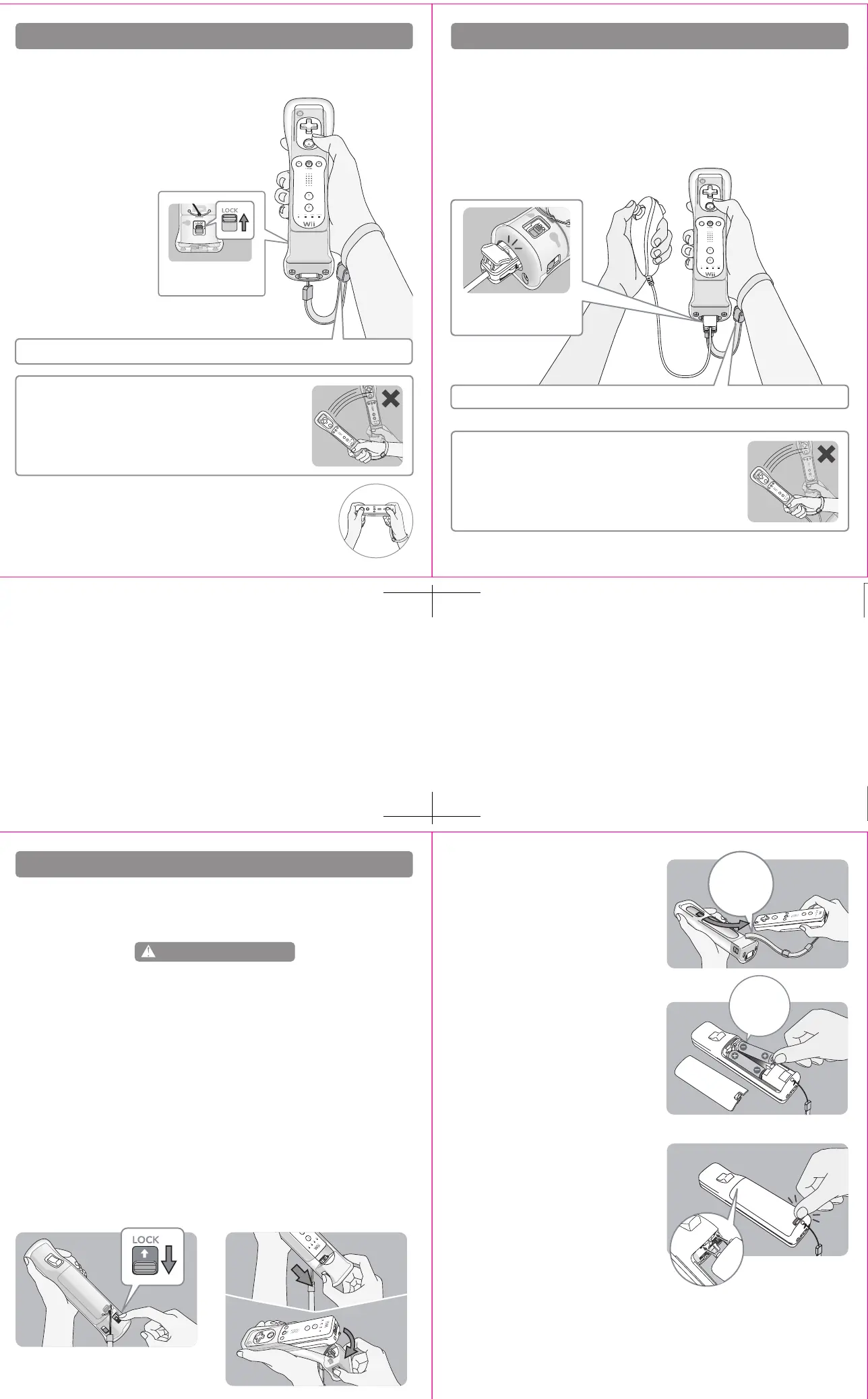
Lock switch in lock
position
Carefully
remove the
wrist strap.
Insert the
negative (–)
end first.
Connector cover locked
in place
Tips on using Wii MotionPlus with the Nunchuk™
• Grip the Wii Remote and Nunchuk firmly and use the wrist strap to prevent losing your
grip on the remote and causing damage to the remote or surrounding objects, or injury
to other people.
• Make sure the connector cover cord is fed through the connector hook and that the
connector cover is securely locked in place by inserting the tab into the connector hook.
Replacing the batteries in the Wii Remote
3. Remove the Wii Remote from the jacket.
Carefully pull the wrist strap through the wrist
strap slot.
4. Remove the battery cover and the old batteries,
pulling the positive (+) end out first. Insert the
new batteries, inserting the negative (–) end first.
5. Replace the battery cover, making sure the two
clips on the end are correctly inserted into the
Wii Remote, pushing until it clicks firmly in
place.
6. Reinstall Wii MotionPlus onto the Wii Remote. Review the separate Wii MotionPlus Installation
Guide included with this product for instructions.
Leakage of battery fluid can cause personal injury as well as damage to your remote. If battery leakage
occurs, thoroughly wash the affected skin and clothes. Keep battery fluid away from your eyes and
mouth. Leaking batteries may make popping sounds.
To avoid battery leakage:
• Do not mix used and new batteries (replace all batteries at the same time).
• Do not mix different brands of batteries.
• Nintendo recommends alkaline batteries. Do not use Lithium ion, nickel cadmium (nicad), or
carbon zinc batteries.
• Do not leave batteries in the Wii Remote for long periods of non-use.
• Do not recharge alkaline or non-rechargeable batteries.
•
Do not put the batteries in backwards. Make sure that the positive (+) and negative (-) ends are facing in
the correct directions. Insert the negative end first. When removing batteries, remove the positive end first.
• Do not use damaged, deformed or leaking batteries.
• Do not dispose of batteries in a fire.
The Wii Remote uses AA batteries. Nintendo recommends high quality alkaline batteries for best
performance and longevity of battery life. If you use rechargeable nickel metal hydride (NiMH)
batteries, be sure to follow the manufacturer’s guidelines for safety and proper usage.
WARNING - Battery Leakage
9
7
8
6
Tips on using Wii MotionPlus
•
Grip the Wii Remote firmly and use the wrist strap to prevent losing your grip on the remote
and causing damage to the remote or surrounding objects, or injury to other people.
• Make sure the lock switch is in the lock position
before using the remote with Wii MotionPlus
attached.
When using the Wii Remote in the horizontal position, you can remove
Wii MotionPlus if it is difficult to press the 1 and 2 Buttons.
IMPORTANT: Do not hold or swing the Wii Remote
by the Wii MotionPlus accessory.
Hold the Wii Remote securely and do no let go of it.
Make sure all players use the wrist strap and that the strap lock is correctly tightened.
Make sure all players use the wrist strap and that the strap lock is correctly tightened.
1. Unlock Wii MotionPlus by pushing the lock
switch downwards.
2. Pull the sensor unit out of the Wii Remote
while holding down the lock release buttons.
Swing thesensor unit down and away from
the base of the Wii Remote.
IMPORTANT: Do not hold or swing the Wii Remote
by the Wii MotionPlus accessory.
Hold the Wii Remote securely and do no let go of it.



 To Next Page
 Loading...