18
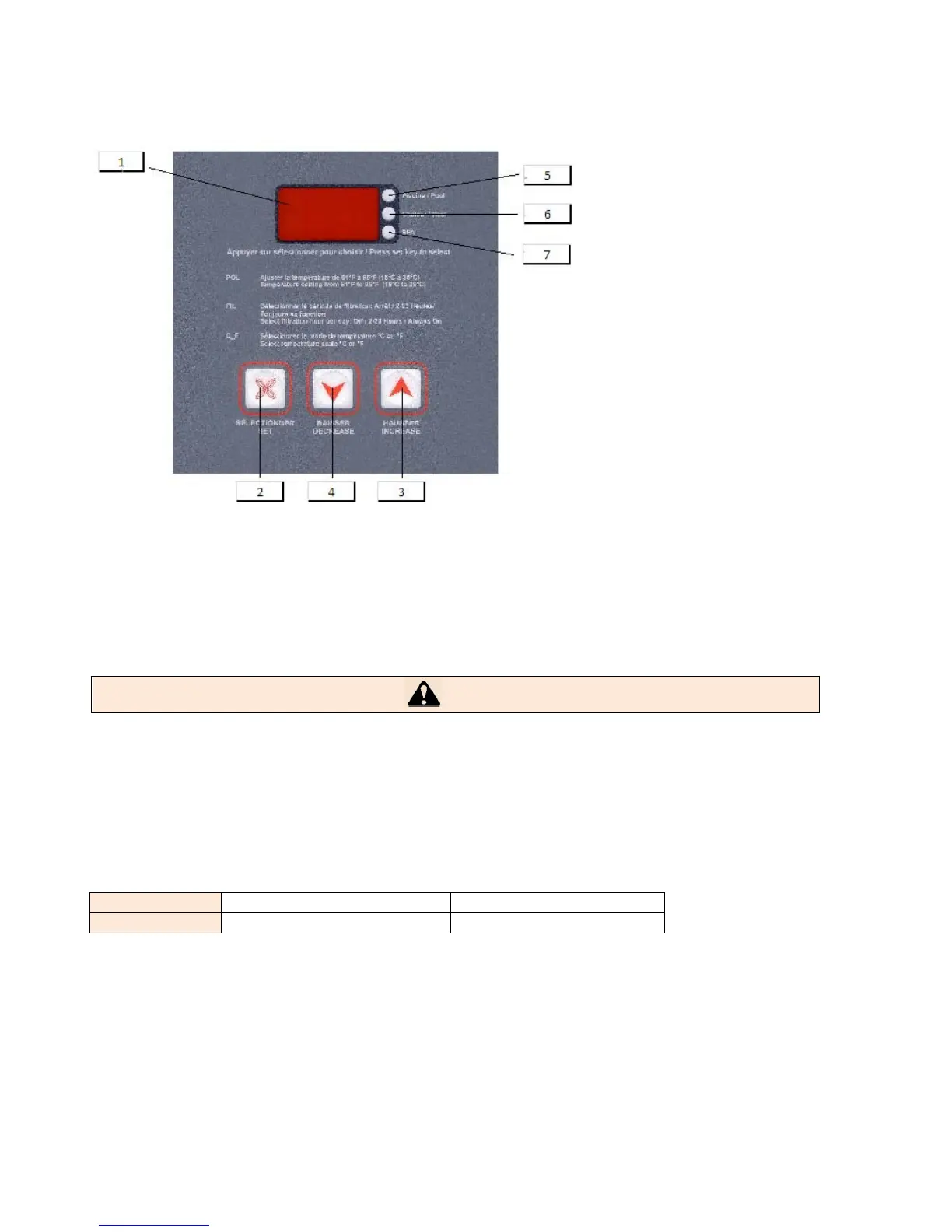
9.2 FRONTPANELDESCRIPTION(C‐SERIES)
1 Displaysthecurrenttemperatureofthewater.
2 Button'SET'whichisusedtomovethroughmenus
3 Button‘INCREASE’whichisusedtoincreasethetemperatureofwater
4 Button`DECREASE'whichisusedtodecreasethetemperatureofwater
5 TheyellowlightmeansweareinthePOOLmode
6
7
MeansweareinHEATINGmode
Meansthecompressorisrunning
WARNING
Thepumpwillgoonandthenthecurrentwatertemperaturewillbedisplayed.
Thecurrenttemperaturedisplayediskeptinmemoryanddisplayedfor5minutesuntilthewatertemperaturesensor
hassampledthecirculatingwater.After5minutes,thewatertemperatureisautomaticallyupdatedanddisplayed.
ADJUSTINGDESIREDTEMPERATURE(B,C&E‐SERIES)
Settings:
Pool OFF,61°Fà95°F OFF,16°Cà35°C
SPAoption OFF,61°Fà104°F OFF,16°Cà40°C
ThecontrolisshippedsettoOFFinPOOLandSPAmode.(option)
Theheatpumpstopsautomaticallyifasettingbelow61°F/16°Cisselected.
InOFFmode,thecontrolwilldisplaythewatertemperature.
UsetheSETkeytoselectPOOLorSPAmode.
Usethe↑keytoincreasethedesiredsettingtoabove61°F/16°C.
Theheatpumpcompressoroperatesautomaticallyifasettingabove61°F/16°Cisselected.
Adjustthesettingstothedesiredvalue.



 To Next Page