[ Edit: 2016/ 11/ 24 Model: E12-A ]
CD eject button:
GUID-11F97BB9-9503-47D0-8BB9-62C812293875
When the button is pushed while a CD loaded,
the CD will be ejected.
If the CD comes out and is not removed, it will be
pulled back into the slot to protect it.
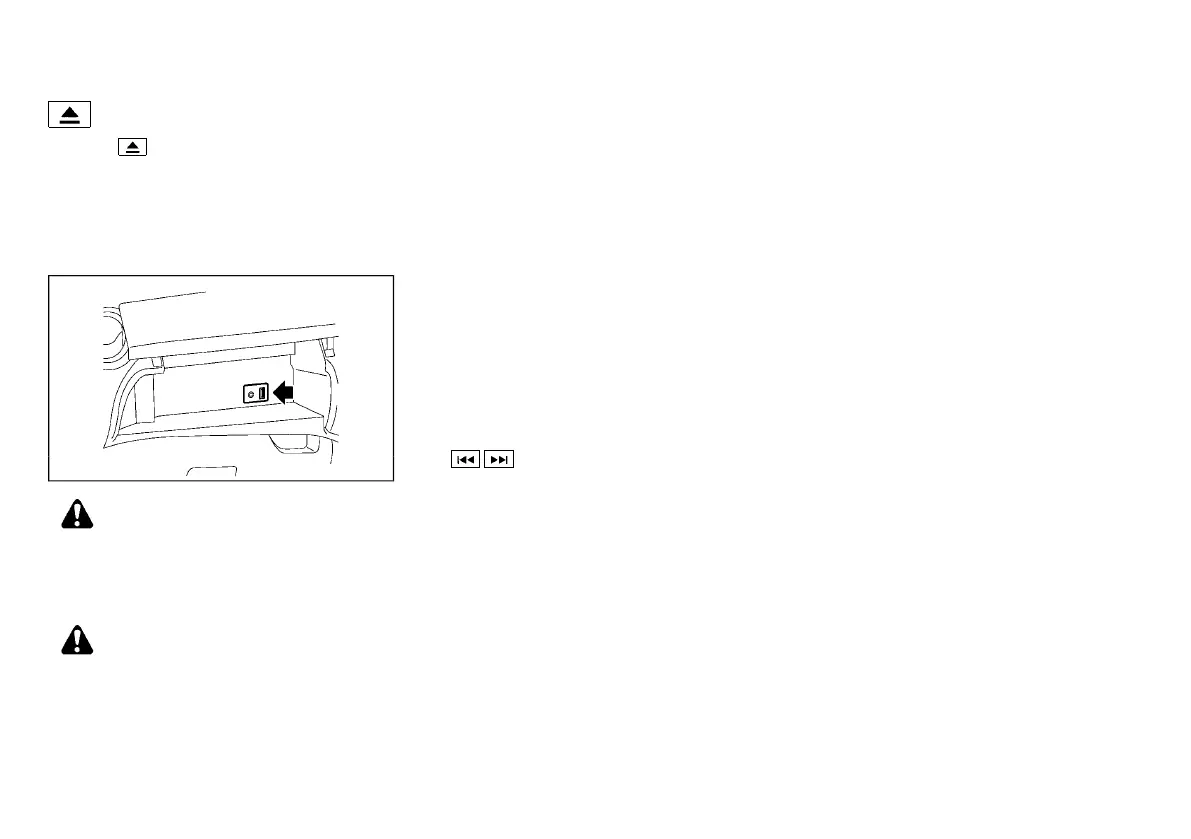
USB (Universal Serial Bus) Connection Port
GUID-4113BD54-48D0-4074-83F7-5903715342CB
USB main operation:
GUID-11F97BB9-9503-47D0-8BB9-62C812293875
JVH1536X
WARNING:
Do not connect, disconnect or operate the USB
device while driving. Doing so can be a distrac-
tion. If distracted you could lose control of your
vehicle and cause an accident or serious injury.
CAUTION:
. Do not force the USB device into the USB
connection port. Inserting a USB device
tilted or upside-down into the port may
damage the port. Make sure that the USB
device is connected correctly to the USB
connection port.
. Do not leave a USB cable in a place where it
can be pulled unintentionally. Pulling the
cable may damage the port.
Refer to your device manufacturer’s owner information
regarding the proper use and care of the device.
The USB connection port is located inside the upper
instrument box. Connect a USB memory device into
the connection port. When the audio system operates
the system will switch to the USB memory device
mode automatically.
If the system has been turned off while the USB
memory device was playing, pushing the ENTER/
SETTING button will start the USB memory device.
The following operations are identical to the audio main
operation of the Compact Disc (CD) operation. For
details, see “CD player operation” (P.4-22).
.
. RDM (Random play)
. RPT (Repeat track)
iPod player operation
GUID-3FBCE19F-DBA1-4D6E-8E83-0AA5B6758AF4
Connecting iPod:
GUID-11F97BB9-9503-47D0-8BB9-62C812293875
The USB connection port is located inside the upper
instrument box. Connect the iPod with a USB
connection port using a cable. See “USB (Universal
Serial Bus) Connection Port” (P.4-23). The battery of
the iPod is charged while the cable is connected to the
vehicle.
Depending on the version of the iPod, the display on
the iPod shows a NISSAN or Accessory Attached
screen when the connection is completed. When the
iPod is connected to the vehicle, the iPod music library
can only be operated by the vehicle audio controls.
* iPod and iPhone are a trademark of Apple Inc.,
registered in the U.S. and other countries.
Refer to your device manufacturer’s owner information
regarding the proper use and care of the device.
Compatibility:
GUID-11F97BB9-9503-47D0-8BB9-62C812293875
The following models are compatible:
. iPod nano 1G (Firmware version 1.3.1 -)
. iPod nano 2G (Firmware version 1.1.3 -)
. iPod nano 3G (Firmware version 1.0.0 -)
. iPod nano 4G (Firmware version 1.0.2 -)
. iPod nano 5G (Firmware version 1.0.1 -)
. iPod nano 6G (Firmware version 1.0 -)
. iPod nano 7G (Firmware version 1.0.0 -)
. iPod 5G (Firmware version 1.2.1 -)
. iPod classic (Firmware version 1.0.0 -)
. iPod Touch (iOS 1.1 -)
. iPod Touch 2G (iOS 2.1.1 -)
. iPod Touch 3G (iOS 3.1 -)
. iPod Touch 4G (iOS 4.1 -)
. iPod Touch 5G (iOS 6.0.0 -)
. iPhone (iOS 1.0.0 - 2.2.1)
. iPhone 3G (iOS 2.1 -)
. iPhone 3GS (iOS 3.0 -)
. iPhone 4/4S (iOS 4.0 -)
. iPhone 5 (iOS 6.0.0 -)
. iPhone 6/6 Plus (iOS 8.0 -)
. iPhone 6s/6s Plus (iOS 9.0 -)
. iPhone 7/7 Plus (iOS 10.0.1 -)
Operations attributable to firmware update by Apple
are not guaranteed.
Monitor, Heater and air conditioner, and audio system 4-23
Condition:


 To Next Page
 Loading...