[ Edit: 2016/ 11/ 24 Model: E12-A ]
. When the AUX contacts the plug of the
connector cable, noise may be heard.
. The connected external device cannot be
operated with the main audio system. The
volume and sound quality can be adjusted.
. The song title in the external device cannot
be displayed on the audio display.
. For the power source of the external device,
use the special battery. The external device
cannot be charged with the AUX terminal.
Noise may be heard if the CD, radio etc. is
operated while charging the battery with the
power socket of the vehicle.
CD/USB MEMORY CARE AND CLEANING
GUID-E3E33586-3F70-46DB-8E40-51AA9D8252D2
CD
GUID-9813B02D-9EA5-408B-86C0-C323C8898550
SAA0451
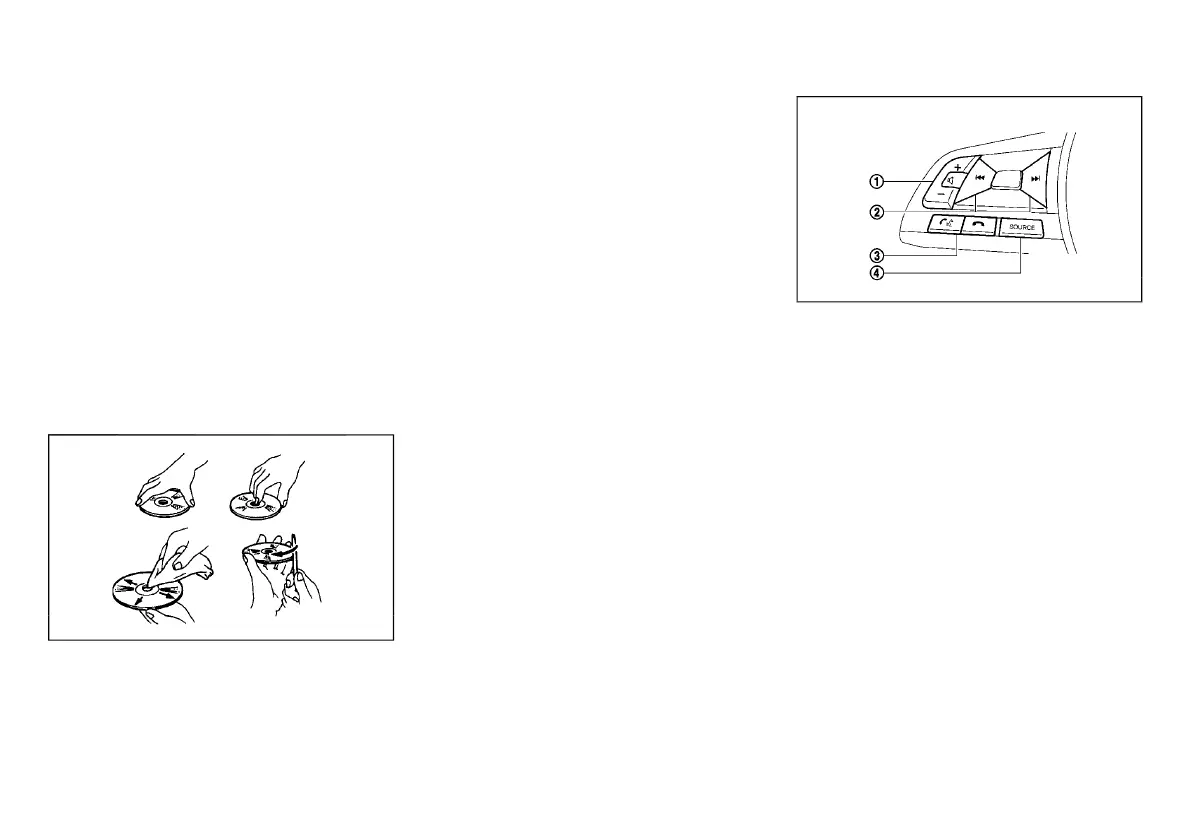
. Handle a disc by its edges. Never touch the
surface of the disc. Do not bend the disc.
. Always place the discs in the storage case when
they are not being used.
. To clean a disc, wipe the surface from the center
to the outer edge using a clean, soft cloth. Do not
wipe the disc using a circular motion.
Do not use a conventional record cleaner or
alcohol intended for industrial use.
. A new disc may be rough on the inner and outer
edges. Remove the rough edges by rubbing the
inner and outer edges with the side of a pen or
pencil as illustrated.
USB memory device
GUID-6B359D7D-D255-4116-8F11-A77064408A45
. Do not touch the terminal portion of the USB
memory device.
. Do not place heavy objects on the USB memory
device.
. Do not store the USB memory device in highly
humid locations.
. Do not expose the USB memory device to direct
sunlight.
. Do not spill any liquids on the USB memory
device.
Refer to the USB memory device Owner’s Manual for
the details.
GUID-70DD4A9C-A6B9-4435-A544-B396681797CF
JVH1535X
1. Volume control switch
2. Tuning switch
3. Phone send/phone end switch
4. SOURCE select switch
The audio and the hands-free phone system can be
operated using the controls on the steering wheel.
Functional availability may vary depending on the
system.
VOLUME CONTROL SWITCH
GUID-A19AC1A1-2867-4F67-BB20-1F908E46C2A1
Push + or - side of the volume control switch to
increase or decrease the volume.
TUNING SWITCH
GUID-333A0894-4702-40B8-9C4B-B3572281E9F1
Push the tuning switch to operate the audio system,
etc. Functional availability may vary depending on the
system.
Monitor, Heater and air conditioner, and audio system 4-25
STEERING WHEEL SWITCH (if
equipped)
Condition:



 To Next Page