[ Edit: 2016/ 11/ 24 Model: E12-A ]
Changing twin trip odometer display
GUID-D7BCDF43-9FD0-4CAC-9284-52F2DB9F7870
Push the trip odometer switch
*
3
to change the
display as follows:
Type A:
GUID-11F97BB9-9503-47D0-8BB9-62C812293875
TRIP A ? TRIP B ? TRIP A
Type B:
GUID-11F97BB9-9503-47D0-8BB9-62C812293875
ODO ? TRIP A ? TRIP B ? Trip computer mode ?
ODO
For trip computer information, see “Trip computer”
(P.2-7).
Resetting twin trip odometer
GUID-E0C8AC0F-A264-4E22-B063-E594C0FBAA28
Push the trip odometer switch
*
3
for more than 1
second to reset the trip odometer to zero.
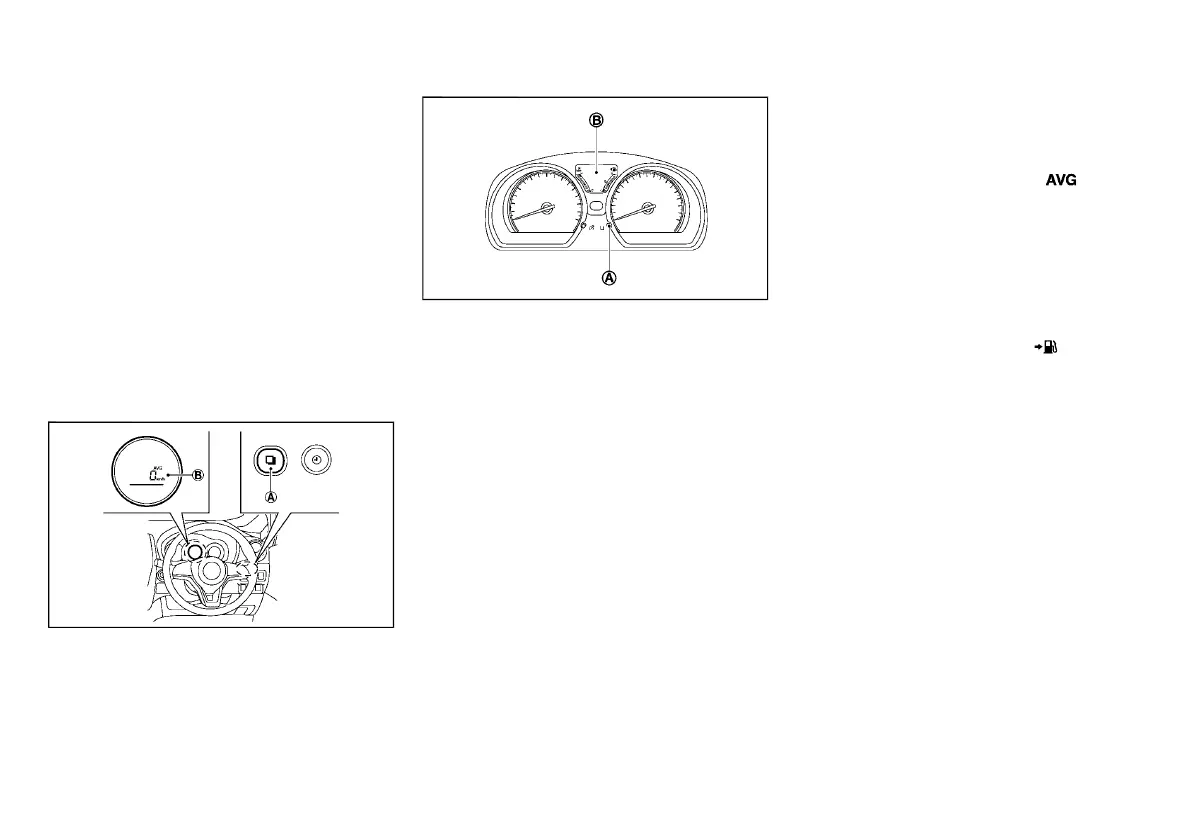
TRIP COMPUTER
E12-A-120227-112A0104-A2E2-4526-A029-F83A367F1514
JVI1538X
Type A
JVI1539X
Type B
The trip computer mode switch
*
A
located the right
side of the meter (Type A) or the meter panel (Type B).
Trip computer appears on the display
*
B
.
When the ignition switch is placed in the “ON”
position, the trip computer can be selected by pushing
the trip computer mode switch
*
A
.
Each time the trip computer mode switch
*
A
is
pushed, the display will change as follows:
Type A:
Current fuel consumption ? Average fuel consump-
tion ? Distance to empty ?Average speed ?
Elapsed time
Type B:
ODO ? (TRIP A ? TRIP B) ? Current fuel
consumption ? Average fuel consumption ? Dis-
tance to empty ? Outside air temperature (if
equipped) ? Clock settings mode
Current fuel consumption (km/l)
E12-A-120227-0716F973-6A80-44EB-98C9-B19D4E40532D
The current fuel consumption mode shows the current
fuel consumption.
Average fuel consumption (km/l)
E12-A-120227-D0600C67-9472-4ABF-B9A0-CEA0B7CCAA1E
The average fuel consumption mode shows the
average fuel consumption since the last reset. Reset-
ting is done by pushing the trip computer mode switch
*
A
for longer than 1 second.
The display is updated every 30 seconds. At about the
first 500 m (1/3 miles) after a reset, the display shows
“---”.
Distance to empty (dte — km)
E12-A-120227-CBB1BCDD-3623-4772-A7ED-B82E7159A26F
The distance to empty (dte) mode provides you with an
estimation of the distance that can be driven before
refueling. The dte is constantly being calculated, based
on the amount of fuel in the fuel tank and the actual fuel
consumption.
The display is updated every 30 seconds.
The dte mode includes a low range warning feature:
when the fuel level is low, the dte mode is automatically
selected and the digits blink in order to draw the
driver’s attention. Push the trip computer mode switch
*
A
to return to the mode that was selected before the
warning occurred.
When the fuel level drops even lower, the dte display
will change to “----”.
. If the amount of fuel added is small, the
display just before the ignition switch is
turned off may continue to be displayed.
. When driving uphill or rounding curves, the
fuel in the tank shifts, which may momenta-
rily change the display.
Instruments and controls 2-7
Condition:



 To Next Page