4. Push the “A/C” button on. (The “A/C” indicator
light will illuminate.)
5. Turn the temperature control dial to the desired
position between the middle and the cool (left)
position.
•
For quick cooling when the outside temperature
is high, move the air intake lever to the “
”
position. Be sure to move the air intake lever to
the “
” position for normal cooling.
•
A visible mist may be seen coming from the vents
in hot, humid conditions as the air is cooled rap-
idly. This does not indicate a malfunction.
Dehumidified heating:
This mode is used to heat and dehumidify the air.
1. Move the air intake lever to the “
” position.
2. Turn the air flow control dial to the “
” posi-
tion.
3. Turn the fan speed control “
” dial to the
desired position.
4. Push the “A/C” button on. (The “A/C” indicator
light will illuminate.)
5. Turn the temperature control dial to the desired
position between the middle and the hot (right)
position.
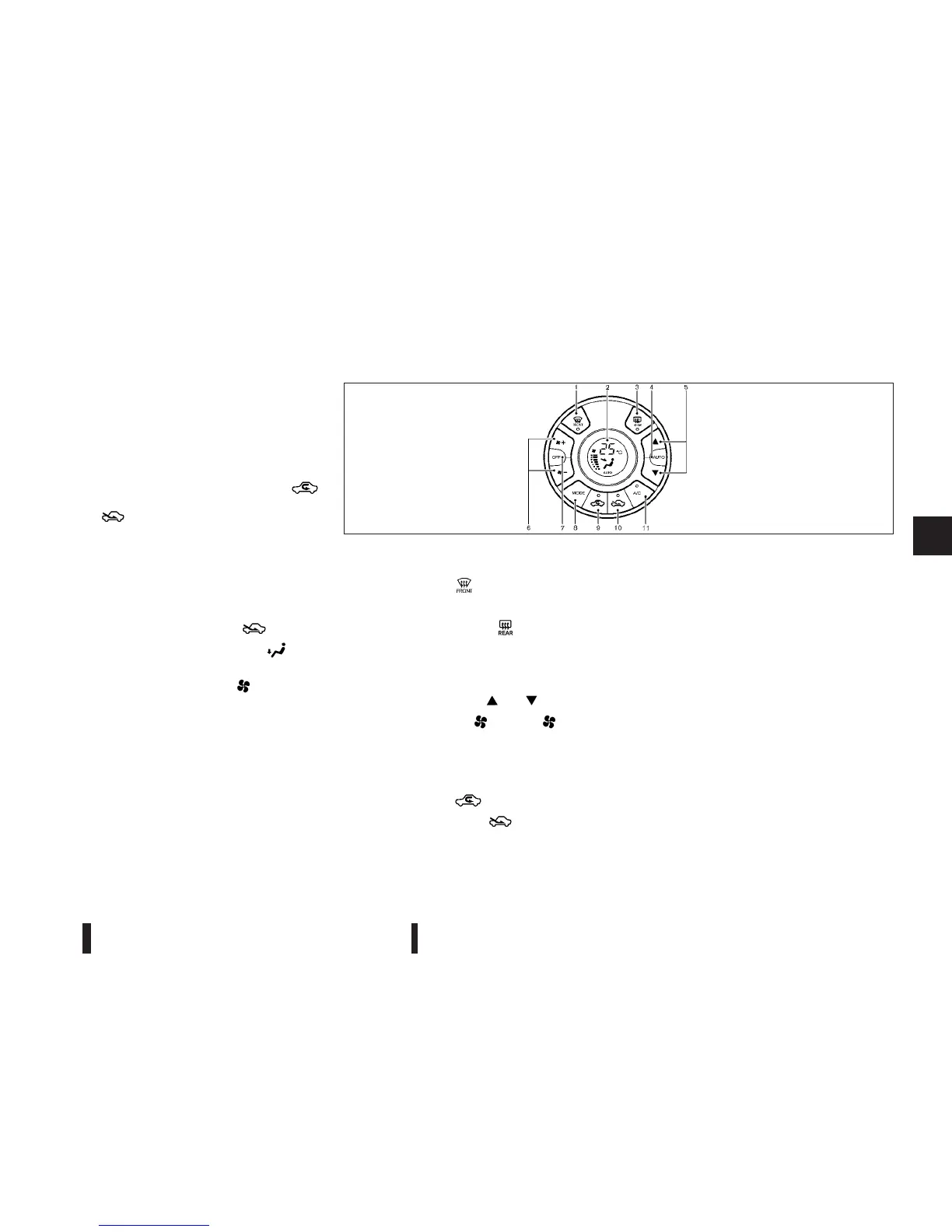
AUTOMATIC AIR CONDITIONER
1.
Front defogger “
” button
2.
Display
3.
Rear window defogger “
” button (See
“Defogger switch” in the “2. Instruments and
controls” section.)
4.
“AUTO” button
5.
Temperature control “
”/“ ” buttons
6.
Fan speed control “
+” and “ -” but-
tons
7.
“OFF” button
8.
“MODE” (air flow control) button
9.
Air recirculation “
” button
10.
Outside air circulation “
” button
11.
“A/C” (Air Conditioner) button
NOTE
The Stop/Start System will not activate when the
front defogger button or rear window defogger
button is turned on.
Automatic operation (AUTO)
The AUTO mode may be used year-round as the
system automatically controls constant temperature,
air flow distribution and fan speed after the desired
temperature is set manually.
To turn off the heater and air conditioner, push the
“OFF” button.
Cooling and dehumidified heating:
1. Push the “AUTO” button. (“AUTO” will appear
on the display.)
2. If the “A/C” indicator light does not illuminate,
push the “A/C” button. (The “A/C” indicator light
will illuminate.)
SAA2592Z
Heater and air conditioner, and audio system 4-17



 To Next Page