[ Edit: 2012/ 4/ 9 Model: E26-A ]
2-6 Instruments and controls
AUTOMATIC TRANSMISSION (AT) POSI-
TION INDICATOR (AT model)
GUID-BF8F4CF3-6EEE-4FCC-8CA2-AAB149CD67BB
The Automatic Transmission (AT) position indicator
indicates the selector lever position when the
ignition switch is in the “ON” position.
UPSHIFT INDICATOR (MT model)
GUID-66836702-9B1D-484A-A417-EFCF906A15C1
When the ignition switch is in the ON position and up-
shifting is required, the upshift indicator display comes
on.
The upshift indicator
is displayed when the
number of set revolutions continues for at least 0.1
seconds. It is possible to change the rpm setting within
the upshift indicator setting mode. See 2-6.
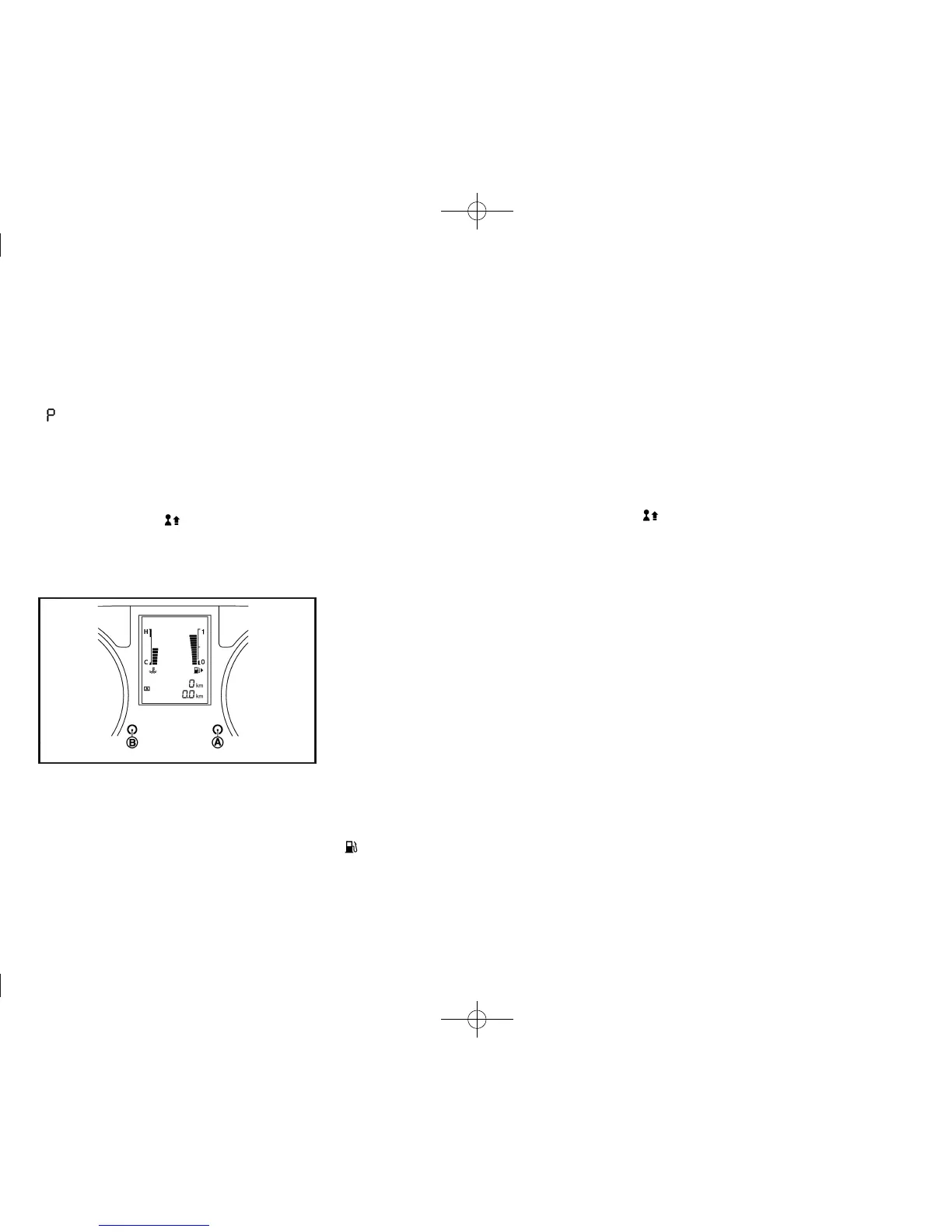
TRIP COMPUTER
GUID-09A031BD-A6C8-4809-BB98-F6BF821E5BAD
JVI0405X
The switch for the trip computer is located on the
meter panel.
When the ignition switch is placed in the “ON”
position, modes of the trip computer can be selected
by pushing the trip computer mode switch
*
A
.
Each time the trip computer mode switch
*
A
is
pushed, the display will change as follows:
(TRIP A ? TRIP B) ? Current fuel consumption ?
Average fuel consumption ? Distance to empty (dte)
? Upshift indicator setting (for MT model) ? (TRIP A)
Current fuel consumption
GUID-A08472C7-6CE2-40C7-8C4D-91986C70F8F3
The current fuel consumption mode shows the current
fuel consumption.
Push the trip computer mode switch
*
B
to toggle the
fuel consumption display between L/100 km and km/L
(if equipped).
Average fuel consumption (L/100 km or mpg)
GUID-F46204B2-43B2-4507-9328-908D43C94E48
The average fuel consumption mode shows the
average fuel consumption since the last reset. Reset-
ting is done by pushing the trip computer mode switch
*
A
for longer than 1 second.
The display is updated every 30 seconds. At about the
first 500 m (1/3 miles) after a reset, the display shows
“----”.
Push the trip computer mode switch
*
B
to toggle the
fuel consumption display between L/100 km and km/L
(if equipped).
Distance to empty (dte — km or miles)
GUID-D9EE1A84-A11F-4E2D-83F5-FD27CB66745D
The distance to empty (dte) mode provides you with an
estimation of the distance that can be driven before
refueling. The dte is constantly being calculated, based
on the amount of fuel in the fuel tank and the actual fuel
consumption.
The display is updated every 30 seconds.
The dte mode includes a low range warning feature:
when the fuel level is low, the dte mode is automatically
selected and the digits and the low fuel warning light
blink in order to draw the driver’s attention. Push
the trip computer mode switch
*
A
to return to the
mode that was selected before the warning occurred.
When the fuel level drops even lower, the dte display
will change to “----”.
. If the amount of fuel added is small, the
display just before the ignition switch is
turned off may continue to be displayed.
. When driving uphill or rounding curves, the
fuel in the tank shifts, which may momenta-
rily change the display.
Upshift indicator setting (MT model)
GUID-3E68A98B-EB95-494D-9863-521EFC7674CA
When this mode is turned on, the upshift indicator
shows the driver the timing to shift into a higher
gear. The use of the upshift indicator will help you to
upshift at a constant engine speed (RPM) from any
gear.
When the engine speed reaches the set speed, the
upshift indicator will flash.
To set the upshift indicator setting value:
GUID-896AA31A-81D 0-4E9B-81ED-1F58D53AA854
1. Push and hold the trip computer mode switch
*
A
, to set the engine speed (RPM). The setting
display will start flashing.
2. While the display is flashing, turn the trip computer
mode switch
*
B
to set the desired RPM. The
figure can be set at intervals of 100 rpm and
between 1,000 and 4,000 rpm (diesel engine
model), or between 1,000 and 6,000 rpm (gaso-
line engine model).
3. Push the trip computer mode switch
*
A
to exit
the setting mode.
If no further action is taken, the display will return to the
upshift indicator setting display.


 To Next Page
 Loading...